> ## Documentation Index
> Fetch the complete documentation index at: https://auth0.com/llms.txt
> Use this file to discover all available pages before exploring further.
> Install the Auth0 AD/LDAP Connector on a Windows or Linux host inside your network and connect it to your Active Directory or LDAP server and your Auth0 tenant.
# Install and Configure AD/LDAP Connector
export const AuthCodeBlock = ({filename, icon, language, highlight, children}) => {
const [displayText, setDisplayText] = useState(children);
const [copyText, setCopyText] = useState(children);
const wrapperRef = React.useRef(null);
useEffect(() => {
let unsubscribe = null;
function init() {
if (!window.autorun || !window.rootStore) {
return;
}
unsubscribe = window.autorun(() => {
let processedChildrenForDisplay = children;
let processedChildrenForCopy = children;
for (const [key, value] of window.rootStore.variableStore.values.entries()) {
const escapedKey = key.replaceAll(/[.*+?^${}()|[\]\\]/g, (String.raw)`\$&`);
let displayValue = value;
if (key === "{yourClientSecret}" && value !== "{yourClientSecret}") {
displayValue = value.substring(0, 3) + "*****MASKED*****";
}
processedChildrenForDisplay = processedChildrenForDisplay.replaceAll(new RegExp(escapedKey, "g"), displayValue);
processedChildrenForCopy = processedChildrenForCopy.replaceAll(new RegExp(escapedKey, "g"), value);
}
setDisplayText(processedChildrenForDisplay);
setCopyText(processedChildrenForCopy);
});
}
if (window.rootStore) {
init();
} else {
window.addEventListener("adu:storeReady", init);
}
return () => {
window.removeEventListener("adu:storeReady", init);
unsubscribe?.();
};
}, [children]);
useEffect(() => {
if (!wrapperRef.current) return;
const originalWriteText = navigator.clipboard.writeText.bind(navigator.clipboard);
let isOverriding = false;
const handleClick = e => {
const button = e.target.closest('[data-testid="copy-code-button"]');
if (!button || !wrapperRef.current.contains(button)) return;
isOverriding = true;
navigator.clipboard.writeText = text => {
if (isOverriding) {
isOverriding = false;
navigator.clipboard.writeText = originalWriteText;
return originalWriteText(copyText);
}
return originalWriteText(text);
};
setTimeout(() => {
if (isOverriding) {
isOverriding = false;
navigator.clipboard.writeText = originalWriteText;
}
}, 100);
};
const wrapper = wrapperRef.current;
wrapper.addEventListener('click', handleClick, true);
return () => {
wrapper.removeEventListener('click', handleClick, true);
if (navigator.clipboard.writeText !== originalWriteText) {
navigator.clipboard.writeText = originalWriteText;
}
};
}, [copyText]);
return
{displayText}
;
};
export const codeExample = `{
"LDAP_URL": "ldap://{yourLdapServerFqdn}",
"LDAP_BASE": "dc={yourDomain},dc=com",
"LDAP_BIND_USER":"{yourLdapUser}",
"LDAP_BIND_PASSWORD":"{yourLdapUserPassword}" //cleartextpassword
}`;
## Prerequisites
* Ensure that your system meets the [system requirements](/docs/authenticate/identity-providers/enterprise-identity-providers/active-directory-ldap/ad-ldap-connector/ad-ldap-connector-requirements).
* Ensure that you have already installed [Git](https://git-scm.com/downloads), [Node.js](https://nodejs.org), and [npm](http://blog.npmjs.org/post/85484771375/how-to-install-npm).
* For most platforms, you will need to have root and/or administrator privileges.
## Install the connector for Windows
### Download and run the installer
Go to [Auth0 Dashboard > Authentication > Enterprise > Active Directory/LDAP](https://manage.auth0.com/#/connections/enterprise/ad), and select the connection you want to configure.
In the **Setup** tab, select the **Install For Windows** button to download the latest installer, which is an MSI file.
Run the installer and follow the instructions to install the **AD/LDAP Connector** as a Windows Service.
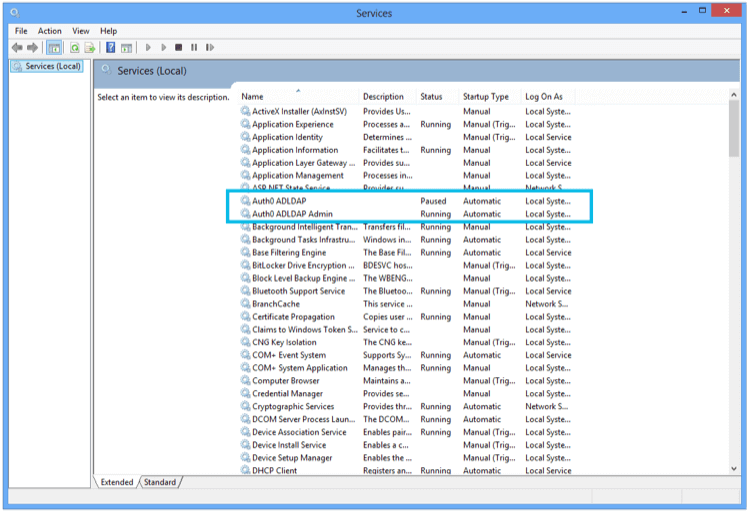 Once the installation is complete, you will see a screen in a browser pointing to localhost:
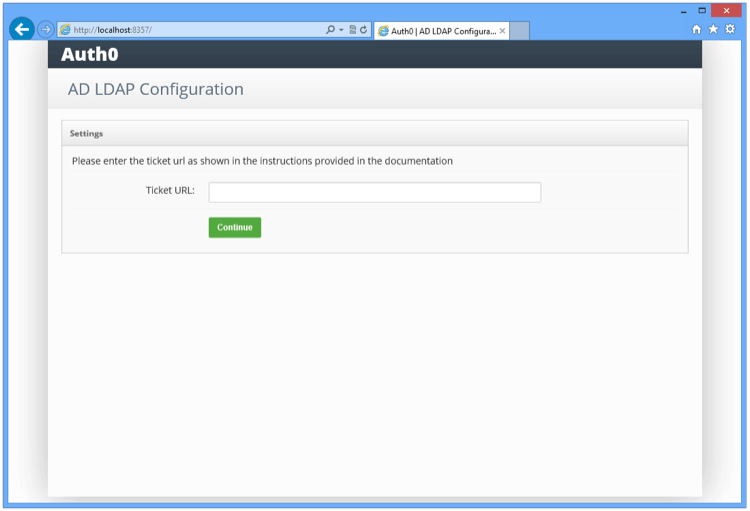 Enter the **TICKET URL** provided when you provisioned the connection. The **TICKET URL** uniquely identifies this connector in Auth0. The Connector will use this to communicate with Auth0 Server and automatically complete the configuration.
### Link to LDAP
Enter the LDAP settings:
Enter the **TICKET URL** provided when you provisioned the connection. The **TICKET URL** uniquely identifies this connector in Auth0. The Connector will use this to communicate with Auth0 Server and automatically complete the configuration.
### Link to LDAP
Enter the LDAP settings:
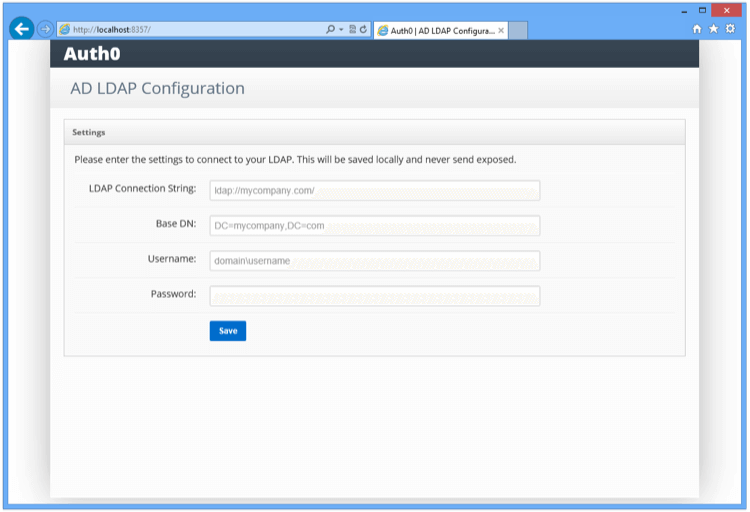 | Setting | Description |
| -------------------------- | ------------------------------------------------------------------------------------------------------------------------------------------------------------------------------------------------------------------------------------------------------------------------------------------------------------------------------------------------------- |
| **LDAP Connection String** | For example, `ldap://ldap.internal.contoso.com`. This is the protocol + the domain name or ip address of your LDAP server. Your LDAP server is the local domain controller where Active Directory is installed. The protocol can be either `ldap` or `ldaps`. If you need to use `ldaps` make sure that the certificate is valid in the current server. |
| **Base DN** | For example, `dc=contoso,dc=com`. This is the base container for all the queries performed by the connector. |
| **Username** | For example, `cn=svcauth0,dc=services,dc=contoso,dc=com` The full distinguish name of a user to perform queries. |
| **Password** | The password of the user. |
Once you submit the above information, the connector will perform a series of tests to validate the information you entered. The results are displayed under **Configuration Log** in the console screen.
| Setting | Description |
| -------------------------- | ------------------------------------------------------------------------------------------------------------------------------------------------------------------------------------------------------------------------------------------------------------------------------------------------------------------------------------------------------- |
| **LDAP Connection String** | For example, `ldap://ldap.internal.contoso.com`. This is the protocol + the domain name or ip address of your LDAP server. Your LDAP server is the local domain controller where Active Directory is installed. The protocol can be either `ldap` or `ldaps`. If you need to use `ldaps` make sure that the certificate is valid in the current server. |
| **Base DN** | For example, `dc=contoso,dc=com`. This is the base container for all the queries performed by the connector. |
| **Username** | For example, `cn=svcauth0,dc=services,dc=contoso,dc=com` The full distinguish name of a user to perform queries. |
| **Password** | The password of the user. |
Once you submit the above information, the connector will perform a series of tests to validate the information you entered. The results are displayed under **Configuration Log** in the console screen.
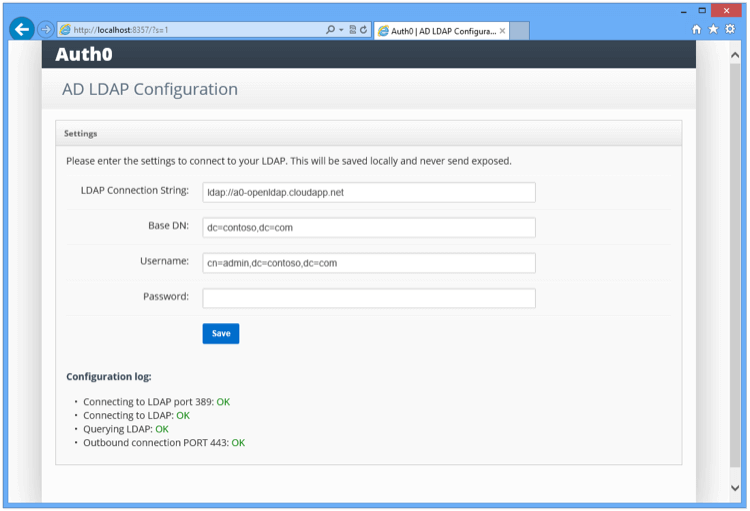 Make sure that all tests are green.
| Test | Description | Troubleshoot |
| ------ | ------------------------------------------------------------------------------------------------------------------- | -------------------------------------------------------------------------------------------- |
| Test 1 | Attempts to establish a TCP connection to the LDAP server and port specified. | Check basic network connectivity and firewall settings that might prevent such a connection. |
| Test 2 | Attempts to perform an LDAP bind on the LDAP server and port specified and with the username and password provided. | Check the LDAP connection string, search path, username and password. |
| Test 3 | Attempts to perform an LDAP search against the directory to check the privileges of the specified username. | Check the privileges of the username in the target directory. |
| Test 4 | Attempts to establish a connection to the Auth0 server. | Check network connectivity and firewall settings that might prevent such a connection. |
## Install the connector for other platforms
1. Download and install the latest version of the **[Auth0 Active Directory/LDAP Connector](https://github.com/auth0/ad-ldap-connector/releases)** package to `/tmp`. To learn more, review the [AD/LDAP Connector repository](https://github.com/auth0/ad-ldap-connector).
2. Start your server.
`node server.js`When prompted for the ticket number, enter the full ticket URL from the **Settings** tab of the **Setup AD/LDAP connector** screen in the Auth0 Management Dashboard.
3. You will be prompted to edit the `config.json` configuration file with your LDAP connection and authentication details:
4. Run `node server.js` once more to start the Connector. Note that the `LDAP_BIND_PASSWORD` line in `config.json` changes to `LDAP_BIND_CREDENTIALS` at this point.
5. Once the Connector is running, you will need to daemonize the Connector (if you don't already have a tool selected, you can consider [systemd](https://www.freedesktop.org/wiki/Software/systemd/)). For example, for using systemd with Ubuntu Xenial, the file `/lib/systemd/system/auth0-adldap.service` could contain the following:
```bash theme={null}
[Unit]
Description=Auth0 AD LDAP Agent
After=network.target
[Service]
Type=simple
Restart=always
User=ubuntu
WorkingDirectory=/opt/auth0-adldap
ExecStart=/usr/bin/node server.js
```
6. Run `node admin/server.js` to access the admin UI. The admin UI will be running and available on `http://localhost:8357`.
If you get an `Invalid Ticket` message when configuring the Connector for the first time, the most likely cause is a network issue (for example, you have the Connector running behind a proxy).
## Learn more
* [AD/LDAP Connector System Requirements](/docs/authenticate/identity-providers/enterprise-identity-providers/active-directory-ldap/ad-ldap-connector/ad-ldap-connector-requirements)
* [Point AD/LDAP Connector to Auth0 Connections](/docs/authenticate/identity-providers/enterprise-identity-providers/active-directory-ldap/ad-ldap-connector/ad-ldap-connector-to-auth0)
* [Configure AD/LDAP Connector Authentication with Client Certificates](/docs/authenticate/identity-providers/enterprise-identity-providers/active-directory-ldap/ad-ldap-connector/configure-ad-ldap-connector-client-certificates)
* [Configure AD/LDAP Connector Authentication with Kerberos](/docs/authenticate/identity-providers/enterprise-identity-providers/active-directory-ldap/ad-ldap-connector/configure-ad-ldap-connector-with-kerberos)
* [Update AD/LDAP Connectors](/docs/authenticate/identity-providers/enterprise-identity-providers/active-directory-ldap/ad-ldap-connector/update-ad-ldap-connectors)
Make sure that all tests are green.
| Test | Description | Troubleshoot |
| ------ | ------------------------------------------------------------------------------------------------------------------- | -------------------------------------------------------------------------------------------- |
| Test 1 | Attempts to establish a TCP connection to the LDAP server and port specified. | Check basic network connectivity and firewall settings that might prevent such a connection. |
| Test 2 | Attempts to perform an LDAP bind on the LDAP server and port specified and with the username and password provided. | Check the LDAP connection string, search path, username and password. |
| Test 3 | Attempts to perform an LDAP search against the directory to check the privileges of the specified username. | Check the privileges of the username in the target directory. |
| Test 4 | Attempts to establish a connection to the Auth0 server. | Check network connectivity and firewall settings that might prevent such a connection. |
## Install the connector for other platforms
1. Download and install the latest version of the **[Auth0 Active Directory/LDAP Connector](https://github.com/auth0/ad-ldap-connector/releases)** package to `/tmp`. To learn more, review the [AD/LDAP Connector repository](https://github.com/auth0/ad-ldap-connector).
2. Start your server.
`node server.js`When prompted for the ticket number, enter the full ticket URL from the **Settings** tab of the **Setup AD/LDAP connector** screen in the Auth0 Management Dashboard.
3. You will be prompted to edit the `config.json` configuration file with your LDAP connection and authentication details:
4. Run `node server.js` once more to start the Connector. Note that the `LDAP_BIND_PASSWORD` line in `config.json` changes to `LDAP_BIND_CREDENTIALS` at this point.
5. Once the Connector is running, you will need to daemonize the Connector (if you don't already have a tool selected, you can consider [systemd](https://www.freedesktop.org/wiki/Software/systemd/)). For example, for using systemd with Ubuntu Xenial, the file `/lib/systemd/system/auth0-adldap.service` could contain the following:
```bash theme={null}
[Unit]
Description=Auth0 AD LDAP Agent
After=network.target
[Service]
Type=simple
Restart=always
User=ubuntu
WorkingDirectory=/opt/auth0-adldap
ExecStart=/usr/bin/node server.js
```
6. Run `node admin/server.js` to access the admin UI. The admin UI will be running and available on `http://localhost:8357`.
If you get an `Invalid Ticket` message when configuring the Connector for the first time, the most likely cause is a network issue (for example, you have the Connector running behind a proxy).
## Learn more
* [AD/LDAP Connector System Requirements](/docs/authenticate/identity-providers/enterprise-identity-providers/active-directory-ldap/ad-ldap-connector/ad-ldap-connector-requirements)
* [Point AD/LDAP Connector to Auth0 Connections](/docs/authenticate/identity-providers/enterprise-identity-providers/active-directory-ldap/ad-ldap-connector/ad-ldap-connector-to-auth0)
* [Configure AD/LDAP Connector Authentication with Client Certificates](/docs/authenticate/identity-providers/enterprise-identity-providers/active-directory-ldap/ad-ldap-connector/configure-ad-ldap-connector-client-certificates)
* [Configure AD/LDAP Connector Authentication with Kerberos](/docs/authenticate/identity-providers/enterprise-identity-providers/active-directory-ldap/ad-ldap-connector/configure-ad-ldap-connector-with-kerberos)
* [Update AD/LDAP Connectors](/docs/authenticate/identity-providers/enterprise-identity-providers/active-directory-ldap/ad-ldap-connector/update-ad-ldap-connectors)