> ## Documentation Index
> Fetch the complete documentation index at: https://auth0.com/llms.txt
> Use this file to discover all available pages before exploring further.
> Learn how to connect to OpenID Connect (OIDC) Identity Providers using an enterprise connection.
# Connect to OpenID Connect Identity Provider
export const AuthCodeGroup = ({children, dropdown}) => {
const [processedChildren, setProcessedChildren] = useState(children);
useEffect(() => {
let unsubscribe = null;
function init() {
unsubscribe = window.autorun(() => {
const processChildren = node => {
if (typeof node === "string") {
let processedNode = node;
for (const [key, value] of window.rootStore.variableStore.values.entries()) {
const escapedKey = key.replaceAll(/[.*+?^${}()|[\]\\]/g, (String.raw)`\$&`);
processedNode = processedNode.replaceAll(new RegExp(escapedKey, "g"), value);
}
return processedNode;
} else if (Array.isArray(node)) {
return node.map(processChildren);
} else if (node && node.props && node.props.children) {
return {
...node,
props: {
...node.props,
children: processChildren(node.props.children)
}
};
}
return node;
};
setProcessedChildren(processChildren(children));
});
}
if (window.rootStore) {
init();
} else {
window.addEventListener("adu:storeReady", init);
}
return () => {
window.removeEventListener("adu:storeReady", init);
unsubscribe?.();
};
}, [children]);
return {processedChildren};
};
export const AuthCodeBlock = ({filename, icon, language, highlight, children}) => {
const [displayText, setDisplayText] = useState(children);
const [copyText, setCopyText] = useState(children);
const wrapperRef = React.useRef(null);
useEffect(() => {
let unsubscribe = null;
function init() {
if (!window.autorun || !window.rootStore) {
return;
}
unsubscribe = window.autorun(() => {
let processedChildrenForDisplay = children;
let processedChildrenForCopy = children;
for (const [key, value] of window.rootStore.variableStore.values.entries()) {
const escapedKey = key.replaceAll(/[.*+?^${}()|[\]\\]/g, (String.raw)`\$&`);
let displayValue = value;
if (key === "{yourClientSecret}" && value !== "{yourClientSecret}") {
displayValue = value.substring(0, 3) + "*****MASKED*****";
}
processedChildrenForDisplay = processedChildrenForDisplay.replaceAll(new RegExp(escapedKey, "g"), displayValue);
processedChildrenForCopy = processedChildrenForCopy.replaceAll(new RegExp(escapedKey, "g"), value);
}
setDisplayText(processedChildrenForDisplay);
setCopyText(processedChildrenForCopy);
});
}
if (window.rootStore) {
init();
} else {
window.addEventListener("adu:storeReady", init);
}
return () => {
window.removeEventListener("adu:storeReady", init);
unsubscribe?.();
};
}, [children]);
useEffect(() => {
if (!wrapperRef.current) return;
const originalWriteText = navigator.clipboard.writeText.bind(navigator.clipboard);
let isOverriding = false;
const handleClick = e => {
const button = e.target.closest('[data-testid="copy-code-button"]');
if (!button || !wrapperRef.current.contains(button)) return;
isOverriding = true;
navigator.clipboard.writeText = text => {
if (isOverriding) {
isOverriding = false;
navigator.clipboard.writeText = originalWriteText;
return originalWriteText(copyText);
}
return originalWriteText(text);
};
setTimeout(() => {
if (isOverriding) {
isOverriding = false;
navigator.clipboard.writeText = originalWriteText;
}
}, 100);
};
const wrapper = wrapperRef.current;
wrapper.addEventListener('click', handleClick, true);
return () => {
wrapper.removeEventListener('click', handleClick, true);
if (navigator.clipboard.writeText !== originalWriteText) {
navigator.clipboard.writeText = originalWriteText;
}
};
}, [copyText]);
return
{displayText}
;
};
## Prerequisites
* [Register your Application with Auth0](/docs/get-started/auth0-overview/create-applications).
* Select an appropriate **Application Type**.
* Add an **Allowed Callback URL** of **`{https://yourApp/callback}`**.
* Make sure your Application's [Grant Types](/docs/get-started/applications/update-grant-types) include the appropriate flows.
## Steps
To connect your application to an OIDC Identity Provider, you must:
1. [Set up your app in the OpenID Connect Identity Provider](#set-up-your-app-in-the-openid-connect-identity-provider)
2. [Create an enterprise connection in Auth0](#create-an-enterprise-connection-in-auth0)
3. [Enable the enterprise connection for your Auth0 Application](#enable-the-enterprise-connection-for-your-auth0-application)
4. [Test the connection](#test-the-connection)
## Set up your app in the OpenID Connect Identity Provider
To allow users to log in using an OIDC Identity Provider, you must register your application with the IdP. The process of doing this varies depending on the OIDC Identity Provider, so you will need to follow your IdP's documentation to complete this task.
Generally, you will want to make sure that at some point you enter your callback URL: `https://{YOUR_AUTH0_DOMAIN}/login/callback`.
If your Auth0 domain name is not shown above and you are not using our [custom domains](/docs/customize/custom-domains) feature, your domain name is a concatenation of your tenant name, your regional subdomain, and `auth0.com`, separated by the dot (`.`) symbol.
For example, if your tenant name is `exampleco-enterprises`, and your tenant is in the US region, your Auth0 domain name would be `exampleco-enterprises.us.auth0.com` and your **Redirect URI** would be `https://exampleco-enterprises.us.auth0.com/login/callback`.
However, if your tenant is in the US region and was created before June 2020, then your Auth0 domain name would be `exampleco-enterprises.auth0.com` and your **Redirect URI** would be `https://exampleco-enterprises.auth0.com/login/callback`.
If you are using [custom domains](/docs/customize/custom-domains), your **Redirect URI** would be `https:///login/callback`.
During this process, your OIDC Identity Provider will generate a unique identifier for the registered API, usually called a **Client ID** or an **Application ID**. Make note of this value; you will need it later.
## Create an enterprise connection in Auth0
Before you configure a OIDC Enterprise Connection in Auth0, ensure you have the **Application (Client) ID** and the **Client Secret** generated when you set up your app in the OIDC provider.
### Create an enterprise connection using the Auth0 Dashboard
To be configurable through the Auth0 Dashboard, the OpenID Connect (OIDC) Identity Provider (IdP) needs to support [OIDC Discovery](https://openid.net/specs/openid-connect-discovery-1_0.html). Otherwise, you can [configure the connection using the Management API](#configure-the-connection-using-the-management-api).
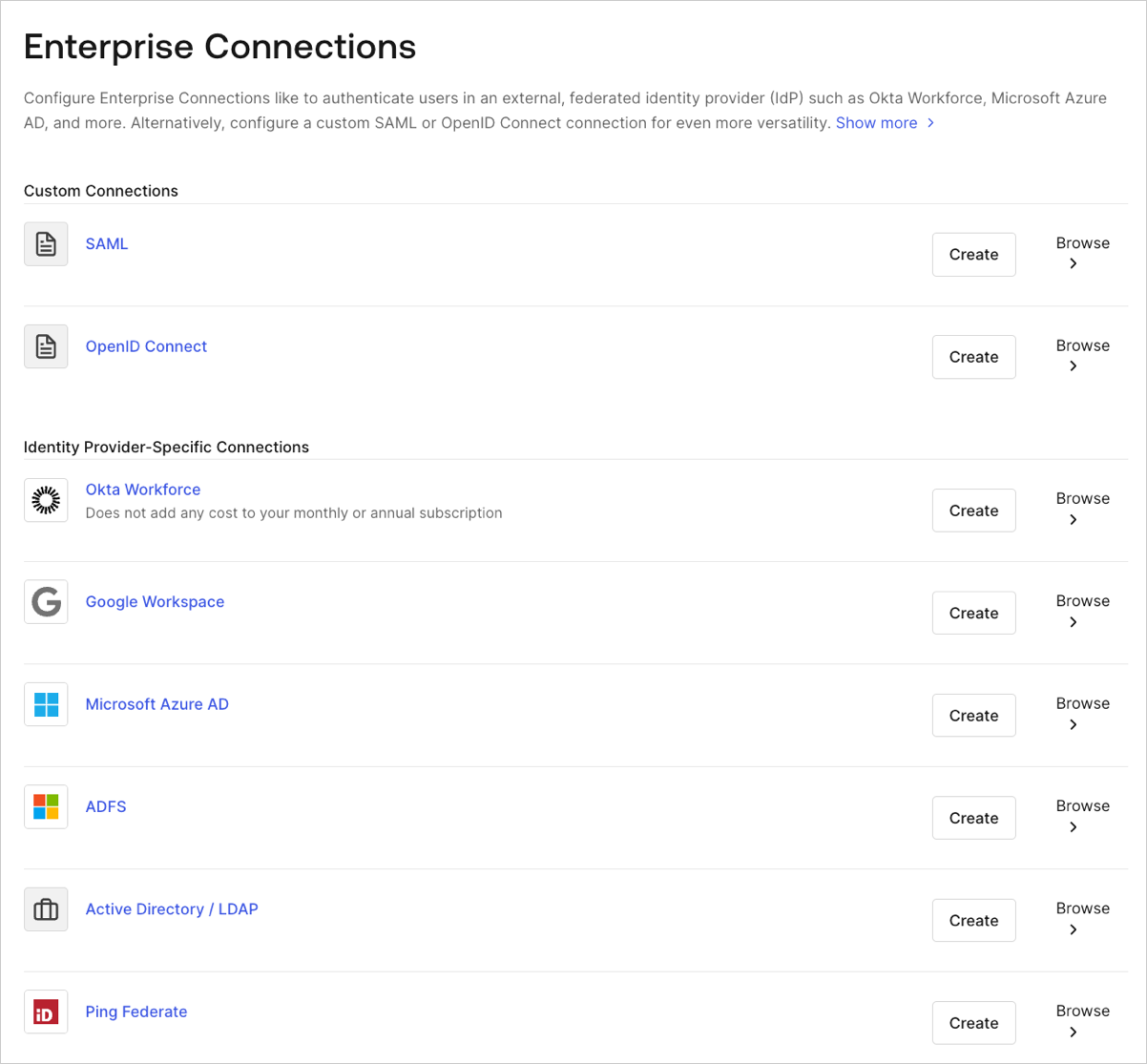
1. Navigate to [Auth0 Dashboard > Authentication > Enterprise](https://manage.auth0.com/#/connections/enterprise), locate **Open ID Connect**, and select **Create**.
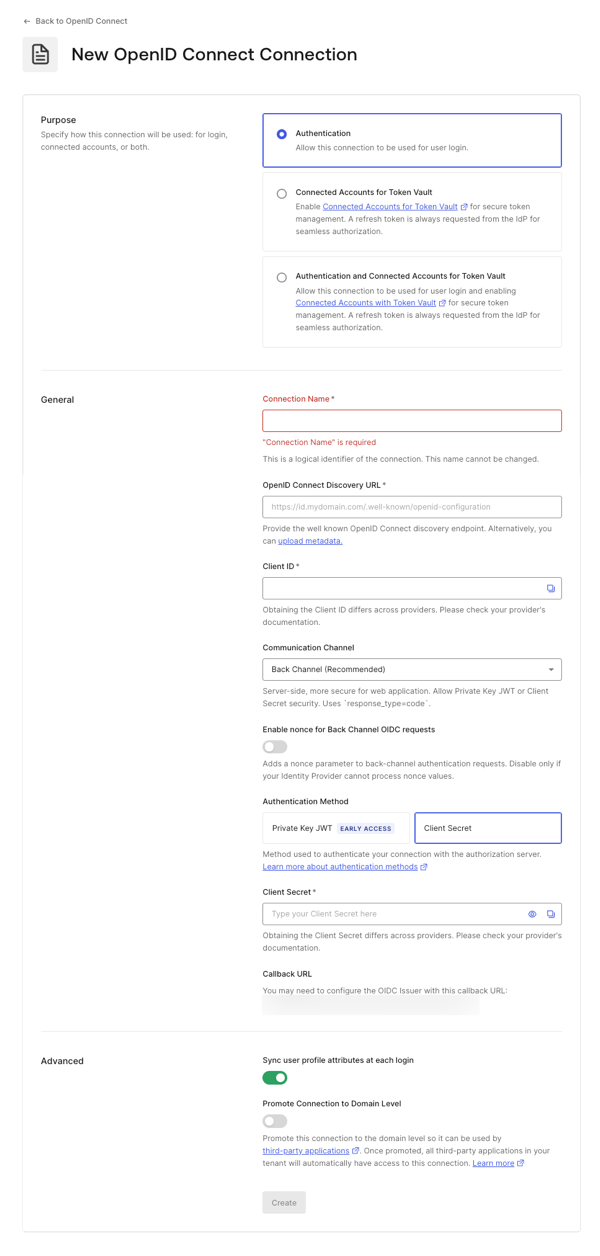
 2. Enter details for your connection, and select **Create:**
 | **Field** | **Description** |
| ---------------------------------------------- | ---------------------------------------------------------------------------------------------------------------------------------------------------------------------------------------------------------------------------------------------------------------------------------------------------------------------------------------------------------------------------------------------------------------------------------------------------------------------------------------------------------------------------------------------------------------------------------------------------------------------------------------------------------------------------- |
| **Purpose** | Determines how you intend to use the connection, for user authentication, to connect external accounts to Auth0, or both. To learn more, read [User authentication vs Connected Accounts](/docs/secure/tokens/token-vault/connected-accounts-for-token-vault#user-authentication-vs-connected-accounts) |
| **Connection name** | Logical identifier for your connection; it must be unique for your tenant. Once set, this name can't be changed. |
| **OpenID Connect Discovery URL** | URL where Auth0 can find the well-known OpenID Connect discovery endpoint, usually available at the
| **Field** | **Description** |
| ---------------------------------------------- | ---------------------------------------------------------------------------------------------------------------------------------------------------------------------------------------------------------------------------------------------------------------------------------------------------------------------------------------------------------------------------------------------------------------------------------------------------------------------------------------------------------------------------------------------------------------------------------------------------------------------------------------------------------------------------- |
| **Purpose** | Determines how you intend to use the connection, for user authentication, to connect external accounts to Auth0, or both. To learn more, read [User authentication vs Connected Accounts](/docs/secure/tokens/token-vault/connected-accounts-for-token-vault#user-authentication-vs-connected-accounts) |
| **Connection name** | Logical identifier for your connection; it must be unique for your tenant. Once set, this name can't be changed. |
| **OpenID Connect Discovery URL** | URL where Auth0 can find the well-known OpenID Connect discovery endpoint, usually available at the /.well-known/openid-configuration endpoint. You can enter the base URL or the full URL. You will see a green checkmark if it can be found at that location, a red mark if it cannot be found, or an error message if the file is found but the required information is not present in the configuration file. For more information, read [Configure Applications with OIDC Discovery](/docs/get-started/applications/configure-applications-with-oidc-discovery). |
| **Client ID** | The identifier given to you by your provider. Unique identifier for your registered application. Enter the saved value of the Client ID for the app you registered with the OIDC Identity Provider. Each provider manages this step differently. |
| **Communication Channel** | Set to Front Channel or Back Channel. Front Channel uses the OIDC protocol with response\_mode=form\_post and response\_type=id\_token. Back Channel uses response\_type=code. |
| **Authentication Method** | Choose how your application authenticates with Auth0. |
| **Client Secret** | Available if Back Channel is chosen earlier. The secret given to you by your provider and each provider manages this step differently. |
| **Callback URL** | URL to which Auth0 redirects users after they authenticate. Ensure that this value is configured for the app you registered with the OIDC Identity Provider. |
| **Sync user profile attributes at each login** | f selected, your tenant updates the relevant name, nickname, given\_name, family\_name, or picture root attributes each time a user logs in. |
| **Promote Connection to Domain Level** | Allows third-party applications to access the connection. |
3. In the **Settings** view, make additional configuration adjustments, if necessary.
| **Field** | **Description** |
| -------------------------------------- | ----------------------------------------------------------------------------------------------------------------------------------------------------------------------------------------------------------------------------------------------------------------------------------------------------------------------------------- |
| **Connection Name** | The name you provided when you created this connection. It can't be changed. |
| **Connection Metadata** | Automatically generated when by the Well-Known Endpoint URL you provided in the previous screen, this can be overwritten by uploading a new metadata file. |
| **Authentication** | Set to **Front Channel** or **Back Channel**. Front Channel uses the OIDC protocol with `response_mode=form_post` and `response_type=id_token`. Back Channel uses `response_type=code`. Select **Manage Authentication** to update on the Credentials tab. |
| **Scopes** | A comma-separated list of Auth0 scopes to request when connecting to the Identify Provider. This will affect the data stored in the user profile. You are required to include at least the `openid` scope. Note that the connection does not call `/userinfo` endpoint and expects the user claims to be present in the `id_token`. |
| **Callback URL** | Some providers need this URL to complete your OIDC connection. |
| **User Mapping** | Provides templates to map specific user attributes to connection variables. |
| **Connection Profile** | To understand how to change your connection profile, read [Configure PKCE and Claim Mapping for OIDC Connections](/docs/authenticate/identity-providers/enterprise-identity-providers/configure-pkce-claim-mapping-for-oidc). |
| **Purpose** | Determines how you intend to use the connection, for user authentication, to connect external accounts to Auth0, or both. To learn more, read [User authentication vs Connected Accounts](/docs/secure/tokens/token-vault/connected-accounts-for-token-vault#user-authentication-vs-connected-accounts) |
| **Global Token Revocation** | Use the provided endpoint to terminate a user's Auth0 session by revoking refresh tokens. Cna be used with Universal Logout and Okta Workforce Identity Cloud. |
| **Promote Connection to Domain Level** | Allows third-party applications to access the connection. |
4. In the **Provisioning** view, configure how user profiles get created and updated in Auth0.
| **Field** | **Description** |
| ---------------------------------------------- | ---------------------------------------------------------------------------------------------------------------------------------------------------------------------------------------------- |
| **Sync user profile attributes at each login** | hen enabled, Auth0 automatically syncs user profile data with each user login, thereby ensuring that changes made in the connection source are automatically updated in Auth0. |
| **Sync Frequency** | Determine how often the user profile should update. |
| **Sync user profiles using SCIM** | When enabled, Auth0 allows user profile data to be synced using SCIM. For more information, see Configure Inbound SCIM. |
5. In the **Login Experience** view, configure how users log in with this connection.
| Field | Description |
| ----------------------------- | ------------------------------------------------------------------------------------------------------------------------------------------------------------------------------------------------------------------- |
| **Home Realm Discovery** | Compares a user's email domain with the provided identity provider domains. For more information, read [Configure Identifier First Authentication](/docs/authenticate/login/auth0-universal-login/identifier-first) |
| **Display connection button** | This option displays the following choices to customize your application's connection button. |
Optional fields are available with Universal Login only. Customers using Classic Login will not see the Add button, Button display name, or Button logo URL.
6. Select **Save Changes**.
### Create an enterprise connection using the Management API
These examples will show you the variety of ways you can create the connection using Auth0's Management API. You ca configure the connection by either providing a metadata URI or by setting the OIDC URLs explicitly. For more information, read [Identity Providers](/docs/authenticate/identity-providers).
#### Use front-channel with discovery endpoint
```bash cURL theme={null}
curl --request POST \
--url 'https://{yourDomain}/api/v2/connections' \
--header 'authorization: Bearer MGMT_API_ACCESS_TOKEN' \
--data '{ "strategy": "oidc", "name": "CONNECTION_NAME", "options": { "type": "front_channel", "discovery_url": "https://IDP_DOMAIN/.well-known/openid-configuration", "client_id" : "IDP_CLIENT_ID", "scopes": "openid profile" } }'
```
```csharp C# theme={null}
var client = new RestClient("https://{yourDomain}/api/v2/connections");
var request = new RestRequest(Method.POST);
request.AddHeader("authorization", "Bearer MGMT_API_ACCESS_TOKEN");
request.AddParameter("undefined", "{ "strategy": "oidc", "name": "CONNECTION_NAME", "options": { "type": "front_channel", "discovery_url": "https://IDP_DOMAIN/.well-known/openid-configuration", "client_id" : "IDP_CLIENT_ID", "scopes": "openid profile" } }", ParameterType.RequestBody);
IRestResponse response = client.Execute(request);
```
```go Go theme={null}
package main
import (
"fmt"
"strings"
"net/http"
"io/ioutil"
)
func main() {
url := "https://{yourDomain}/api/v2/connections"
payload := strings.NewReader("{ "strategy": "oidc", "name": "CONNECTION_NAME", "options": { "type": "front_channel", "discovery_url": "https://IDP_DOMAIN/.well-known/openid-configuration", "client_id" : "IDP_CLIENT_ID", "scopes": "openid profile" } }")
req, _ := http.NewRequest("POST", url, payload)
req.Header.Add("authorization", "Bearer MGMT_API_ACCESS_TOKEN")
res, _ := http.DefaultClient.Do(req)
defer res.Body.Close()
body, _ := ioutil.ReadAll(res.Body)
fmt.Println(res)
fmt.Println(string(body))
}
```
```java Java theme={null}
HttpResponse response = Unirest.post("https://{yourDomain}/api/v2/connections")
.header("authorization", "Bearer MGMT_API_ACCESS_TOKEN")
.body("{ "strategy": "oidc", "name": "CONNECTION_NAME", "options": { "type": "front_channel", "discovery_url": "https://IDP_DOMAIN/.well-known/openid-configuration", "client_id" : "IDP_CLIENT_ID", "scopes": "openid profile" } }")
.asString();
```
```javascript Node.JS theme={null}
var axios = require("axios").default;
var options = {
method: 'POST',
url: 'https://{yourDomain}/api/v2/connections',
headers: {authorization: 'Bearer MGMT_API_ACCESS_TOKEN'},
data: {
strategy: 'oidc',
name: 'CONNECTION_NAME',
options: {
type: 'front_channel',
discovery_url: 'https://IDP_DOMAIN/.well-known/openid-configuration',
client_id: 'IDP_CLIENT_ID',
scopes: 'openid profile'
}
}
};
axios.request(options).then(function (response) {
console.log(response.data);
}).catch(function (error) {
console.error(error);
});
```
```php PHP theme={null}
$curl = curl_init();
curl_setopt_array($curl, [
CURLOPT_URL => "https://{yourDomain}/api/v2/connections",
CURLOPT_RETURNTRANSFER => true,
CURLOPT_ENCODING => "",
CURLOPT_MAXREDIRS => 10,
CURLOPT_TIMEOUT => 30,
CURLOPT_HTTP_VERSION => CURL_HTTP_VERSION_1_1,
CURLOPT_CUSTOMREQUEST => "POST",
CURLOPT_POSTFIELDS => "{ "strategy": "oidc", "name": "CONNECTION_NAME", "options": { "type": "front_channel", "discovery_url": "https://IDP_DOMAIN/.well-known/openid-configuration", "client_id" : "IDP_CLIENT_ID", "scopes": "openid profile" } }",
CURLOPT_HTTPHEADER => [
"authorization: Bearer MGMT_API_ACCESS_TOKEN"
],
]);
$response = curl_exec($curl);
$err = curl_error($curl);
curl_close($curl);
if ($err) {
echo "cURL Error #:" . $err;
} else {
echo $response;
}
```
```python Python theme={null}
import http.client
conn = http.client.HTTPSConnection("")
payload = "{ "strategy": "oidc", "name": "CONNECTION_NAME", "options": { "type": "front_channel", "discovery_url": "https://IDP_DOMAIN/.well-known/openid-configuration", "client_id" : "IDP_CLIENT_ID", "scopes": "openid profile" } }"
headers = { 'authorization': "Bearer MGMT_API_ACCESS_TOKEN" }
conn.request("POST", "/{yourDomain}/api/v2/connections", payload, headers)
res = conn.getresponse()
data = res.read()
print(data.decode("utf-8"))
```
```ruby Ruby theme={null}
require 'uri'
require 'net/http'
require 'openssl'
url = URI("https://{yourDomain}/api/v2/connections")
http = Net::HTTP.new(url.host, url.port)
http.use_ssl = true
http.verify_mode = OpenSSL::SSL::VERIFY_NONE
request = Net::HTTP::Post.new(url)
request["authorization"] = 'Bearer MGMT_API_ACCESS_TOKEN'
request.body = "{ "strategy": "oidc", "name": "CONNECTION_NAME", "options": { "type": "front_channel", "discovery_url": "https://IDP_DOMAIN/.well-known/openid-configuration", "client_id" : "IDP_CLIENT_ID", "scopes": "openid profile" } }"
response = http.request(request)
puts response.read_body
```
#### Use back-channel with discovery endpoint
```bash cURL theme={null}
curl --request POST \
--url 'https://{yourDomain}/api/v2/connections' \
--header 'authorization: Bearer MGMT_API_ACCESS_TOKEN' \
--data '{ "strategy": "oidc", "name": "CONNECTION_NAME", "options": { "type": "back_channel", "discovery_url": "https://IDP_DOMAIN/.well-known/openid-configuration", "client_id" : "IDP_CLIENT_ID", "client_secret" : "IDP_CLIENT_SECRET", "scopes": "openid profile" } }'
```
```csharp C# theme={null}
var client = new RestClient("https://{yourDomain}/api/v2/connections");
var request = new RestRequest(Method.POST);
request.AddHeader("authorization", "Bearer MGMT_API_ACCESS_TOKEN");
request.AddParameter("undefined", "{ "strategy": "oidc", "name": "CONNECTION_NAME", "options": { "type": "back_channel", "discovery_url": "https://IDP_DOMAIN/.well-known/openid-configuration", "client_id" : "IDP_CLIENT_ID", "client_secret" : "IDP_CLIENT_SECRET", "scopes": "openid profile" } }", ParameterType.RequestBody);
IRestResponse response = client.Execute(request);
```
```go Go theme={null}
package main
import (
"fmt"
"strings"
"net/http"
"io/ioutil"
)
func main() {
url := "https://{yourDomain}/api/v2/connections"
payload := strings.NewReader("{ "strategy": "oidc", "name": "CONNECTION_NAME", "options": { "type": "back_channel", "discovery_url": "https://IDP_DOMAIN/.well-known/openid-configuration", "client_id" : "IDP_CLIENT_ID", "client_secret" : "IDP_CLIENT_SECRET", "scopes": "openid profile" } }")
req, _ := http.NewRequest("POST", url, payload)
req.Header.Add("authorization", "Bearer MGMT_API_ACCESS_TOKEN")
res, _ := http.DefaultClient.Do(req)
defer res.Body.Close()
body, _ := ioutil.ReadAll(res.Body)
fmt.Println(res)
fmt.Println(string(body))
}
```
```java Java theme={null}
HttpResponse response = Unirest.post("https://{yourDomain}/api/v2/connections")
.header("authorization", "Bearer MGMT_API_ACCESS_TOKEN")
.body("{ "strategy": "oidc", "name": "CONNECTION_NAME", "options": { "type": "back_channel", "discovery_url": "https://IDP_DOMAIN/.well-known/openid-configuration", "client_id" : "IDP_CLIENT_ID", "client_secret" : "IDP_CLIENT_SECRET", "scopes": "openid profile" } }")
.asString();
```
```javascript Node.JS theme={null}
var axios = require("axios").default;
var options = {
method: 'POST',
url: 'https://{yourDomain}/api/v2/connections',
headers: {authorization: 'Bearer MGMT_API_ACCESS_TOKEN'},
data: {
strategy: 'oidc',
name: 'CONNECTION_NAME',
options: {
type: 'back_channel',
discovery_url: 'https://IDP_DOMAIN/.well-known/openid-configuration',
client_id: 'IDP_CLIENT_ID',
client_secret: 'IDP_CLIENT_SECRET',
scopes: 'openid profile'
}
}
};
axios.request(options).then(function (response) {
console.log(response.data);
}).catch(function (error) {
console.error(error);
});
```
```php PHP theme={null}
$curl = curl_init();
curl_setopt_array($curl, [
CURLOPT_URL => "https://{yourDomain}/api/v2/connections",
CURLOPT_RETURNTRANSFER => true,
CURLOPT_ENCODING => "",
CURLOPT_MAXREDIRS => 10,
CURLOPT_TIMEOUT => 30,
CURLOPT_HTTP_VERSION => CURL_HTTP_VERSION_1_1,
CURLOPT_CUSTOMREQUEST => "POST",
CURLOPT_POSTFIELDS => "{ "strategy": "oidc", "name": "CONNECTION_NAME", "options": { "type": "back_channel", "discovery_url": "https://IDP_DOMAIN/.well-known/openid-configuration", "client_id" : "IDP_CLIENT_ID", "client_secret" : "IDP_CLIENT_SECRET", "scopes": "openid profile" } }",
CURLOPT_HTTPHEADER => [
"authorization: Bearer MGMT_API_ACCESS_TOKEN"
],
]);
$response = curl_exec($curl);
$err = curl_error($curl);
curl_close($curl);
if ($err) {
echo "cURL Error #:" . $err;
} else {
echo $response;
}
```
```python Python theme={null}
import http.client
conn = http.client.HTTPSConnection("")
payload = "{ "strategy": "oidc", "name": "CONNECTION_NAME", "options": { "type": "back_channel", "discovery_url": "https://IDP_DOMAIN/.well-known/openid-configuration", "client_id" : "IDP_CLIENT_ID", "client_secret" : "IDP_CLIENT_SECRET", "scopes": "openid profile" } }"
headers = { 'authorization': "Bearer MGMT_API_ACCESS_TOKEN" }
conn.request("POST", "/{yourDomain}/api/v2/connections", payload, headers)
res = conn.getresponse()
data = res.read()
print(data.decode("utf-8"))
```
```ruby Ruby theme={null}
require 'uri'
require 'net/http'
require 'openssl'
url = URI("https://{yourDomain}/api/v2/connections")
http = Net::HTTP.new(url.host, url.port)
http.use_ssl = true
http.verify_mode = OpenSSL::SSL::VERIFY_NONE
request = Net::HTTP::Post.new(url)
request["authorization"] = 'Bearer MGMT_API_ACCESS_TOKEN'
request.body = "{ "strategy": "oidc", "name": "CONNECTION_NAME", "options": { "type": "back_channel", "discovery_url": "https://IDP_DOMAIN/.well-known/openid-configuration", "client_id" : "IDP_CLIENT_ID", "client_secret" : "IDP_CLIENT_SECRET", "scopes": "openid profile" } }"
response = http.request(request)
puts response.read_body
```
#### Use back-channel specifying issuer settings
```bash cURL theme={null}
curl --request POST \
--url 'https://{yourDomain}/api/v2/connections' \
--header 'authorization: Bearer MGMT_API_ACCESS_TOKEN' \
--data '{ "strategy": "oidc", "name": "CONNECTION_NAME", "options": { "type": "back_channel", "issuer": "https://IDP_DOMAIN", "authorization_endpoint": "https://IDP_DOMAIN/authorize", "client_secret" : "IDP_CLIENT_SECRET", "client_id" : "IDP_CLIENT_ID", "scopes": "openid profile" } }'
```
```csharp C# theme={null}
var client = new RestClient("https://{yourDomain}/api/v2/connections");
var request = new RestRequest(Method.POST);
request.AddHeader("authorization", "Bearer MGMT_API_ACCESS_TOKEN");
request.AddParameter("undefined", "{ "strategy": "oidc", "name": "CONNECTION_NAME", "options": { "type": "back_channel", "issuer": "https://IDP_DOMAIN", "authorization_endpoint": "https://IDP_DOMAIN/authorize", "client_secret" : "IDP_CLIENT_SECRET", "client_id" : "IDP_CLIENT_ID", "scopes": "openid profile" } }", ParameterType.RequestBody);
IRestResponse response = client.Execute(request);
```
```go Go theme={null}
package main
import (
"fmt"
"strings"
"net/http"
"io/ioutil"
)
func main() {
url := "https://{yourDomain}/api/v2/connections"
payload := strings.NewReader("{ "strategy": "oidc", "name": "CONNECTION_NAME", "options": { "type": "back_channel", "issuer": "https://IDP_DOMAIN", "authorization_endpoint": "https://IDP_DOMAIN/authorize", "client_secret" : "IDP_CLIENT_SECRET", "client_id" : "IDP_CLIENT_ID", "scopes": "openid profile" } }")
req, _ := http.NewRequest("POST", url, payload)
req.Header.Add("authorization", "Bearer MGMT_API_ACCESS_TOKEN")
res, _ := http.DefaultClient.Do(req)
defer res.Body.Close()
body, _ := ioutil.ReadAll(res.Body)
fmt.Println(res)
fmt.Println(string(body))
}
```
```java Java theme={null}
HttpResponse response = Unirest.post("https://{yourDomain}/api/v2/connections")
.header("authorization", "Bearer MGMT_API_ACCESS_TOKEN")
.body("{ "strategy": "oidc", "name": "CONNECTION_NAME", "options": { "type": "back_channel", "issuer": "https://IDP_DOMAIN", "authorization_endpoint": "https://IDP_DOMAIN/authorize", "client_secret" : "IDP_CLIENT_SECRET", "client_id" : "IDP_CLIENT_ID", "scopes": "openid profile" } }")
.asString();
```
```javascript Node.JS theme={null}
var axios = require("axios").default;
var options = {
method: 'POST',
url: 'https://{yourDomain}/api/v2/connections',
headers: {authorization: 'Bearer MGMT_API_ACCESS_TOKEN'},
data: {
strategy: 'oidc',
name: 'CONNECTION_NAME',
options: {
type: 'back_channel',
issuer: 'https://IDP_DOMAIN',
authorization_endpoint: 'https://IDP_DOMAIN/authorize',
client_secret: 'IDP_CLIENT_SECRET',
client_id: 'IDP_CLIENT_ID',
scopes: 'openid profile'
}
}
};
axios.request(options).then(function (response) {
console.log(response.data);
}).catch(function (error) {
console.error(error);
});
```
```php PHP theme={null}
$curl = curl_init();
curl_setopt_array($curl, [
CURLOPT_URL => "https://{yourDomain}/api/v2/connections",
CURLOPT_RETURNTRANSFER => true,
CURLOPT_ENCODING => "",
CURLOPT_MAXREDIRS => 10,
CURLOPT_TIMEOUT => 30,
CURLOPT_HTTP_VERSION => CURL_HTTP_VERSION_1_1,
CURLOPT_CUSTOMREQUEST => "POST",
CURLOPT_POSTFIELDS => "{ "strategy": "oidc", "name": "CONNECTION_NAME", "options": { "type": "back_channel", "issuer": "https://IDP_DOMAIN", "authorization_endpoint": "https://IDP_DOMAIN/authorize", "client_secret" : "IDP_CLIENT_SECRET", "client_id" : "IDP_CLIENT_ID", "scopes": "openid profile" } }",
CURLOPT_HTTPHEADER => [
"authorization: Bearer MGMT_API_ACCESS_TOKEN"
],
]);
$response = curl_exec($curl);
$err = curl_error($curl);
curl_close($curl);
if ($err) {
echo "cURL Error #:" . $err;
} else {
echo $response;
}
```
```python Python theme={null}
import http.client
conn = http.client.HTTPSConnection("")
payload = "{ "strategy": "oidc", "name": "CONNECTION_NAME", "options": { "type": "back_channel", "issuer": "https://IDP_DOMAIN", "authorization_endpoint": "https://IDP_DOMAIN/authorize", "client_secret" : "IDP_CLIENT_SECRET", "client_id" : "IDP_CLIENT_ID", "scopes": "openid profile" } }"
headers = { 'authorization': "Bearer MGMT_API_ACCESS_TOKEN" }
conn.request("POST", "/{yourDomain}/api/v2/connections", payload, headers)
res = conn.getresponse()
data = res.read()
print(data.decode("utf-8"))
```
```ruby Ruby theme={null}
require 'uri'
require 'net/http'
require 'openssl'
url = URI("https://{yourDomain}/api/v2/connections")
http = Net::HTTP.new(url.host, url.port)
http.use_ssl = true
http.verify_mode = OpenSSL::SSL::VERIFY_NONE
request = Net::HTTP::Post.new(url)
request["authorization"] = 'Bearer MGMT_API_ACCESS_TOKEN'
request.body = "{ "strategy": "oidc", "name": "CONNECTION_NAME", "options": { "type": "back_channel", "issuer": "https://IDP_DOMAIN", "authorization_endpoint": "https://IDP_DOMAIN/authorize", "client_secret" : "IDP_CLIENT_SECRET", "client_id" : "IDP_CLIENT_ID", "scopes": "openid profile" } }"
response = http.request(request)
puts response.read_body
```
#### Use front-channel specifying issuer settings
```bash cURL theme={null}
curl --request POST \
--url 'https://{yourDomain}/api/v2/connections' \
--header 'authorization: Bearer MGMT_API_ACCESS_TOKEN' \
--data '{ "strategy": "oidc", "name": "CONNECTION_NAME", "options": { "type": "front_channel", "issuer": "https://IDP_DOMAIN", "authorization_endpoint": "https://IDP_DOMAIN/authorize", "token_endpoint": "https://IDP_DOMAIN/oauth/token", "client_id" : "IDP_CLIENT_ID", "scopes": "openid profile" } }'
```
```csharp C# theme={null}
var client = new RestClient("https://{yourDomain}/api/v2/connections");
var request = new RestRequest(Method.POST);
request.AddHeader("authorization", "Bearer MGMT_API_ACCESS_TOKEN");
request.AddParameter("undefined", "{ "strategy": "oidc", "name": "CONNECTION_NAME", "options": { "type": "front_channel", "issuer": "https://IDP_DOMAIN", "authorization_endpoint": "https://IDP_DOMAIN/authorize", "token_endpoint": "https://IDP_DOMAIN/oauth/token", "client_id" : "IDP_CLIENT_ID", "scopes": "openid profile" } }", ParameterType.RequestBody);
IRestResponse response = client.Execute(request);
```
```go Go theme={null}
package main
import (
"fmt"
"strings"
"net/http"
"io/ioutil"
)
func main() {
url := "https://{yourDomain}/api/v2/connections"
payload := strings.NewReader("{ "strategy": "oidc", "name": "CONNECTION_NAME", "options": { "type": "front_channel", "issuer": "https://IDP_DOMAIN", "authorization_endpoint": "https://IDP_DOMAIN/authorize", "token_endpoint": "https://IDP_DOMAIN/oauth/token", "client_id" : "IDP_CLIENT_ID", "scopes": "openid profile" } }")
req, _ := http.NewRequest("POST", url, payload)
req.Header.Add("authorization", "Bearer MGMT_API_ACCESS_TOKEN")
res, _ := http.DefaultClient.Do(req)
defer res.Body.Close()
body, _ := ioutil.ReadAll(res.Body)
fmt.Println(res)
fmt.Println(string(body))
}
```
```java Java theme={null}
HttpResponse response = Unirest.post("https://{yourDomain}/api/v2/connections")
.header("authorization", "Bearer MGMT_API_ACCESS_TOKEN")
.body("{ "strategy": "oidc", "name": "CONNECTION_NAME", "options": { "type": "front_channel", "issuer": "https://IDP_DOMAIN", "authorization_endpoint": "https://IDP_DOMAIN/authorize", "token_endpoint": "https://IDP_DOMAIN/oauth/token", "client_id" : "IDP_CLIENT_ID", "scopes": "openid profile" } }")
.asString();
```
```javascript Node.JS theme={null}
var axios = require("axios").default;
var options = {
method: 'POST',
url: 'https://{yourDomain}/api/v2/connections',
headers: {authorization: 'Bearer MGMT_API_ACCESS_TOKEN'},
data: {
strategy: 'oidc',
name: 'CONNECTION_NAME',
options: {
type: 'front_channel',
issuer: 'https://IDP_DOMAIN',
authorization_endpoint: 'https://IDP_DOMAIN/authorize',
token_endpoint: 'https://IDP_DOMAIN/oauth/token',
client_id: 'IDP_CLIENT_ID',
scopes: 'openid profile'
}
}
};
axios.request(options).then(function (response) {
console.log(response.data);
}).catch(function (error) {
console.error(error);
});
```
```php PHP theme={null}
$curl = curl_init();
curl_setopt_array($curl, [
CURLOPT_URL => "https://{yourDomain}/api/v2/connections",
CURLOPT_RETURNTRANSFER => true,
CURLOPT_ENCODING => "",
CURLOPT_MAXREDIRS => 10,
CURLOPT_TIMEOUT => 30,
CURLOPT_HTTP_VERSION => CURL_HTTP_VERSION_1_1,
CURLOPT_CUSTOMREQUEST => "POST",
CURLOPT_POSTFIELDS => "{ "strategy": "oidc", "name": "CONNECTION_NAME", "options": { "type": "front_channel", "issuer": "https://IDP_DOMAIN", "authorization_endpoint": "https://IDP_DOMAIN/authorize", "token_endpoint": "https://IDP_DOMAIN/oauth/token", "client_id" : "IDP_CLIENT_ID", "scopes": "openid profile" } }",
CURLOPT_HTTPHEADER => [
"authorization: Bearer MGMT_API_ACCESS_TOKEN"
],
]);
$response = curl_exec($curl);
$err = curl_error($curl);
curl_close($curl);
if ($err) {
echo "cURL Error #:" . $err;
} else {
echo $response;
}
```
```python Python theme={null}
import http.client
conn = http.client.HTTPSConnection("")
payload = "{ "strategy": "oidc", "name": "CONNECTION_NAME", "options": { "type": "front_channel", "issuer": "https://IDP_DOMAIN", "authorization_endpoint": "https://IDP_DOMAIN/authorize", "token_endpoint": "https://IDP_DOMAIN/oauth/token", "client_id" : "IDP_CLIENT_ID", "scopes": "openid profile" } }"
headers = { 'authorization': "Bearer MGMT_API_ACCESS_TOKEN" }
conn.request("POST", "/{yourDomain}/api/v2/connections", payload, headers)
res = conn.getresponse()
data = res.read()
print(data.decode("utf-8"))
```
```ruby Ruby theme={null}
require 'uri'
require 'net/http'
require 'openssl'
url = URI("https://{yourDomain}/api/v2/connections")
http = Net::HTTP.new(url.host, url.port)
http.use_ssl = true
http.verify_mode = OpenSSL::SSL::VERIFY_NONE
request = Net::HTTP::Post.new(url)
request["authorization"] = 'Bearer MGMT_API_ACCESS_TOKEN'
request.body = "{ "strategy": "oidc", "name": "CONNECTION_NAME", "options": { "type": "front_channel", "issuer": "https://IDP_DOMAIN", "authorization_endpoint": "https://IDP_DOMAIN/authorize", "token_endpoint": "https://IDP_DOMAIN/oauth/token", "client_id" : "IDP_CLIENT_ID", "scopes": "openid profile" } }"
response = http.request(request)
puts response.read_body
```
## Configure PKCE and claims mapping
This Enterprise connection can support Proof Key for Code Exchange (PKCE), as well as attribute and token mapping. To learn more, review [Configure PKCE and Claim Mapping for OIDC Connections](/docs/authenticate/identity-providers/enterprise-identity-providers/configure-pkce-claim-mapping-for-oidc).
## Enable the enterprise connection for your Auth0 application
To use your new enterprise connection, you must first [enable the connection](/docs/authenticate/identity-providers/enterprise-identity-providers/enable-enterprise-connections) for your Auth0 Applications.
## Test the connection
Now you're ready to [test your connection](/docs/authenticate/identity-providers/enterprise-identity-providers/test-enterprise-connections).
## Manually configure Issuer metadata
If you click **Show Issuer Details** on the Issuer URL endpoint, you can see the data and adjust it if you need to.
## Federate with Auth0
The OpenID Connect enterprise connection is useful when federating to another Auth0 tenant. Enter your Auth0 tenant URL (for example, `https://.us.auth0.com`) in the **Issuer** field, and enter the Client ID for any application in the tenant to which you want to federate in the **Client ID** field.
New tenants will have `us` as part of the URL. Tenants created before the regional domain addition will continue to work. For example, `https://{YOUR ACCOUNT}.auth0.com`.
## Configure Global Token Revocation
This connection type supports a Global Token Revocation endpoint, which allows a compliant identity provider to revoke Auth0 user sessions, revoke refresh tokens, and trigger back-channel logout for applications using a secure back-channel.
This feature can be used with Universal Logout in Okta Workforce Identity.
For more information and configuration instructions, see [Universal Logout](/docs/authenticate/login/logout/universal-logout).