> ## Documentation Index
> Fetch the complete documentation index at: https://auth0.com/llms.txt
> Use this file to discover all available pages before exploring further.
> Learn how to promote a connection to domain level using the Auth0 Dashboard or Auth0 Management API.
# Promote Connections to Domain Level
export const AuthCodeGroup = ({children, dropdown}) => {
const [processedChildren, setProcessedChildren] = useState(children);
useEffect(() => {
let unsubscribe = null;
function init() {
unsubscribe = window.autorun(() => {
const processChildren = node => {
if (typeof node === "string") {
let processedNode = node;
for (const [key, value] of window.rootStore.variableStore.values.entries()) {
const escapedKey = key.replaceAll(/[.*+?^${}()|[\]\\]/g, (String.raw)`\$&`);
processedNode = processedNode.replaceAll(new RegExp(escapedKey, "g"), value);
}
return processedNode;
} else if (Array.isArray(node)) {
return node.map(processChildren);
} else if (node && node.props && node.props.children) {
return {
...node,
props: {
...node.props,
children: processChildren(node.props.children)
}
};
}
return node;
};
setProcessedChildren(processChildren(children));
});
}
if (window.rootStore) {
init();
} else {
window.addEventListener("adu:storeReady", init);
}
return () => {
window.removeEventListener("adu:storeReady", init);
unsubscribe?.();
};
}, [children]);
return {processedChildren};
};
export const AuthCodeBlock = ({filename, icon, language, highlight, children}) => {
const [displayText, setDisplayText] = useState(children);
const [copyText, setCopyText] = useState(children);
const wrapperRef = React.useRef(null);
useEffect(() => {
let unsubscribe = null;
function init() {
if (!window.autorun || !window.rootStore) {
return;
}
unsubscribe = window.autorun(() => {
let processedChildrenForDisplay = children;
let processedChildrenForCopy = children;
for (const [key, value] of window.rootStore.variableStore.values.entries()) {
const escapedKey = key.replaceAll(/[.*+?^${}()|[\]\\]/g, (String.raw)`\$&`);
let displayValue = value;
if (key === "{yourClientSecret}" && value !== "{yourClientSecret}") {
displayValue = value.substring(0, 3) + "*****MASKED*****";
}
processedChildrenForDisplay = processedChildrenForDisplay.replaceAll(new RegExp(escapedKey, "g"), displayValue);
processedChildrenForCopy = processedChildrenForCopy.replaceAll(new RegExp(escapedKey, "g"), value);
}
setDisplayText(processedChildrenForDisplay);
setCopyText(processedChildrenForCopy);
});
}
if (window.rootStore) {
init();
} else {
window.addEventListener("adu:storeReady", init);
}
return () => {
window.removeEventListener("adu:storeReady", init);
unsubscribe?.();
};
}, [children]);
useEffect(() => {
if (!wrapperRef.current) return;
const originalWriteText = navigator.clipboard.writeText.bind(navigator.clipboard);
let isOverriding = false;
const handleClick = e => {
const button = e.target.closest('[data-testid="copy-code-button"]');
if (!button || !wrapperRef.current.contains(button)) return;
isOverriding = true;
navigator.clipboard.writeText = text => {
if (isOverriding) {
isOverriding = false;
navigator.clipboard.writeText = originalWriteText;
return originalWriteText(copyText);
}
return originalWriteText(text);
};
setTimeout(() => {
if (isOverriding) {
isOverriding = false;
navigator.clipboard.writeText = originalWriteText;
}
}, 100);
};
const wrapper = wrapperRef.current;
wrapper.addEventListener('click', handleClick, true);
return () => {
wrapper.removeEventListener('click', handleClick, true);
if (navigator.clipboard.writeText !== originalWriteText) {
navigator.clipboard.writeText = originalWriteText;
}
};
}, [copyText]);
return
{displayText}
;
};
When you promote a connection to the domain level, any [third-party application](/docs/get-started/applications/third-party-applications) in your tenant can use it to authenticate users. This enables third-party applications to access your identity providers. Third-party applications can only use domain-level connections.
Because dynamically registered clients cannot be individually mapped to connections at creation time, you must promote connections to the domain level when you use [Dynamic Client Registration](/docs/get-started/applications/dynamic-client-registration).
You can promote a connection using the Auth0 Dashboard or the Management API.
You can promote a connection to the domain level directly from the Auth0 Dashboard. This option is available for all connection types (Database, Social, Enterprise, and Passwordless).
1. Navigate to **Dashboard > Authentication** and select the connection type (e.g., **Database, Social, Enterprise**).
2. Create a new connection or select an existing one to configure.
3. Go to the **Settings** tab.
4. Scroll down to find the **Promote Connection to Domain Level** setting, which is typically in the **Advanced** section.
5. Enable the toggle switch.
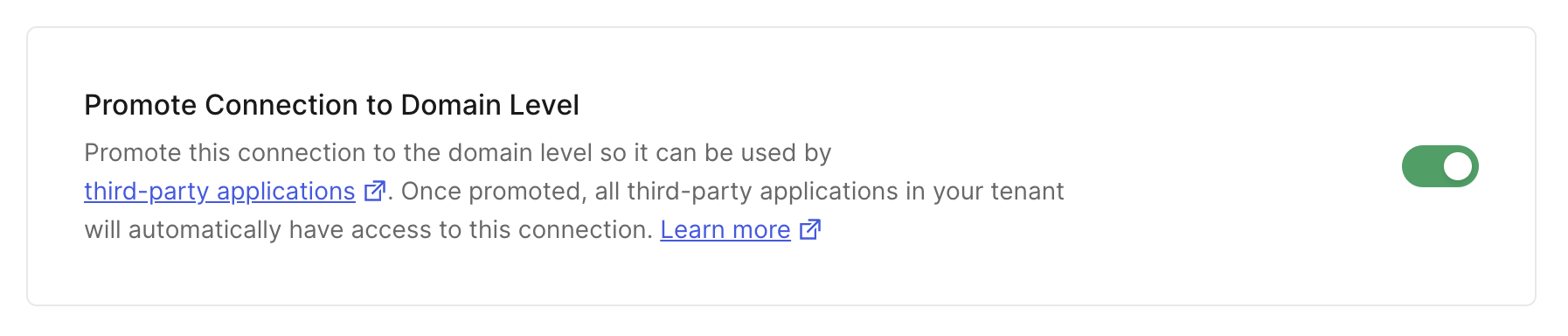 6. Click **Save Changes**.
Alternatively, you can promote a connection using a `PATCH` call to the [Update a Connection endpoint](https://auth0.com/docs/api/management/v2#!/Connections/patch_connections_by_id) of the Management API. Be sure to replace the `CONNECTION_ID` and `MGMT_API_ACCESS_TOKEN` placeholder values with your specific information.
```bash cURL theme={null}
curl --request PATCH \
--url 'https://{yourDomain}/api/v2/connections/CONNECTION_ID' \
--header 'authorization: Bearer MGMT_API_ACCESS_TOKEN' \
--header 'cache-control: no-cache' \
--header 'content-type: application/json' \
--data '{ "is_domain_connection": true }'
```
```csharp C# theme={null}
var client = new RestClient("https://{yourDomain}/api/v2/connections/CONNECTION_ID");
var request = new RestRequest(Method.PATCH);
request.AddHeader("content-type", "application/json");
request.AddHeader("authorization", "Bearer MGMT_API_ACCESS_TOKEN");
request.AddHeader("cache-control", "no-cache");
request.AddParameter("application/json", "{ "is_domain_connection": true }", ParameterType.RequestBody);
IRestResponse response = client.Execute(request);
```
```go Go theme={null}
package main
import (
"fmt"
"strings"
"net/http"
"io/ioutil"
)
func main() {
url := "https://{yourDomain}/api/v2/connections/CONNECTION_ID"
payload := strings.NewReader("{ "is_domain_connection": true }")
req, _ := http.NewRequest("PATCH", url, payload)
req.Header.Add("content-type", "application/json")
req.Header.Add("authorization", "Bearer MGMT_API_ACCESS_TOKEN")
req.Header.Add("cache-control", "no-cache")
res, _ := http.DefaultClient.Do(req)
defer res.Body.Close()
body, _ := ioutil.ReadAll(res.Body)
fmt.Println(res)
fmt.Println(string(body))
}
```
```java Java theme={null}
HttpResponse response = Unirest.patch("https://{yourDomain}/api/v2/connections/CONNECTION_ID")
.header("content-type", "application/json")
.header("authorization", "Bearer MGMT_API_ACCESS_TOKEN")
.header("cache-control", "no-cache")
.body("{ "is_domain_connection": true }")
.asString();
```
```javascript Node.JS theme={null}
var axios = require("axios").default;
var options = {
method: 'PATCH',
url: 'https://{yourDomain}/api/v2/connections/CONNECTION_ID',
headers: {
'content-type': 'application/json',
authorization: 'Bearer MGMT_API_ACCESS_TOKEN',
'cache-control': 'no-cache'
},
data: {is_domain_connection: true}
};
axios.request(options).then(function (response) {
console.log(response.data);
}).catch(function (error) {
console.error(error);
});
```
```php PHP theme={null}
$curl = curl_init();
curl_setopt_array($curl, [
CURLOPT_URL => "https://{yourDomain}/api/v2/connections/CONNECTION_ID",
CURLOPT_RETURNTRANSFER => true,
CURLOPT_ENCODING => "",
CURLOPT_MAXREDIRS => 10,
CURLOPT_TIMEOUT => 30,
CURLOPT_HTTP_VERSION => CURL_HTTP_VERSION_1_1,
CURLOPT_CUSTOMREQUEST => "PATCH",
CURLOPT_POSTFIELDS => "{ "is_domain_connection": true }",
CURLOPT_HTTPHEADER => [
"authorization: Bearer MGMT_API_ACCESS_TOKEN",
"cache-control: no-cache",
"content-type: application/json"
],
]);
$response = curl_exec($curl);
$err = curl_error($curl);
curl_close($curl);
if ($err) {
echo "cURL Error #:" . $err;
} else {
echo $response;
}
```
```python Python theme={null}
import http.client
conn = http.client.HTTPSConnection("")
payload = "{ "is_domain_connection": true }"
headers = {
'content-type': "application/json",
'authorization': "Bearer MGMT_API_ACCESS_TOKEN",
'cache-control': "no-cache"
}
conn.request("PATCH", "/{yourDomain}/api/v2/connections/CONNECTION_ID", payload, headers)
res = conn.getresponse()
data = res.read()
print(data.decode("utf-8"))
```
```ruby Ruby theme={null}
require 'uri'
require 'net/http'
require 'openssl'
url = URI("https://{yourDomain}/api/v2/connections/CONNECTION_ID")
http = Net::HTTP.new(url.host, url.port)
http.use_ssl = true
http.verify_mode = OpenSSL::SSL::VERIFY_NONE
request = Net::HTTP::Patch.new(url)
request["content-type"] = 'application/json'
request["authorization"] = 'Bearer MGMT_API_ACCESS_TOKEN'
request["cache-control"] = 'no-cache'
request.body = "{ "is_domain_connection": true }"
response = http.request(request)
puts response.read_body
```
| Value | Description |
| ----------------------- | -------------------------------------------------------------------------------------------------------------------------------------------------------- |
| `CONNECTION_ID` | Τhe ID of the connection to be promoted. |
| `MGMT_API_ACCESS_TOKEN` | [Access Token for the Management API](https://auth0.com/docs/api/management/v2/tokens) with the [scope](/docs/glossary?term=scope) `update:connections`. |
6. Click **Save Changes**.
Alternatively, you can promote a connection using a `PATCH` call to the [Update a Connection endpoint](https://auth0.com/docs/api/management/v2#!/Connections/patch_connections_by_id) of the Management API. Be sure to replace the `CONNECTION_ID` and `MGMT_API_ACCESS_TOKEN` placeholder values with your specific information.
```bash cURL theme={null}
curl --request PATCH \
--url 'https://{yourDomain}/api/v2/connections/CONNECTION_ID' \
--header 'authorization: Bearer MGMT_API_ACCESS_TOKEN' \
--header 'cache-control: no-cache' \
--header 'content-type: application/json' \
--data '{ "is_domain_connection": true }'
```
```csharp C# theme={null}
var client = new RestClient("https://{yourDomain}/api/v2/connections/CONNECTION_ID");
var request = new RestRequest(Method.PATCH);
request.AddHeader("content-type", "application/json");
request.AddHeader("authorization", "Bearer MGMT_API_ACCESS_TOKEN");
request.AddHeader("cache-control", "no-cache");
request.AddParameter("application/json", "{ "is_domain_connection": true }", ParameterType.RequestBody);
IRestResponse response = client.Execute(request);
```
```go Go theme={null}
package main
import (
"fmt"
"strings"
"net/http"
"io/ioutil"
)
func main() {
url := "https://{yourDomain}/api/v2/connections/CONNECTION_ID"
payload := strings.NewReader("{ "is_domain_connection": true }")
req, _ := http.NewRequest("PATCH", url, payload)
req.Header.Add("content-type", "application/json")
req.Header.Add("authorization", "Bearer MGMT_API_ACCESS_TOKEN")
req.Header.Add("cache-control", "no-cache")
res, _ := http.DefaultClient.Do(req)
defer res.Body.Close()
body, _ := ioutil.ReadAll(res.Body)
fmt.Println(res)
fmt.Println(string(body))
}
```
```java Java theme={null}
HttpResponse response = Unirest.patch("https://{yourDomain}/api/v2/connections/CONNECTION_ID")
.header("content-type", "application/json")
.header("authorization", "Bearer MGMT_API_ACCESS_TOKEN")
.header("cache-control", "no-cache")
.body("{ "is_domain_connection": true }")
.asString();
```
```javascript Node.JS theme={null}
var axios = require("axios").default;
var options = {
method: 'PATCH',
url: 'https://{yourDomain}/api/v2/connections/CONNECTION_ID',
headers: {
'content-type': 'application/json',
authorization: 'Bearer MGMT_API_ACCESS_TOKEN',
'cache-control': 'no-cache'
},
data: {is_domain_connection: true}
};
axios.request(options).then(function (response) {
console.log(response.data);
}).catch(function (error) {
console.error(error);
});
```
```php PHP theme={null}
$curl = curl_init();
curl_setopt_array($curl, [
CURLOPT_URL => "https://{yourDomain}/api/v2/connections/CONNECTION_ID",
CURLOPT_RETURNTRANSFER => true,
CURLOPT_ENCODING => "",
CURLOPT_MAXREDIRS => 10,
CURLOPT_TIMEOUT => 30,
CURLOPT_HTTP_VERSION => CURL_HTTP_VERSION_1_1,
CURLOPT_CUSTOMREQUEST => "PATCH",
CURLOPT_POSTFIELDS => "{ "is_domain_connection": true }",
CURLOPT_HTTPHEADER => [
"authorization: Bearer MGMT_API_ACCESS_TOKEN",
"cache-control: no-cache",
"content-type: application/json"
],
]);
$response = curl_exec($curl);
$err = curl_error($curl);
curl_close($curl);
if ($err) {
echo "cURL Error #:" . $err;
} else {
echo $response;
}
```
```python Python theme={null}
import http.client
conn = http.client.HTTPSConnection("")
payload = "{ "is_domain_connection": true }"
headers = {
'content-type': "application/json",
'authorization': "Bearer MGMT_API_ACCESS_TOKEN",
'cache-control': "no-cache"
}
conn.request("PATCH", "/{yourDomain}/api/v2/connections/CONNECTION_ID", payload, headers)
res = conn.getresponse()
data = res.read()
print(data.decode("utf-8"))
```
```ruby Ruby theme={null}
require 'uri'
require 'net/http'
require 'openssl'
url = URI("https://{yourDomain}/api/v2/connections/CONNECTION_ID")
http = Net::HTTP.new(url.host, url.port)
http.use_ssl = true
http.verify_mode = OpenSSL::SSL::VERIFY_NONE
request = Net::HTTP::Patch.new(url)
request["content-type"] = 'application/json'
request["authorization"] = 'Bearer MGMT_API_ACCESS_TOKEN'
request["cache-control"] = 'no-cache'
request.body = "{ "is_domain_connection": true }"
response = http.request(request)
puts response.read_body
```
| Value | Description |
| ----------------------- | -------------------------------------------------------------------------------------------------------------------------------------------------------- |
| `CONNECTION_ID` | Τhe ID of the connection to be promoted. |
| `MGMT_API_ACCESS_TOKEN` | [Access Token for the Management API](https://auth0.com/docs/api/management/v2/tokens) with the [scope](/docs/glossary?term=scope) `update:connections`. |