> ## Documentation Index
> Fetch the complete documentation index at: https://auth0.com/llms.txt
> Use this file to discover all available pages before exploring further.
> Learn how to add login functionality to your native app with Facebook.
# Add Facebook Login to Native Apps
export const AuthCodeBlock = ({filename, icon, language, highlight, children}) => {
const [displayText, setDisplayText] = useState(children);
const [copyText, setCopyText] = useState(children);
const wrapperRef = React.useRef(null);
useEffect(() => {
let unsubscribe = null;
function init() {
if (!window.autorun || !window.rootStore) {
return;
}
unsubscribe = window.autorun(() => {
let processedChildrenForDisplay = children;
let processedChildrenForCopy = children;
for (const [key, value] of window.rootStore.variableStore.values.entries()) {
const escapedKey = key.replaceAll(/[.*+?^${}()|[\]\\]/g, (String.raw)`\$&`);
let displayValue = value;
if (key === "{yourClientSecret}" && value !== "{yourClientSecret}") {
displayValue = value.substring(0, 3) + "*****MASKED*****";
}
processedChildrenForDisplay = processedChildrenForDisplay.replaceAll(new RegExp(escapedKey, "g"), displayValue);
processedChildrenForCopy = processedChildrenForCopy.replaceAll(new RegExp(escapedKey, "g"), value);
}
setDisplayText(processedChildrenForDisplay);
setCopyText(processedChildrenForCopy);
});
}
if (window.rootStore) {
init();
} else {
window.addEventListener("adu:storeReady", init);
}
return () => {
window.removeEventListener("adu:storeReady", init);
unsubscribe?.();
};
}, [children]);
useEffect(() => {
if (!wrapperRef.current) return;
const originalWriteText = navigator.clipboard.writeText.bind(navigator.clipboard);
let isOverriding = false;
const handleClick = e => {
const button = e.target.closest('[data-testid="copy-code-button"]');
if (!button || !wrapperRef.current.contains(button)) return;
isOverriding = true;
navigator.clipboard.writeText = text => {
if (isOverriding) {
isOverriding = false;
navigator.clipboard.writeText = originalWriteText;
return originalWriteText(copyText);
}
return originalWriteText(text);
};
setTimeout(() => {
if (isOverriding) {
isOverriding = false;
navigator.clipboard.writeText = originalWriteText;
}
}, 100);
};
const wrapper = wrapperRef.current;
wrapper.addEventListener('click', handleClick, true);
return () => {
wrapper.removeEventListener('click', handleClick, true);
if (navigator.clipboard.writeText !== originalWriteText) {
navigator.clipboard.writeText = originalWriteText;
}
};
}, [copyText]);
return
{displayText}
;
};
You can add functionality to your native application to allow your users to authenticate using Facebook natively, within the application. This does not require redirection via a web browser and will let mobile applications comply with the [Facebook Developer Policy](https://developers.facebook.com/policy/), which requires that mobile applications use the Facebook SDK for [Android](https://developers.facebook.com/docs/android) or [iOS](https://developers.facebook.com/docs/ios) to authenticate.
When integrating with the Facebook SDKs, your applications will be sharing data with Facebook. Make sure you understand the data that is being shared and that you reflect it properly in your application's privacy policy. Auth0 has no control over what data will be shared with Facebook via the SDK.
Check the [Facebook GDPR](https://www.facebook.com/business/m/one-sheeters/gdpr-developer-faqs) page for more information about data collected by the Facebook SDK and Facebook Login.
## How it works
The Native Facebook login flow works as follows:
* **Step 1**: The application authenticates a user via the Facebook SDK and acquires an Access Token.
* **Step 2**: The application uses that Access Token to request a special [Facebook Session Info Access Token](https://developers.facebook.com/docs/facebook-login/access-tokens/session-info-access-token).
* **Step 3**: Use the Facebook SDK to retrieve the users's profile.
* **Step 4**: The application can then use the Facebook Session Info token to authenticate with Auth0.
## Prerequisites
Before you configure Native Facebook login for your native app via Auth0, you must:
1. [Set up Facebook as an Auth0 connection](https://marketplace.auth0.com/integrations/facebook-social-connection)
2. [Use the relevant Facebook SDK in your application](https://developers.facebook.com/docs/apis-and-sdks/)
3. Navigate to [Auth0 Dashboard > Applications > Applications](https://manage.auth0.com/#/applications), and create an application with Auth0 (if you have not already).
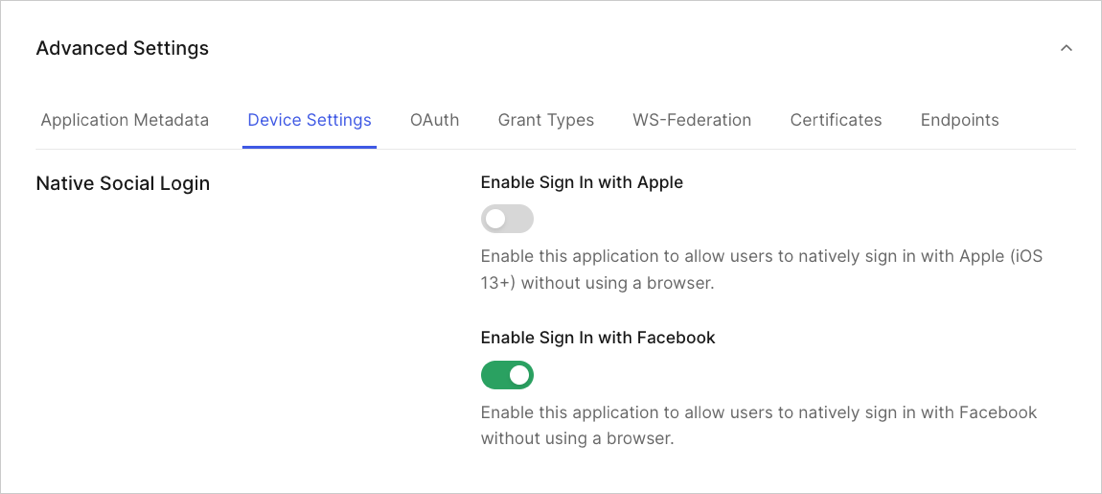
4. At the bottom of the settings page, select **Show Advanced Settings** and then the **Device Settings** view. Under **Native Social Login**, enable the **Enable Sign In with Facebook** toggle.
 ## Implementation
The process to authenticate a user profile using Native Facebook login is a four-step one, from your application's perspective:
### Step 1
The application authenticates a user via the Facebook SDK. It will obtain an Access Token from Facebook.
## Step 2
The application uses the Access Token to request a [Facebook Session Info Access Token](https://developers.facebook.com/docs/facebook-login/access-tokens/session-info-access-token).
This request will look similar to the following:
```json wrap lines theme={null}
GET https://graph.facebook.com/v5.0/oauth/access_token?grant_type=fb_attenuate_token&client_id=457704041391802&fb_exchange_token=
```
and the response:
```json lines theme={null}
{
"access_token": "XAAGgR4b...1lHWNCpqrAhcpoAZDZD",
"token_type": "bearer",
"expires_in": 5183924
}
```
### Step 3
The application needs to retrieve the user profile from Facebook using the Facebook SDK, which will end in a request similar to the following:
```json wrap lines theme={null}
GET https://graph.facebook.com/v5.0/?access_token=&fields=email,name
```
### Step 4
The application can then use the session info Access Token and the Facebook user profile to authenticate with Auth0 by calling Auth0's `/oauth/token` endpoint using the Token Exchange flow with the `facebook-session-access-token` token type. If all goes well, Auth0 will return a normal response from the exchange, with the addition of the user profile. The user profile should be a JSON object, encoded as a string.
export const codeExample = `POST https://{yourDomain}/oauth/token
grant_type: 'urn:ietf:params:oauth:grant-type:token-exchange'
subject_token_type: 'http://auth0.com/oauth/token-type/facebook-info-session-access-token'
audience: 'your-api'
scope: 'read:appointments openid profile email email_verified'
subject_token: 'XAAGgR4b...1lHWNCpqrUHZAEtUuZAhcpoAZDZD'
client_id: '{yourClientId}'
user_profile: '{"email":"john@example.com", "name":"John Doe"}'`;
and the response from Auth0:
```json lines theme={null}
{
"access_token": "eyJ0eXA..yXQaPLVXg",
"id_token": "eyJ0.tFE5HPipdOsA",
"scope": "openid profile email read:appointments",
"expires_in": 86400,
"token_type": "Bearer"
}
```
## User Profile and Email Validation
In the previous example, you had to retrieve the User Profile from Facebook and include it in the call to `/oauth/token`. This is because the Facebook Session Access Token cannot be used to directly retrieve the profile, and the Facebook Access Token cannot be sent directly to the server, due to [Apple's AppStore Review Guidelines](https://developer.apple.com/app-store/review/guidelines). Therefore, it must be retrieved in the client and sent to Auth0 in this fashion.
Given that Auth0 can't guarantee that the user profile is the same that was returned by Facebook, it will set the `email_verified` field to `false`.
## Logout
Since the native login implementation does not make use of standard browser-based flows, application owners must also take care to perform logout appropriately. When an application needs to perform a logout, it should also [Revoke the Auth0 Refresh Token](https://auth0.com/docs/api/authentication#revoke-refresh-token).
## Keep reading
* [Native Facebook Login with iOS Swift](/docs/quickstart/native/ios-swift-facebook-login)
* [Native Facebook Login with Android](/docs/quickstart/native/android-facebook-login)
* [Rate Limits on Native Social Logins](/docs/troubleshoot/customer-support/operational-policies/rate-limit-policy)
## Implementation
The process to authenticate a user profile using Native Facebook login is a four-step one, from your application's perspective:
### Step 1
The application authenticates a user via the Facebook SDK. It will obtain an Access Token from Facebook.
## Step 2
The application uses the Access Token to request a [Facebook Session Info Access Token](https://developers.facebook.com/docs/facebook-login/access-tokens/session-info-access-token).
This request will look similar to the following:
```json wrap lines theme={null}
GET https://graph.facebook.com/v5.0/oauth/access_token?grant_type=fb_attenuate_token&client_id=457704041391802&fb_exchange_token=
```
and the response:
```json lines theme={null}
{
"access_token": "XAAGgR4b...1lHWNCpqrAhcpoAZDZD",
"token_type": "bearer",
"expires_in": 5183924
}
```
### Step 3
The application needs to retrieve the user profile from Facebook using the Facebook SDK, which will end in a request similar to the following:
```json wrap lines theme={null}
GET https://graph.facebook.com/v5.0/?access_token=&fields=email,name
```
### Step 4
The application can then use the session info Access Token and the Facebook user profile to authenticate with Auth0 by calling Auth0's `/oauth/token` endpoint using the Token Exchange flow with the `facebook-session-access-token` token type. If all goes well, Auth0 will return a normal response from the exchange, with the addition of the user profile. The user profile should be a JSON object, encoded as a string.
export const codeExample = `POST https://{yourDomain}/oauth/token
grant_type: 'urn:ietf:params:oauth:grant-type:token-exchange'
subject_token_type: 'http://auth0.com/oauth/token-type/facebook-info-session-access-token'
audience: 'your-api'
scope: 'read:appointments openid profile email email_verified'
subject_token: 'XAAGgR4b...1lHWNCpqrUHZAEtUuZAhcpoAZDZD'
client_id: '{yourClientId}'
user_profile: '{"email":"john@example.com", "name":"John Doe"}'`;
and the response from Auth0:
```json lines theme={null}
{
"access_token": "eyJ0eXA..yXQaPLVXg",
"id_token": "eyJ0.tFE5HPipdOsA",
"scope": "openid profile email read:appointments",
"expires_in": 86400,
"token_type": "Bearer"
}
```
## User Profile and Email Validation
In the previous example, you had to retrieve the User Profile from Facebook and include it in the call to `/oauth/token`. This is because the Facebook Session Access Token cannot be used to directly retrieve the profile, and the Facebook Access Token cannot be sent directly to the server, due to [Apple's AppStore Review Guidelines](https://developer.apple.com/app-store/review/guidelines). Therefore, it must be retrieved in the client and sent to Auth0 in this fashion.
Given that Auth0 can't guarantee that the user profile is the same that was returned by Facebook, it will set the `email_verified` field to `false`.
## Logout
Since the native login implementation does not make use of standard browser-based flows, application owners must also take care to perform logout appropriately. When an application needs to perform a logout, it should also [Revoke the Auth0 Refresh Token](https://auth0.com/docs/api/authentication#revoke-refresh-token).
## Keep reading
* [Native Facebook Login with iOS Swift](/docs/quickstart/native/ios-swift-facebook-login)
* [Native Facebook Login with Android](/docs/quickstart/native/android-facebook-login)
* [Rate Limits on Native Social Logins](/docs/troubleshoot/customer-support/operational-policies/rate-limit-policy)