> ## Documentation Index
> Fetch the complete documentation index at: https://auth0.com/llms.txt
> Use this file to discover all available pages before exploring further.
> Learn how OIDC Back-Channel Logout Initiators work and how to configure them for your application(s).
# OIDC Back-Channel Logout Initiators
export const AuthCodeBlock = ({filename, icon, language, highlight, children}) => {
const [displayText, setDisplayText] = useState(children);
const [copyText, setCopyText] = useState(children);
const wrapperRef = React.useRef(null);
useEffect(() => {
let unsubscribe = null;
function init() {
if (!window.autorun || !window.rootStore) {
return;
}
unsubscribe = window.autorun(() => {
let processedChildrenForDisplay = children;
let processedChildrenForCopy = children;
for (const [key, value] of window.rootStore.variableStore.values.entries()) {
const escapedKey = key.replaceAll(/[.*+?^${}()|[\]\\]/g, (String.raw)`\$&`);
let displayValue = value;
if (key === "{yourClientSecret}" && value !== "{yourClientSecret}") {
displayValue = value.substring(0, 3) + "*****MASKED*****";
}
processedChildrenForDisplay = processedChildrenForDisplay.replaceAll(new RegExp(escapedKey, "g"), displayValue);
processedChildrenForCopy = processedChildrenForCopy.replaceAll(new RegExp(escapedKey, "g"), value);
}
setDisplayText(processedChildrenForDisplay);
setCopyText(processedChildrenForCopy);
});
}
if (window.rootStore) {
init();
} else {
window.addEventListener("adu:storeReady", init);
}
return () => {
window.removeEventListener("adu:storeReady", init);
unsubscribe?.();
};
}, [children]);
useEffect(() => {
if (!wrapperRef.current) return;
const originalWriteText = navigator.clipboard.writeText.bind(navigator.clipboard);
let isOverriding = false;
const handleClick = e => {
const button = e.target.closest('[data-testid="copy-code-button"]');
if (!button || !wrapperRef.current.contains(button)) return;
isOverriding = true;
navigator.clipboard.writeText = text => {
if (isOverriding) {
isOverriding = false;
navigator.clipboard.writeText = originalWriteText;
return originalWriteText(copyText);
}
return originalWriteText(text);
};
setTimeout(() => {
if (isOverriding) {
isOverriding = false;
navigator.clipboard.writeText = originalWriteText;
}
}, 100);
};
const wrapper = wrapperRef.current;
wrapper.addEventListener('click', handleClick, true);
return () => {
wrapper.removeEventListener('click', handleClick, true);
if (navigator.clipboard.writeText !== originalWriteText) {
navigator.clipboard.writeText = originalWriteText;
}
};
}, [copyText]);
return
{displayText}
;
};
OIDC Back-Channel Logout Initiators allow you to remotely log out users from their applications based on session termination events. OIDC Back-Channel Logout Initiators work across protocols—for example, an identity provider-initiated (IdP-initiated) SAML logout request—and are unaffected by third-party cookie restrictions.
This feature is an extension to the standard OIDC back-channel specification. You can configure it to initiate an OIDC Back-Channel Logout request for specific session termination events, such as a password change or session expiration, or for all session termination events.
Administrators can enable this feature for specific applications with the Auth0 Management API.
## How OIDC Back-Channel Logout Initiators work
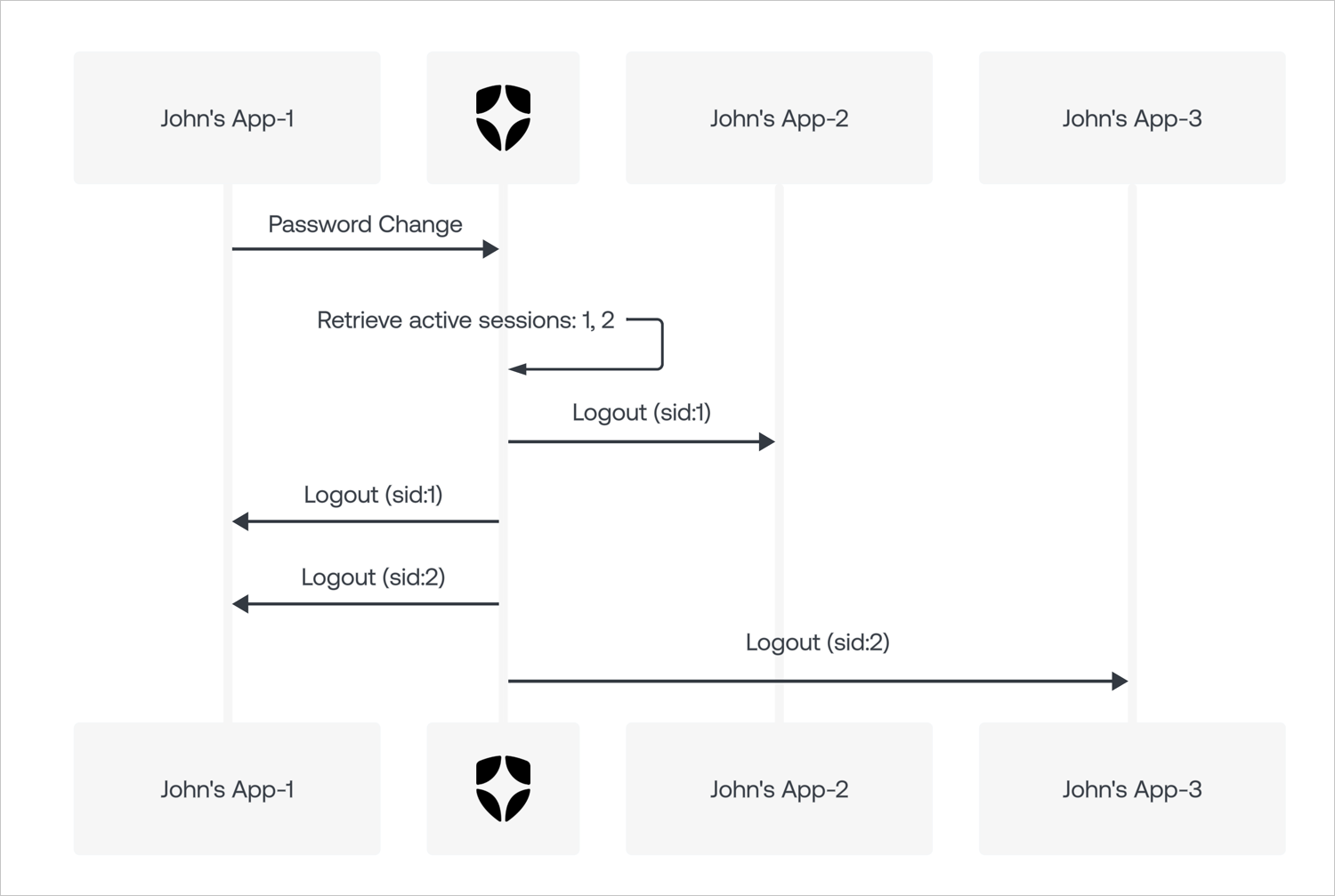
Initiators bind an OIDC Back-Channel Logout response to a session termination event. They capture the event and use it to trigger an OIDC logout token in all applications associated with the given session.
Initiators do not control session management in your tenant, including session termination events.
The following diagram illustrates how an OIDC Back-Channel Logout Initiator works for a password change event:
 ## Configure OIDC Back-Channel Logout Initiators
You can configure OIDC Back-Channel Logout Initiators with the Auth0 Management API.
### Management API
You can configure the OIDC Back-Channel Logout Initiators for an application with the Management API by using the [Update a Client](https://auth0.com/docs/api/management/v2/clients/patch-clients-by-id) endpoint.
1. Get an [Management API access token](/docs/secure/tokens/access-tokens/management-api-access-tokens) with the `update:clients` scope.
2. Call the [Update a Client](https://auth0.com/docs/api/management/v2/clients/patch-clients-by-id) endpoint with the appropriate configuration data in the payload. For example, to log out an application after a password change event, provide the following:
export const codeExample1 = ` PATCH /api/v2/clients/{yourClientId}
{
...
"oidc_logout": {
"backchannel_logout_urls": ["https://example.com/cb"]
"backchannel_logout_initiators": {
"mode":"custom",
"selected_initiators": ["rp-logout", "idp-logout", "password-changed"]
}
}
...
}
`;
#### Properties
The `backchannel_logout_initiators` object supports the following properties:
| Property | Type | Required? | Description | Supported values |
| --------------------- | ------ | ------------------------------ | --------------------------------------------- | ---------------------------------------------------------------------------------------------------------------------------------- |
| `mode` | string | Required | Configuration method for enabling initiators. | `custom`, `all` |
| `selected_initiators` | array | Required if `mode` is `custom` | List of initiators to enable. | `rp-logout`, `idp-logout`, `password-changed`, `session-expired`, `session-revoked`, `account-deleted`, `email-identifier-changed` |
##### mode property
The `mode` property determines the configuration method for enabling initiators.
By default, it is set to `custom`, which allows you to specify which initiators you want to enable. If you want your application to logout anytime the IdP session ends, set it to `all`.
The `mode` property supports the following values:
| Value | Description |
| -------- | ---------------------------------------------------------------------- |
| `custom` | Enables only the initiators listed in the `selected_initiators` array. |
| `all` | Automatically enables all current and future initiators. |
##### selected\_initiators property
The `selected_initiators` property contains the list of initiators to be enabled for the given application.
The `selected_initiators` property supports the following values:
| Value | Description |
| -------------------------- | ------------------------------------------------------------- |
| `rp-logout` | Request was initiated by a relying party (RP). |
| `idp-logout` | Request was initiated by an external identity provider (IdP). |
| `password-changed` | Request was initiated by a password change. |
| `session-expired` | Request was initiated by session expiration. |
| `session-revoked` | Request was initiated by session deletion. |
| `account-deleted` | Request was initiated by an account deletion. |
| `email-identifier-changed` | Request was initiated by an email identifier change. |
#### Examples
##### Subscribe an application to all current and future initiators
export const codeExample2 = `PATCH /api/v2/clients/{yourClientId}
{
...
"oidc_logout": {
"backchannel_logout_urls": ["https://example.com/cb"]
"backchannel_logout_initiators": {
"mode":"all"
}
}
...
}`;
##### Subscribe an application to password-changed initiator only (rp-logout and idp-logout are required)
export const codeExample3 = `PATCH /api/v2/clients/{yourClientId}
{
...
"oidc_logout": {
"backchannel_logout_urls": ["https://example.com/cb"]
"backchannel_logout_initiators": {
"mode":"custom",
"selected_initiators": ["rp-logout", "idp-logout", "password-changed"]
}
}
...
}`;
##### Unsubscribe all initiators (rp-logout remains the default)
export const codeExample4 = `PATCH /api/v2/clients/{yourClientId}
{
...
"oidc_logout": {
"backchannel_logout_urls": ["https://example.com/cb"]
}
...
}`;
### Dashboard
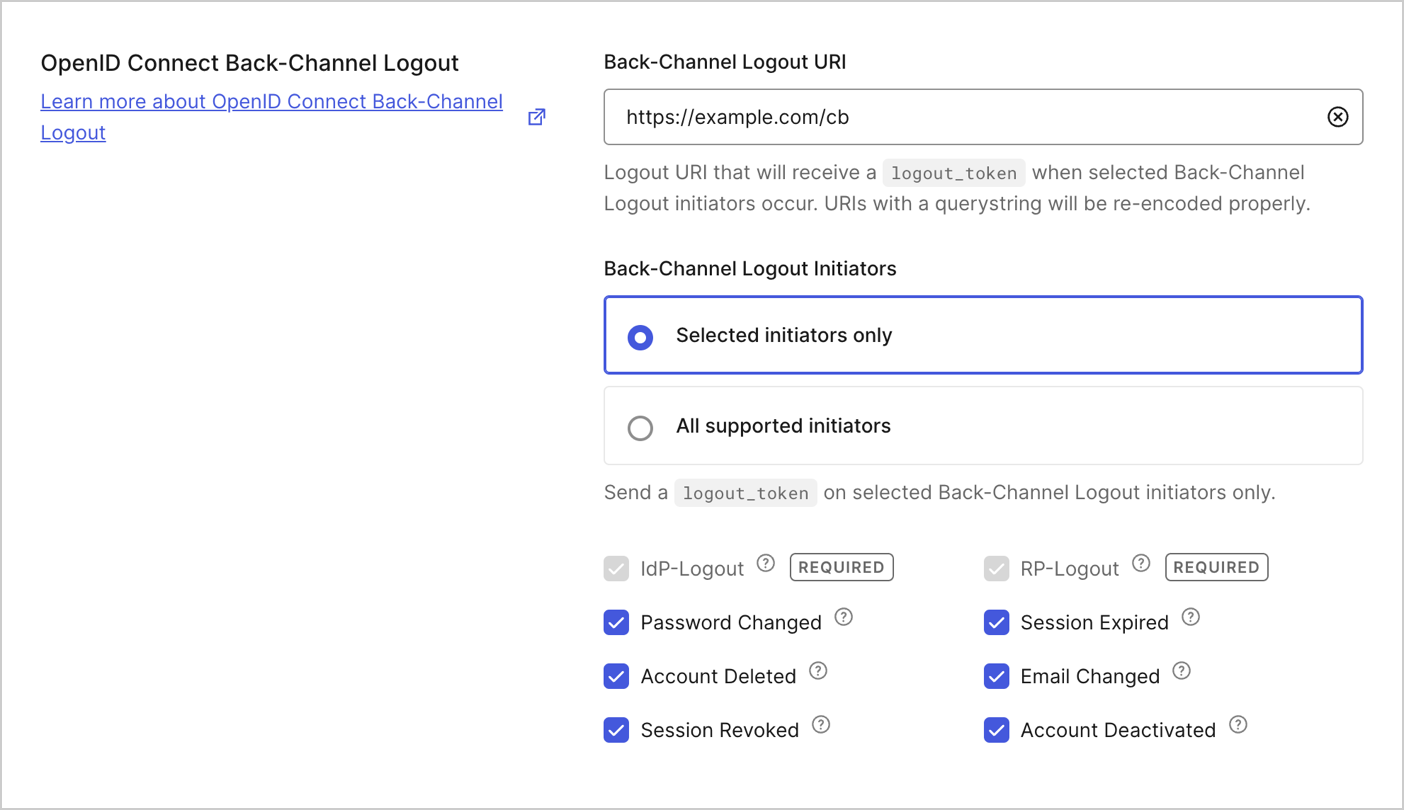
OpenID Connect Back-Channel Logout can be configured alongside the rest of your application settings. This feature automatically activates once a Back-Channel Logout URI is provided.
## Configure OIDC Back-Channel Logout Initiators
You can configure OIDC Back-Channel Logout Initiators with the Auth0 Management API.
### Management API
You can configure the OIDC Back-Channel Logout Initiators for an application with the Management API by using the [Update a Client](https://auth0.com/docs/api/management/v2/clients/patch-clients-by-id) endpoint.
1. Get an [Management API access token](/docs/secure/tokens/access-tokens/management-api-access-tokens) with the `update:clients` scope.
2. Call the [Update a Client](https://auth0.com/docs/api/management/v2/clients/patch-clients-by-id) endpoint with the appropriate configuration data in the payload. For example, to log out an application after a password change event, provide the following:
export const codeExample1 = ` PATCH /api/v2/clients/{yourClientId}
{
...
"oidc_logout": {
"backchannel_logout_urls": ["https://example.com/cb"]
"backchannel_logout_initiators": {
"mode":"custom",
"selected_initiators": ["rp-logout", "idp-logout", "password-changed"]
}
}
...
}
`;
#### Properties
The `backchannel_logout_initiators` object supports the following properties:
| Property | Type | Required? | Description | Supported values |
| --------------------- | ------ | ------------------------------ | --------------------------------------------- | ---------------------------------------------------------------------------------------------------------------------------------- |
| `mode` | string | Required | Configuration method for enabling initiators. | `custom`, `all` |
| `selected_initiators` | array | Required if `mode` is `custom` | List of initiators to enable. | `rp-logout`, `idp-logout`, `password-changed`, `session-expired`, `session-revoked`, `account-deleted`, `email-identifier-changed` |
##### mode property
The `mode` property determines the configuration method for enabling initiators.
By default, it is set to `custom`, which allows you to specify which initiators you want to enable. If you want your application to logout anytime the IdP session ends, set it to `all`.
The `mode` property supports the following values:
| Value | Description |
| -------- | ---------------------------------------------------------------------- |
| `custom` | Enables only the initiators listed in the `selected_initiators` array. |
| `all` | Automatically enables all current and future initiators. |
##### selected\_initiators property
The `selected_initiators` property contains the list of initiators to be enabled for the given application.
The `selected_initiators` property supports the following values:
| Value | Description |
| -------------------------- | ------------------------------------------------------------- |
| `rp-logout` | Request was initiated by a relying party (RP). |
| `idp-logout` | Request was initiated by an external identity provider (IdP). |
| `password-changed` | Request was initiated by a password change. |
| `session-expired` | Request was initiated by session expiration. |
| `session-revoked` | Request was initiated by session deletion. |
| `account-deleted` | Request was initiated by an account deletion. |
| `email-identifier-changed` | Request was initiated by an email identifier change. |
#### Examples
##### Subscribe an application to all current and future initiators
export const codeExample2 = `PATCH /api/v2/clients/{yourClientId}
{
...
"oidc_logout": {
"backchannel_logout_urls": ["https://example.com/cb"]
"backchannel_logout_initiators": {
"mode":"all"
}
}
...
}`;
##### Subscribe an application to password-changed initiator only (rp-logout and idp-logout are required)
export const codeExample3 = `PATCH /api/v2/clients/{yourClientId}
{
...
"oidc_logout": {
"backchannel_logout_urls": ["https://example.com/cb"]
"backchannel_logout_initiators": {
"mode":"custom",
"selected_initiators": ["rp-logout", "idp-logout", "password-changed"]
}
}
...
}`;
##### Unsubscribe all initiators (rp-logout remains the default)
export const codeExample4 = `PATCH /api/v2/clients/{yourClientId}
{
...
"oidc_logout": {
"backchannel_logout_urls": ["https://example.com/cb"]
}
...
}`;
### Dashboard
OpenID Connect Back-Channel Logout can be configured alongside the rest of your application settings. This feature automatically activates once a Back-Channel Logout URI is provided.
 #### Selected initiators only
Only the required initiators (`rp-logout` and `idp-logout`) will be subscribed to by default. Any additional initiators, including any added in the future, must first be selected before they can initiate a logout from your application.
Select this option if you want your application to log out only for initiators you select.
#### All supported initiators
All supported initiators, including any added in the future, will be subscribed to by default.
Select this option if you want your application to log out any time the IdP session ends.
#### Selected initiators only
Only the required initiators (`rp-logout` and `idp-logout`) will be subscribed to by default. Any additional initiators, including any added in the future, must first be selected before they can initiate a logout from your application.
Select this option if you want your application to log out only for initiators you select.
#### All supported initiators
All supported initiators, including any added in the future, will be subscribed to by default.
Select this option if you want your application to log out any time the IdP session ends.