> ## Documentation Index
> Fetch the complete documentation index at: https://auth0.com/llms.txt
> Use this file to discover all available pages before exploring further.
> Learn how to configure an Auth0 SAML connection to support Identity Provider-initiated sign-on to a SAML Identity Provider for OIDC applications.
# Configure IdP-Initiated SAML Sign-on to OIDC Apps
Auth0 provides a method to translate an Identity Provider-initiated (IdP) SAML response into an OpenID Connect (OIDC) response for an application.
The OIDC protocol does not support IdP-initiated authentication flows, but this method allows you to simulate an IdP-initiated authentication flow using the [Implicit Flow with Form Post](/docs/get-started/authentication-and-authorization-flow/implicit-flow-with-form-post).
We strongly recommend you start the login flow at the OIDC application rather than at the IdP. To learn more, read [Configure SAML Identity Provider-Initiated Single Sign-On](/docs/authenticate/protocols/saml/saml-sso-integrations/identity-provider-initiated-single-sign-on).
If you’d like to implement this method, you must:
* Add a custom login route handler to your application.
* Update your SAML connection to:
1. Accept incoming IdP-initiated SAML responses.
2. Redirect to a default application that sends a Service Provider-initiated authentication request.
## How it works
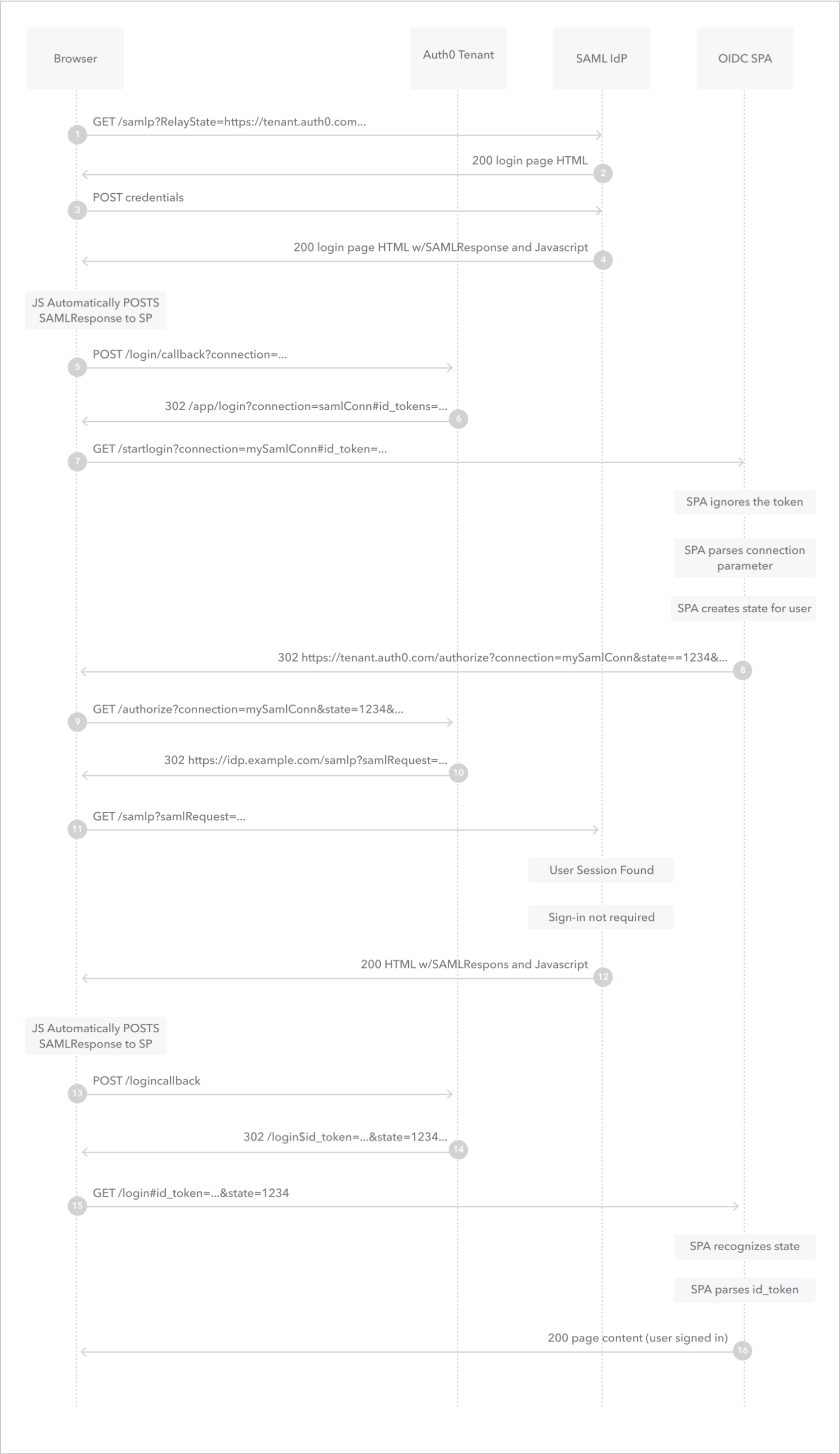 1. User navigates to the SAML IdP’s login endpoint.
2. SAML IdP returns the login page.
3. User submits credentials to the SAML IdP.
4. SAML IdP creates a session for the user and then returns an HTML page with Form Post and the SAML response.
5. Page automatically sends the SAML response to the Auth0 tenant through an HTTP `POST` call.
6. Auth0 tenant redirects the user’s browser to the OIDC application’s custom login route handler with the ID token as a URL fragment.
7. Browser calls the custom login route handler of the OIDC application with the `connection` parameter and the ID token.
8. OIDC application ignores the ID token, parses the `connection` parameter, creates a `state` parameter for the session, and then redirects the user’s browser to the Auth0 tenant’s `/authorize` endpoint.
9. Browser calls the Auth0 tenant’s `/authorize` endpoint with the provided `connection` and `state` parameters.
10. Auth0 tenant generates a SAML login request and then redirects the user’s browser to SAML IdP’s login endpoint.
11. Browser sends the SAML login request to the SAML IdP’s login endpoint.
12. SAML IdP finds the user’s session and then returns an HTML page with Form Post and the SAML response.
13. Page automatically sends the SAML response to the Auth0 tenant through an HTTP `POST` call.
14. Auth0 tenant redirects the user’s browser to the application’s login route handler.
15. Browser calls the application’s login route handler with the provided `state` parameter and ID token.
16. OIDC application verifies the `state` parameter, parses the ID token and creates an application session for the user.
## Create the custom login route handler
The custom login route handler calls your application’s login method. The handler must accept the `connection` parameter and include it in the authentication request sent to your Auth0 tenant.
We recommend that you associate the custom login route handler with a different endpoint than the one associated with your standard login route handler. For example, if your standard login route handler is associated with the `/login` endpoint, you could associate the custom login route handler with the `/startlogin` endpoint.
If you are not using an Auth0 SDK to handle authentication, you must ensure that your application’s login method passes a `state` parameter value to the `/authorize` endpoint and validates the `state` parameter in the response from the Identity Provider to protect against CSRF attacks. To learn more, read [Prevent Attacks and Redirect Users with OAuth 2.0 State Parameters](/docs/secure/attack-protection/state-parameters).
### Example
If you are using the [Auth0 Single Page App SDK](/docs/libraries/auth0-single-page-app-sdk), you can add a custom login route handler and update the login method to support the connection parameter like so:
```javascript lines expandable theme={null}
const router = {
"/": () => showContent("content-home"),
"/profile": () =>
requireAuth(() => showContent("content-profile"), "/profile"),
"/login": () => login(),
"/startlogin": () => startlogin()
};
//new method to start login from idp-initiated callback
const startlogin = async () => {
console.log(window.location.href)
let myURL = new URL(window.location.href);
let conn = myURL.searchParams.get("connection");
return login(null, conn);
}
/**
* Starts the authentication flow
*/
const login = async (targetUrl, connection) => {
try {
console.log("Logging in", targetUrl);
const options = {
redirect_uri: window.location.origin,
};
if (connection) {
options.connection = connection;
}
if (targetUrl) {
options.appState = { targetUrl };
}
await auth0.loginWithRedirect(options);
} catch (err) {
console.log("Log in failed", err);
}
};
```
## Create the query string
The query string contains the `redirect_uri` parameter. The parameter’s value must be URL encoded and is composed of:
1. The application endpoint associated with the custom login route handler.
2. The `connection` parameter with the value of your SAML connection name.
### Example
If your application endpoint is `https://exampleco.com/startlogin` and your SAML connection name is `my-saml-connection`, the query string would be `redirect_uri=https%3A%2F%2Fexampleco.com%2Fstartlogin%3Fconnection%3Dmy-saml-connection`.
## Configure the application
1. Go to [Auth0 Dashboard > Applications > Applications](https://manage.auth0.com/#/applications).
2. Create a new Application to represent the OIDC application in Auth0.
3. Update **Allowed Callback URLs** to include the application endpoint associated with your custom login route handler.
## Configure the connection
1. Go to [Auth0 Dashboard > Authentication > Enterprise > SAML](https://manage.auth0.com/#/connections/enterprise/samlp).
2. Create a new SAML connection.
3. Switch to the **IdP-Initiated SSO** view.
4. Select **Accept Requests.**
5. For **Default Application**, select the application you previously created.
6. For **Response Protocol**, select **OpenID Connect**.
7. For **Query String**, enter the query string you previously created.
## Learn more
* [Connect Your App to SAML Identity Providers](/docs/authenticate/identity-providers/enterprise-identity-providers/saml)
* [Configure SAML Identity Provider-Initiated Single Sign-On](/docs/authenticate/protocols/saml/saml-sso-integrations/identity-provider-initiated-single-sign-on)
* [Log Users Out of SAML Identity Providers](/docs/authenticate/login/logout/log-users-out-of-saml-idps)
1. User navigates to the SAML IdP’s login endpoint.
2. SAML IdP returns the login page.
3. User submits credentials to the SAML IdP.
4. SAML IdP creates a session for the user and then returns an HTML page with Form Post and the SAML response.
5. Page automatically sends the SAML response to the Auth0 tenant through an HTTP `POST` call.
6. Auth0 tenant redirects the user’s browser to the OIDC application’s custom login route handler with the ID token as a URL fragment.
7. Browser calls the custom login route handler of the OIDC application with the `connection` parameter and the ID token.
8. OIDC application ignores the ID token, parses the `connection` parameter, creates a `state` parameter for the session, and then redirects the user’s browser to the Auth0 tenant’s `/authorize` endpoint.
9. Browser calls the Auth0 tenant’s `/authorize` endpoint with the provided `connection` and `state` parameters.
10. Auth0 tenant generates a SAML login request and then redirects the user’s browser to SAML IdP’s login endpoint.
11. Browser sends the SAML login request to the SAML IdP’s login endpoint.
12. SAML IdP finds the user’s session and then returns an HTML page with Form Post and the SAML response.
13. Page automatically sends the SAML response to the Auth0 tenant through an HTTP `POST` call.
14. Auth0 tenant redirects the user’s browser to the application’s login route handler.
15. Browser calls the application’s login route handler with the provided `state` parameter and ID token.
16. OIDC application verifies the `state` parameter, parses the ID token and creates an application session for the user.
## Create the custom login route handler
The custom login route handler calls your application’s login method. The handler must accept the `connection` parameter and include it in the authentication request sent to your Auth0 tenant.
We recommend that you associate the custom login route handler with a different endpoint than the one associated with your standard login route handler. For example, if your standard login route handler is associated with the `/login` endpoint, you could associate the custom login route handler with the `/startlogin` endpoint.
If you are not using an Auth0 SDK to handle authentication, you must ensure that your application’s login method passes a `state` parameter value to the `/authorize` endpoint and validates the `state` parameter in the response from the Identity Provider to protect against CSRF attacks. To learn more, read [Prevent Attacks and Redirect Users with OAuth 2.0 State Parameters](/docs/secure/attack-protection/state-parameters).
### Example
If you are using the [Auth0 Single Page App SDK](/docs/libraries/auth0-single-page-app-sdk), you can add a custom login route handler and update the login method to support the connection parameter like so:
```javascript lines expandable theme={null}
const router = {
"/": () => showContent("content-home"),
"/profile": () =>
requireAuth(() => showContent("content-profile"), "/profile"),
"/login": () => login(),
"/startlogin": () => startlogin()
};
//new method to start login from idp-initiated callback
const startlogin = async () => {
console.log(window.location.href)
let myURL = new URL(window.location.href);
let conn = myURL.searchParams.get("connection");
return login(null, conn);
}
/**
* Starts the authentication flow
*/
const login = async (targetUrl, connection) => {
try {
console.log("Logging in", targetUrl);
const options = {
redirect_uri: window.location.origin,
};
if (connection) {
options.connection = connection;
}
if (targetUrl) {
options.appState = { targetUrl };
}
await auth0.loginWithRedirect(options);
} catch (err) {
console.log("Log in failed", err);
}
};
```
## Create the query string
The query string contains the `redirect_uri` parameter. The parameter’s value must be URL encoded and is composed of:
1. The application endpoint associated with the custom login route handler.
2. The `connection` parameter with the value of your SAML connection name.
### Example
If your application endpoint is `https://exampleco.com/startlogin` and your SAML connection name is `my-saml-connection`, the query string would be `redirect_uri=https%3A%2F%2Fexampleco.com%2Fstartlogin%3Fconnection%3Dmy-saml-connection`.
## Configure the application
1. Go to [Auth0 Dashboard > Applications > Applications](https://manage.auth0.com/#/applications).
2. Create a new Application to represent the OIDC application in Auth0.
3. Update **Allowed Callback URLs** to include the application endpoint associated with your custom login route handler.
## Configure the connection
1. Go to [Auth0 Dashboard > Authentication > Enterprise > SAML](https://manage.auth0.com/#/connections/enterprise/samlp).
2. Create a new SAML connection.
3. Switch to the **IdP-Initiated SSO** view.
4. Select **Accept Requests.**
5. For **Default Application**, select the application you previously created.
6. For **Response Protocol**, select **OpenID Connect**.
7. For **Query String**, enter the query string you previously created.
## Learn more
* [Connect Your App to SAML Identity Providers](/docs/authenticate/identity-providers/enterprise-identity-providers/saml)
* [Configure SAML Identity Provider-Initiated Single Sign-On](/docs/authenticate/protocols/saml/saml-sso-integrations/identity-provider-initiated-single-sign-on)
* [Log Users Out of SAML Identity Providers](/docs/authenticate/login/logout/log-users-out-of-saml-idps)