> ## Documentation Index
> Fetch the complete documentation index at: https://auth0.com/llms.txt
> Use this file to discover all available pages before exploring further.
> Learn how to configure Auth0 as an identity provider using the SAML2 Web App addon for Amazon Web Services (AWS).
# Configure Amazon Web Services as SAML Service Provider
Configure the SAML2 Web App addon for Amazon Web Services (AWS) for an application.
1. Go to [Dashboard > Applications > Applications](https://manage.auth0.com/#/applications) and either create a new application or click the name of an application to update.
2. Go to the **Addons** tab and enable the **SAML2 Web App** toggle.
3. On the **Settings** tab, set the **Application Callback URL** to: `https://signin.aws.amazon.com/saml`.
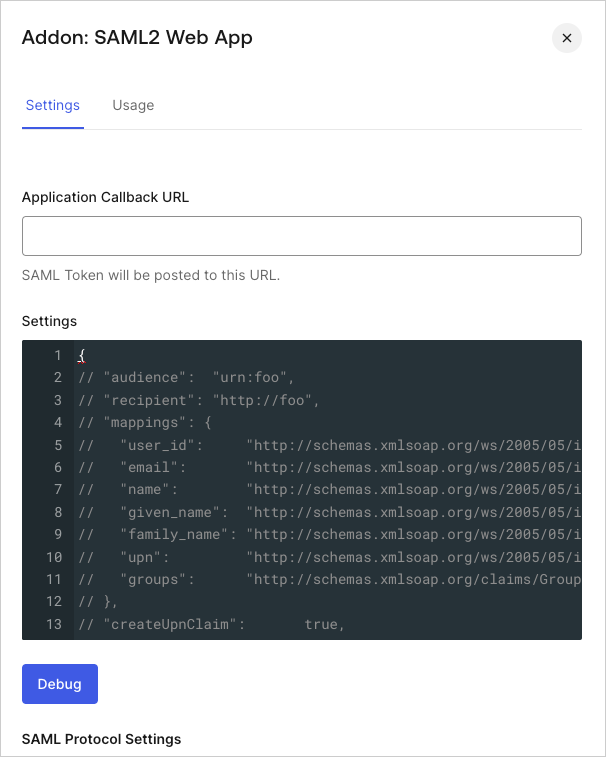 4. Paste the following code into the **Settings** text box and click **Debug**. Be sure to replace the `AWS_SSO_ISSUER_URL` and `AWS_SSO_ACS_URL` placeholders with values you copied from AWS.
```json lines theme={null}
{
"audience": "AWS_SSO_ISSUER_URL",
"destination": "AWS_SSO_ACS_URL",
"mappings": {
"email": "http://schemas.xmlsoap.org/ws/2005/05/identity/claims/emailaddress",
"name": "http://schemas.xmlsoap.org/ws/2005/05/identity/claims/name"
},
"createUpnClaim": false,
"passthroughClaimsWithNoMapping": false,
"mapUnknownClaimsAsIs": false,
"mapIdentities": false,
"nameIdentifierFormat": "urn:oasis:names:tc:SAML:1.1:nameid-format:emailAddress",
"nameIdentifierProbes": [
"http://schemas.xmlsoap.org/ws/2005/05/identity/claims/emailaddress"
]
}
```
5. Scroll to the bottom of the page and click **Enable**.
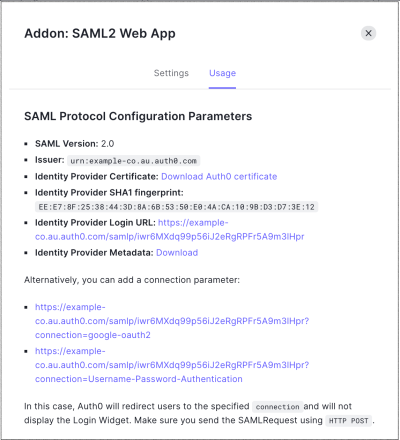
6. On the **Usage** tab, locate **Identity Provider Metadata**, and click **Download** to download the metadata file. You'll need this when you configure Auth0 as the identity provider.
4. Paste the following code into the **Settings** text box and click **Debug**. Be sure to replace the `AWS_SSO_ISSUER_URL` and `AWS_SSO_ACS_URL` placeholders with values you copied from AWS.
```json lines theme={null}
{
"audience": "AWS_SSO_ISSUER_URL",
"destination": "AWS_SSO_ACS_URL",
"mappings": {
"email": "http://schemas.xmlsoap.org/ws/2005/05/identity/claims/emailaddress",
"name": "http://schemas.xmlsoap.org/ws/2005/05/identity/claims/name"
},
"createUpnClaim": false,
"passthroughClaimsWithNoMapping": false,
"mapUnknownClaimsAsIs": false,
"mapIdentities": false,
"nameIdentifierFormat": "urn:oasis:names:tc:SAML:1.1:nameid-format:emailAddress",
"nameIdentifierProbes": [
"http://schemas.xmlsoap.org/ws/2005/05/identity/claims/emailaddress"
]
}
```
5. Scroll to the bottom of the page and click **Enable**.
6. On the **Usage** tab, locate **Identity Provider Metadata**, and click **Download** to download the metadata file. You'll need this when you configure Auth0 as the identity provider.
 To learn how to configure AWS for SSO, read [Configure Amazon Web Services for Single Sign-On](/docs/customize/integrations/aws/configure-amazon-web-services-for-sso).
## Learn more
* [Use Amazon Web Services Session Tags for Role-Based Access Control](/docs/customize/integrations/aws/session-tags)
* [Configure Amazon Web Services for Single Sign-On](/docs/customize/integrations/aws/configure-amazon-web-services-for-sso)
To learn how to configure AWS for SSO, read [Configure Amazon Web Services for Single Sign-On](/docs/customize/integrations/aws/configure-amazon-web-services-for-sso).
## Learn more
* [Use Amazon Web Services Session Tags for Role-Based Access Control](/docs/customize/integrations/aws/session-tags)
* [Configure Amazon Web Services for Single Sign-On](/docs/customize/integrations/aws/configure-amazon-web-services-for-sso)