> ## Documentation Index
> Fetch the complete documentation index at: https://auth0.com/llms.txt
> Use this file to discover all available pages before exploring further.
> Learn about the Custom Token Exchange Trigger, which is executed when the Auth0 Authorization Server receives a Custom Token Exchange Request to log a user in.
# Custom Token Exchange Trigger
Custom Token Exchange (CTE) is currently available in Early Access for all Auth0 B2C Professional, B2B Professional, and Enterprise customers. By using this feature, you agree to the applicable Free Trial terms in [Okta’s Master Subscription Agreement](https://www.okta.com/legal/). To learn more about Auth0’s product release cycle, read [Product Release Stages](/docs/troubleshoot/product-lifecycle/product-release-stages). To learn more about subscription types, review the Auth0 [pricing](https://auth0.com/pricing) page.
After the Auth0 Authorization Server validates that the Custom Token Exchange request is valid and maps to an existing [Custom Token Exchange Profile](/docs/authenticate/custom-token-exchange/configure-custom-token-exchange#create-custom-token-exchange-profile), the `custom-token-exchange` trigger executes the single Action associated with that profile. If the Action successfully completes and sets a user for the transaction, `post-login` Actions and the rest of the Auth0 pipeline are then executed for that logged-in user.
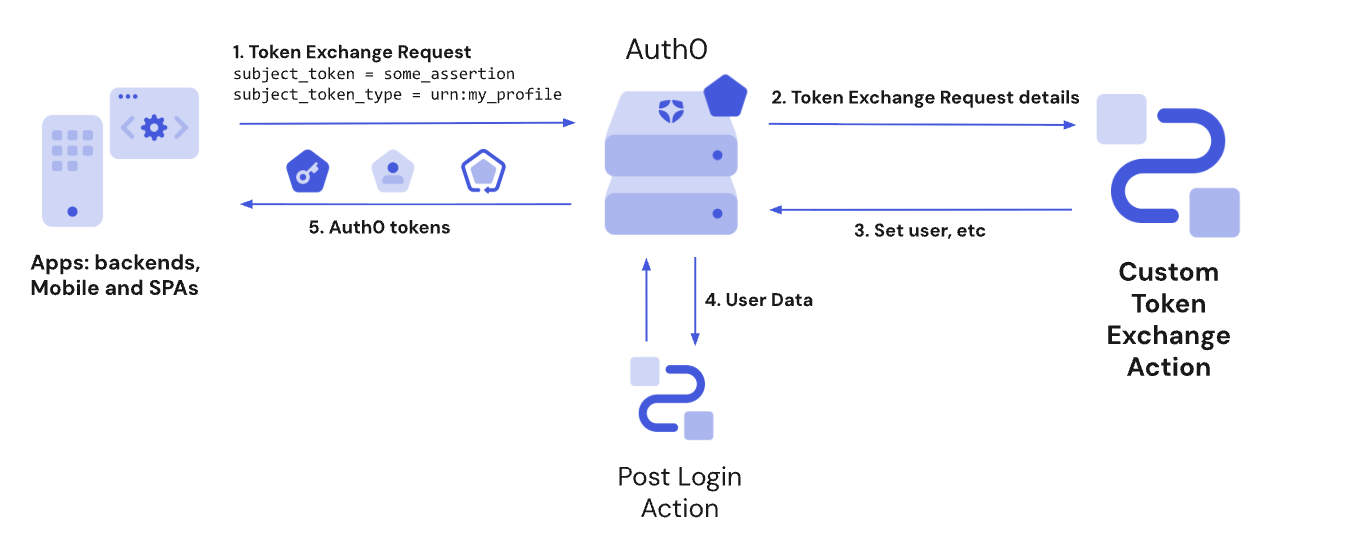 Actions in this flow are blocking (synchronous), which means they execute as part of a trigger’s process and will prevent the rest of the Auth0 pipeline from running until the Action is complete.
## Custom Token Exchange vs Post Login Actions
The Post Login Actions trigger executes after the Custom Token Exchange Action runs for the user you set for the transaction. For other use cases, such as adding custom claims to access tokens, use the [Post Login Action trigger](/docs/customize/actions/explore-triggers/signup-and-login-triggers/login-trigger).
The Custom Token Exchange uses the token exchange grant type, where the `event.transaction.protocol` is set to `oauth2-token-exchange` in the Post Login Action trigger. Both the Custom Token Exchange and Native Social Login use the token exchange grant type. To distinguish between the two, use the value of the `subject_token_type`, which should correspond to one of your Custom Token Exchange Profiles.
Custom Token Exchange Early Access doesn’t support `api.authentication.challengeWith()` or `api.authentication.enrollWith()`. If you use those methods with your Post-Login Actions, the transaction will fail with a non-recoverable error. Make sure you skip those two methods when `event.transaction.protocol==oauth2-token-exchange` depending on the `subject_token_type` value.
## Actor support for delegation
The `custom-token-exchange` trigger supports delegated authorization scenarios. The Action can call [`api.authentication.setActor()`](/docs/customize/actions/explore-triggers/signup-and-login-triggers/custom-token-exchange-trigger/custom-token-exchange-api-object#api-authentication-setactor-actor) to include an `act` claim in issued tokens, identifying the principal acting on behalf of the subject user.
`setActor()` can be called regardless of whether the request includes an `actor_token`. The `actor_token` parameter is one way for the calling application to pass actor information to the Action, but the actor identity can also be embedded in the `subject_token` itself or obtained through other custom means within the Action code.
When the request does include `actor_token` and `actor_token_type`, these values are available in [`event.transaction`](/docs/customize/actions/explore-triggers/signup-and-login-triggers/custom-token-exchange-trigger/custom-token-exchange-event-object#event-transaction). If `actor_token_type` is `urn:ietf:params:oauth:token-type:id_token` and the token is a valid Auth0 ID token from the same tenant, the server automatically validates the token and populates `event.transaction.actor_token_user` with the actor’s user profile.
The `act` claim set via `setActor()` is also available in Post-Login Actions via [`event.transaction.actor`](/docs/customize/actions/explore-triggers/signup-and-login-triggers/login-trigger/post-login-event-object#event-transaction).
## Triggers
### Custom Token Exchange
The `custom-token-exchange` trigger is the first step in the Auth0 pipeline. This function is executed after the received Custom Token Exchange request has been validated and successfully mapped to an existing profile.
### References
* [Event object](/docs/customize/actions/explore-triggers/signup-and-login-triggers/custom-token-exchange-trigger/custom-token-exchange-event-object): Provides contextual information about the a Token Exchange request, including the subject\_token, IP address, client, and more.
* [API object](/docs/customize/actions/explore-triggers/signup-and-login-triggers/custom-token-exchange-trigger/custom-token-exchange-api-object): Provides methods to use with your Token Exchange Action that allows you to set the user, set the actor for delegation, reject the transaction, set user metadata and access the Actions cache, and more.
## Common Use Cases
To learn about common Custom Token Exchange use cases, read [Example Use Cases](/docs/authenticate/custom-token-exchange/cte-example-use-cases).
Actions in this flow are blocking (synchronous), which means they execute as part of a trigger’s process and will prevent the rest of the Auth0 pipeline from running until the Action is complete.
## Custom Token Exchange vs Post Login Actions
The Post Login Actions trigger executes after the Custom Token Exchange Action runs for the user you set for the transaction. For other use cases, such as adding custom claims to access tokens, use the [Post Login Action trigger](/docs/customize/actions/explore-triggers/signup-and-login-triggers/login-trigger).
The Custom Token Exchange uses the token exchange grant type, where the `event.transaction.protocol` is set to `oauth2-token-exchange` in the Post Login Action trigger. Both the Custom Token Exchange and Native Social Login use the token exchange grant type. To distinguish between the two, use the value of the `subject_token_type`, which should correspond to one of your Custom Token Exchange Profiles.
Custom Token Exchange Early Access doesn’t support `api.authentication.challengeWith()` or `api.authentication.enrollWith()`. If you use those methods with your Post-Login Actions, the transaction will fail with a non-recoverable error. Make sure you skip those two methods when `event.transaction.protocol==oauth2-token-exchange` depending on the `subject_token_type` value.
## Actor support for delegation
The `custom-token-exchange` trigger supports delegated authorization scenarios. The Action can call [`api.authentication.setActor()`](/docs/customize/actions/explore-triggers/signup-and-login-triggers/custom-token-exchange-trigger/custom-token-exchange-api-object#api-authentication-setactor-actor) to include an `act` claim in issued tokens, identifying the principal acting on behalf of the subject user.
`setActor()` can be called regardless of whether the request includes an `actor_token`. The `actor_token` parameter is one way for the calling application to pass actor information to the Action, but the actor identity can also be embedded in the `subject_token` itself or obtained through other custom means within the Action code.
When the request does include `actor_token` and `actor_token_type`, these values are available in [`event.transaction`](/docs/customize/actions/explore-triggers/signup-and-login-triggers/custom-token-exchange-trigger/custom-token-exchange-event-object#event-transaction). If `actor_token_type` is `urn:ietf:params:oauth:token-type:id_token` and the token is a valid Auth0 ID token from the same tenant, the server automatically validates the token and populates `event.transaction.actor_token_user` with the actor’s user profile.
The `act` claim set via `setActor()` is also available in Post-Login Actions via [`event.transaction.actor`](/docs/customize/actions/explore-triggers/signup-and-login-triggers/login-trigger/post-login-event-object#event-transaction).
## Triggers
### Custom Token Exchange
The `custom-token-exchange` trigger is the first step in the Auth0 pipeline. This function is executed after the received Custom Token Exchange request has been validated and successfully mapped to an existing profile.
### References
* [Event object](/docs/customize/actions/explore-triggers/signup-and-login-triggers/custom-token-exchange-trigger/custom-token-exchange-event-object): Provides contextual information about the a Token Exchange request, including the subject\_token, IP address, client, and more.
* [API object](/docs/customize/actions/explore-triggers/signup-and-login-triggers/custom-token-exchange-trigger/custom-token-exchange-api-object): Provides methods to use with your Token Exchange Action that allows you to set the user, set the actor for delegation, reject the transaction, set user metadata and access the Actions cache, and more.
## Common Use Cases
To learn about common Custom Token Exchange use cases, read [Example Use Cases](/docs/authenticate/custom-token-exchange/cte-example-use-cases).