> ## Documentation Index
> Fetch the complete documentation index at: https://auth0.com/llms.txt
> Use this file to discover all available pages before exploring further.
> Learn how to manage users in the Delegated Administration Extension.
# Delegated Administration: Manage Users
In the Application exposed by the Delegated Administration extension, there are two views available: **Users** and **Logs**. On the **User**s view, you can see the display and modify users associated with your Auth0 account.
By default, all users are displayed, but you can filter the displayed list by configuring a Filter Hook.
For more information on the Filter Hook, see [Delegation Administration: Filter Hook](/docs/customize/extensions/delegated-administration-extension/delegated-administration-hooks/delegated-administration-filter-hook).
## User actions in Delegated Administration dashboard
To limit the number of options someone with access to the Dashboard exposed by the Delegated Administration extension, configure an Access Hook.
Read more about Access Hooks at [Delegated Administration: Access Hook](/docs/customize/extensions/delegated-administration-extension/delegated-administration-hooks/delegated-administration-access-hook).
The **Change Profile** option is available only if you have configured custom fields.
Notice the new **Reset Password** option available via the extension. This option will send an email to the user allowing them to choose a new password. To do this, select a user, and select **Actions** > **Reset Password**.
This will send an email to the user, containing a link to change the password.
If your profile indicates that you have the `Delegated Admin - Administrator` role, the **Logs** view allows you to see a list of authentications made by your users (this view is only visible to users with the `Delegated Admin - Administrator` role). The contents of this view are a subset of the data displayed in [Auth0 Dashboard > Monitoring > Logs](https://manage.auth0.com/#/logs). The Logs dashboard also displays data on administrative actions taken in the Auth0 Dashboard.
## Create users
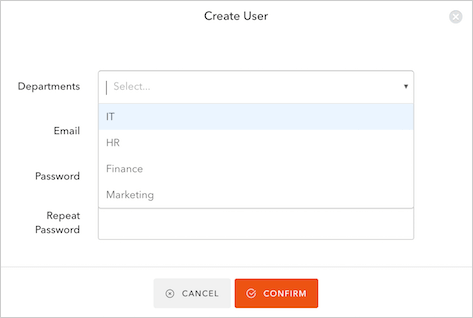
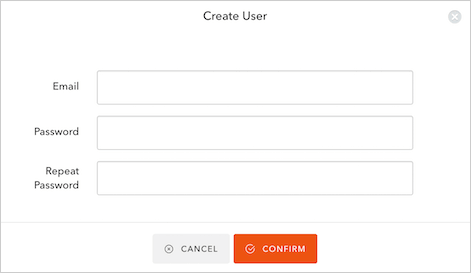
You can create a new user by selecting the **+ Create User** button on the **Users** view. You need to specify email and password. Depending on your role, you may not be able to set the **Departmen**t to which the new user belongs.
For example, users with the `Delegated Admin - Administrator` role can see the **Department** field and select any of its values.
 On the other hand, Kelly, who has the `Delegated Admin - User` role and belongs to the Finance department, cannot see the **Department** field. The user she creates will be automatically assigned to the Finance department.
 By default, token expiration time is 10 hours. However, for security reasons, when using Delegated Administration, Auth0 doesn't save a token to cookies or `sessionStorage`. You must start a new session on each page reload.
## Learn more
* [Delegated Administration: Extension Hooks](/docs/customize/extensions/delegated-administration-extension/delegated-administration-hooks)
By default, token expiration time is 10 hours. However, for security reasons, when using Delegated Administration, Auth0 doesn't save a token to cookies or `sessionStorage`. You must start a new session on each page reload.
## Learn more
* [Delegated Administration: Extension Hooks](/docs/customize/extensions/delegated-administration-extension/delegated-administration-hooks)