> ## Documentation Index
> Fetch the complete documentation index at: https://auth0.com/llms.txt
> Use this file to discover all available pages before exploring further.
> Learn how dynamic variables can create multi-language login prompts.
# Use Dynamic Variables to Internationalize Custom Form Elements
You can render [Sign-Up Prompt Customizations](/docs/customize/login-pages/universal-login/customize-signup-and-login-prompts) differently depending on contextual data. It uses the `locale` variable to conditionally render form inputs and define validation behavior.
The following use case works with the `locale` variable to render a Terms of Service message and checkbox. Any variable exposed to [Page Templates](/docs/customize/login-pages/universal-login/customize-templates#available-variables) can be substituted.
### Prerequisites
* Tenant has a verified [Custom Domain](/docs/customize/custom-domains)
* Tenant has a Page Template set
### Enable fr and es locales
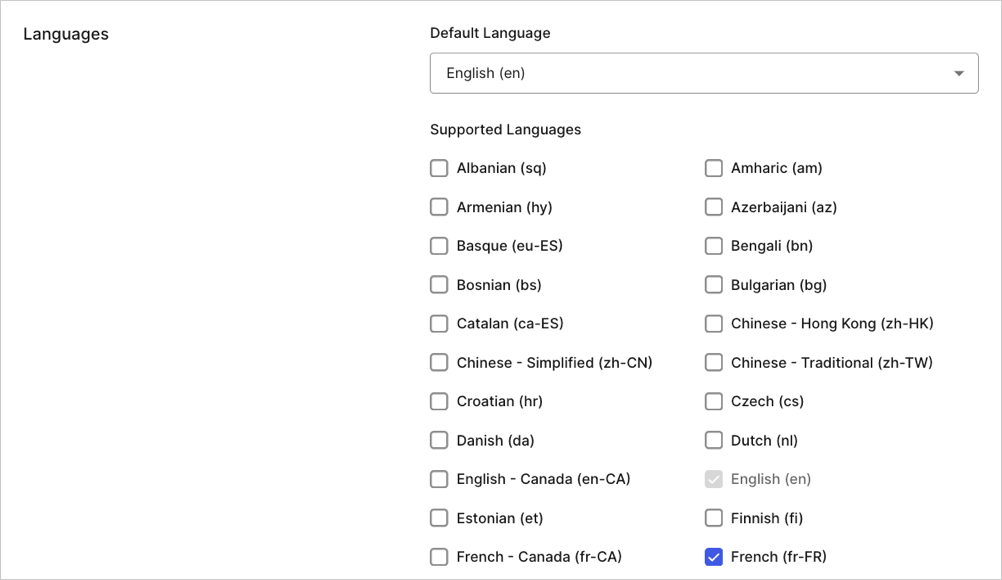
Go to your Auth0 Dashboard, then navigate to Settings > General and enable the locales:
 ### Conditionally render Custom Fields
Use Management API to add a template partial to the `form-content-end` signup prompt Universal Login Prompt container. In the case where the locale is `es` or `fr`, you may want to render a Terms of Service message and a checkbox.
```liquid lines theme={null}
{% if locale == 'fr' %}
{% endif %}
{% if locale == 'es' %}
{% endif %}
```
The following request is sent to the **Set custom text for a specific prompt** endpoint in the [Management API](https://auth0.com/docs/api/management/v2/prompts/put-custom-text-by-language):
```javascript lines theme={null}
// PUT prompts/signup/partials
{
"signup": {
"form-content-end": "{% if locale..."
}
}
```
Your signup prompt now displays a ToS message and checkbox only when the locale is set to `fr` or `es`:
### Conditionally render Custom Fields
Use Management API to add a template partial to the `form-content-end` signup prompt Universal Login Prompt container. In the case where the locale is `es` or `fr`, you may want to render a Terms of Service message and a checkbox.
```liquid lines theme={null}
{% if locale == 'fr' %}
{% endif %}
{% if locale == 'es' %}
{% endif %}
```
The following request is sent to the **Set custom text for a specific prompt** endpoint in the [Management API](https://auth0.com/docs/api/management/v2/prompts/put-custom-text-by-language):
```javascript lines theme={null}
// PUT prompts/signup/partials
{
"signup": {
"form-content-end": "{% if locale..."
}
}
```
Your signup prompt now displays a ToS message and checkbox only when the locale is set to `fr` or `es`:
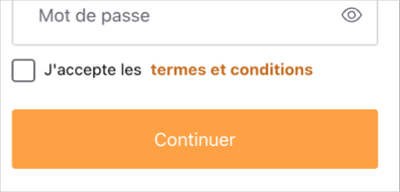
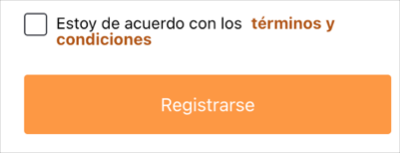
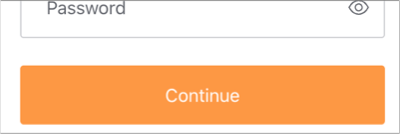 To test your output, go to **Manage Dashboard** and navigate to [Branding > Universal Login > Customization Options](https://manage.auth0.com/dashboard/us/dev-6endizjt/universal-login/customizations/colors), then right-click the **Try button** and copy the link address. Append the following query parameters to the copied url and navigate to the new url: `&screen_hint=signup&ui_locales=fr` (or `es`).
### Add validation
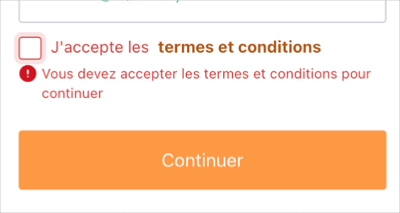
When the locale is `fr,` you can validate that the checkbox is checked before continuing. Update the template partial using the following validation code:
```liquid lines expandable theme={null}
{% if locale == 'fr' %}
{% endif %}
{% if locale == 'es' %}
{% endif %}
```
With this validation in place, only users with the `fr` locale are required to consent to the ToS.
To test your output, go to **Manage Dashboard** and navigate to [Branding > Universal Login > Customization Options](https://manage.auth0.com/dashboard/us/dev-6endizjt/universal-login/customizations/colors), then right-click the **Try button** and copy the link address. Append the following query parameters to the copied url and navigate to the new url: `&screen_hint=signup&ui_locales=fr` (or `es`).
### Add validation
When the locale is `fr,` you can validate that the checkbox is checked before continuing. Update the template partial using the following validation code:
```liquid lines expandable theme={null}
{% if locale == 'fr' %}
{% endif %}
{% if locale == 'es' %}
{% endif %}
```
With this validation in place, only users with the `fr` locale are required to consent to the ToS.
 The validations in this use case happen client-side and are intended to be a user convenience. They are not guaranteed to run; for example, the user’s browser may have Javascript turned off. In addition, validations can be modified by curious or malicious actors. To ensure the integrity of validation logic, client-side validations should be paired with server-side validations.