> ## Documentation Index
> Fetch the complete documentation index at: https://auth0.com/llms.txt
> Use this file to discover all available pages before exploring further.
> Migrate your phone provider configuration to the Unified Phone Experience.
# Use Auth0's Unified Phone Experience for Multi-Factor Authentication
To migrate to the Unified Phone Experience, you must:
* Have Multi-Factor Authentication (MFA) SMS, Voice, or SMS+Voice notifications enabled and configured in your tenant, or
* Have Passwordless SMS enabled and configured in your tenant
If you have not configured either MFA or Passwordless, read [Configure Auth0's Unified Phone Experience](/docs/customize/phone-messages/unified-phone/configure-unified-phone) to start from the beginning.
If you have both MFA and Passwordless integrations with different providers, you must use a [Custom Phone Provider](/docs/customize/phone-messages/configure-phone-messaging-providers/configure-a-custom-phone-provider).
If you utilize Phone as ID, you are automatically using Auth0's Unified Phone Experience and no additional action is needed.
The Unified Phone Experience centralizes all your phone provider configurations in one location in your tenant. You do not need to configure a phone provider multiple times for various phone authentication factors. To learn more about phone factors for MFA, read [SMS and voice notifications for MFA](/docs/secure/multi-factor-authentication/multi-factor-authentication-factors/configure-sms-voice-notifications-mfa).
If you already have a phone provider configured for [SMS and Voice notifications for Multi-Factor Authentication (MFA)](/docs/secure/multi-factor-authentication/multi-factor-authentication-factors/configure-sms-voice-notifications-mfa), you can migrate your configuration to the Unified Phone Experience and apply your configuration at the tenant-level.
Auth0 does not provide feedback to the end user on whether a phone message has been sent successfully with the tenant-level provider. To troubleshoot issues, review the [tenant logs](/docs/deploy-monitor/logs).
## Update your phone provider
To use the Unified Phone Experience, you need to:
* Verify current settings
* Configure your provider:
* Configure Twilio
* Configure a custom phone provider
* Update your phone factors and delivery methods
* Update Management API endpoints
* Update Auth0 Actions triggers
### Verify current settings
1. To verify your current MFA settings, navigate to [**Auth0 Dashboard > Security > Multi-factor Auth**](https://manage.auth0.com/#/security/mfa).
2. Select **Phone Message**.
3. New Auth0 tenants are able to use the Unified Phone Experience, a banner advises you to configure a tenant phone provider:
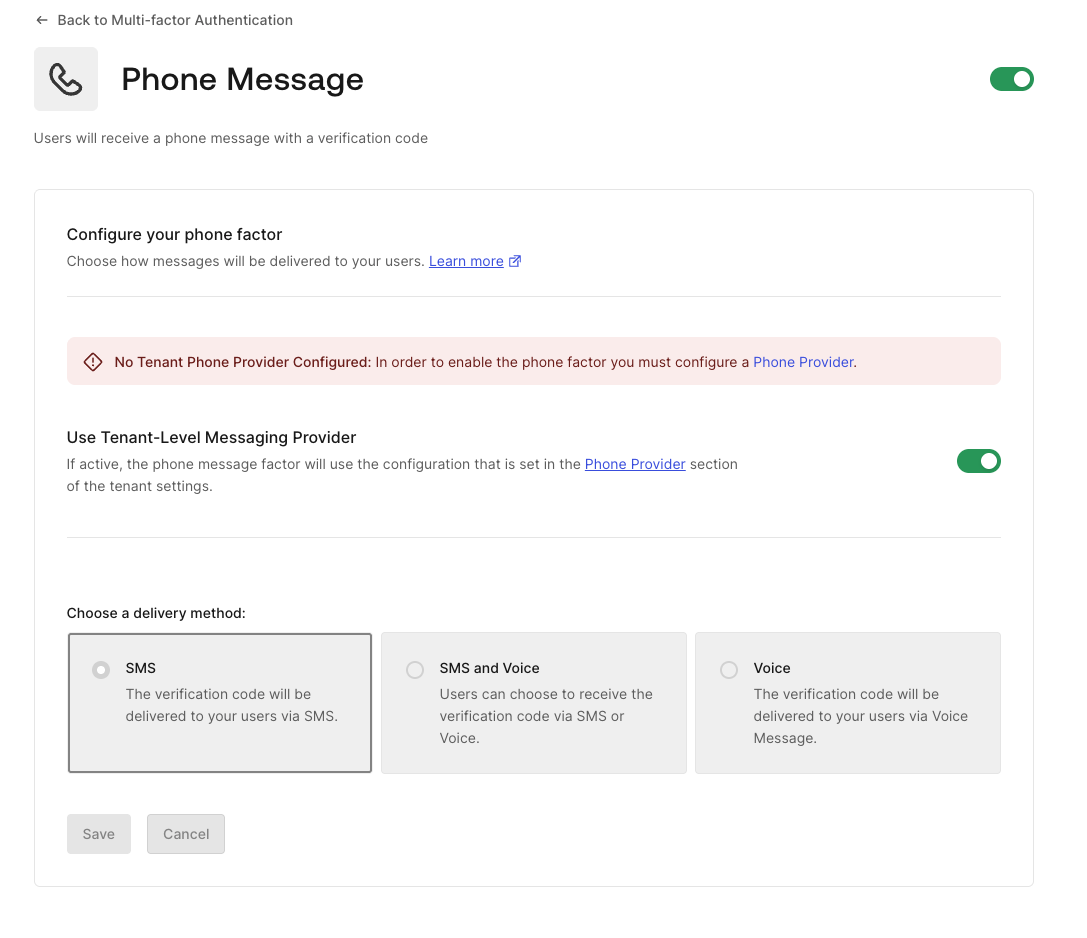 * Existing tenants prior to March 2025 are able to configure SMS and Voice notificatiosn for Multi-Factor Authentication (MFA) along with the Unified Phone Experience.
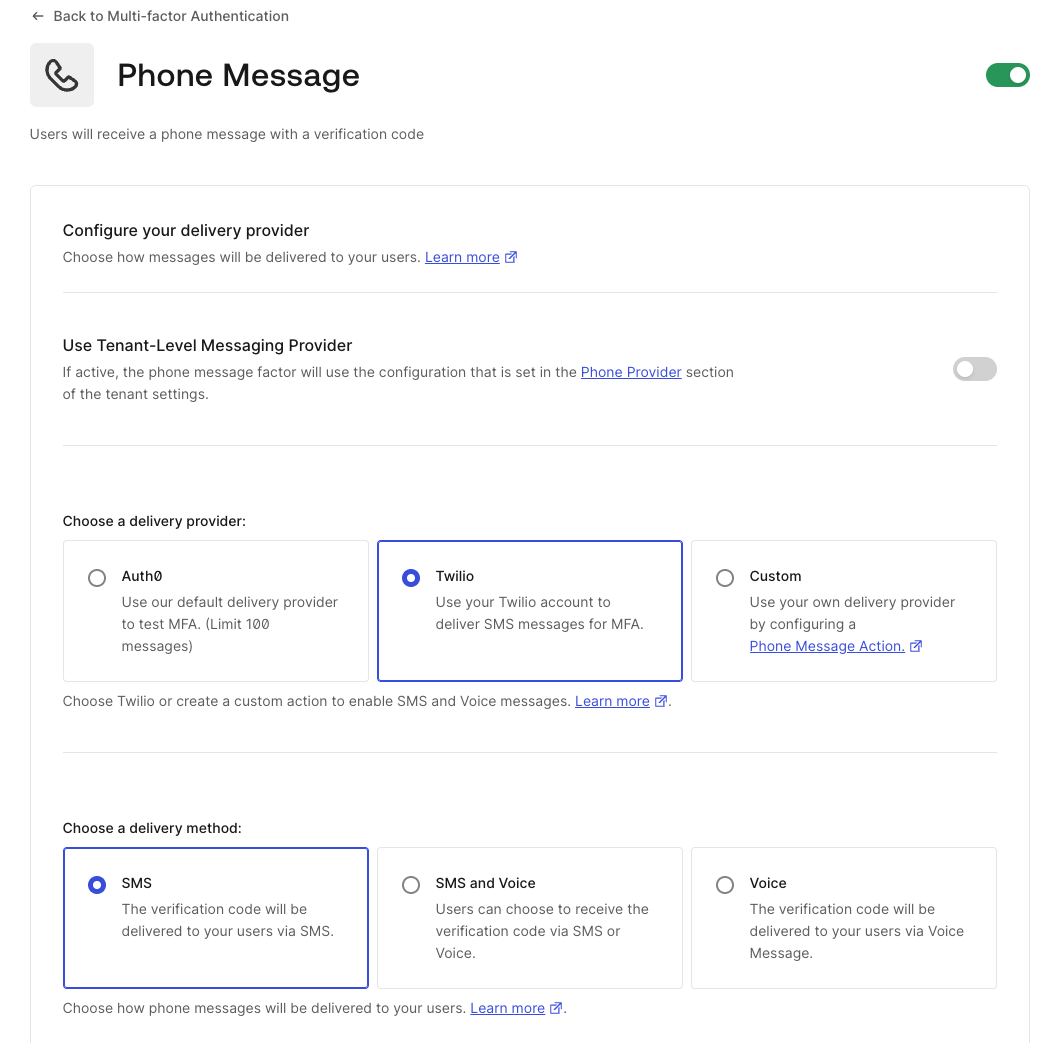 Auth0 recommends to use the Unified Phone Experience. If you must use the [SMS and Voice notifications for Multi-Factor Authentication (MFA)](/docs/secure/multi-factor-authentication/multi-factor-authentication-factors/configure-sms-voice-notifications-mfa) experience to configure your phone provider, and the toggle to **Use Tenant-Level Messaging Provider** is missing, contact [Auth0 Support](/docs/troubleshoot/customer-support).
4. To verify your tenant settings, navigate to [**Dashboard > Tenant Settings**](https://manage.auth0.com/#/tenant/advanced).
5. Select **Advanced**.
6. Locate **Unified Phone Experience**.
Auth0 recommends to use the Unified Phone Experience. If you must use the [SMS and Voice notifications for Multi-Factor Authentication (MFA)](/docs/secure/multi-factor-authentication/multi-factor-authentication-factors/configure-sms-voice-notifications-mfa) experience to configure your phone provider, and the toggle to **Use Tenant-Level Messaging Provider** is missing, contact [Auth0 Support](/docs/troubleshoot/customer-support).
4. To verify your tenant settings, navigate to [**Dashboard > Tenant Settings**](https://manage.auth0.com/#/tenant/advanced).
5. Select **Advanced**.
6. Locate **Unified Phone Experience**.
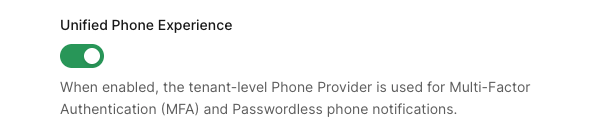 7. Toggle to enable, if needed.
### Configure Twilio as a tenant-level provider
If you are using Twilio as your phone provider for Multi-Factor Authentication, you must add the Twilio SID and AuthToken to the Unified Phone Experience. You can copy the Twilio SID from your existing configuration, but you will need to get the value of the AuthToken from Twilio.
1. Navigate to [**Branding > Phone Provider**](https://manage.auth0.com/#/phone/templates/phone/provider).
2. Select and configure your provider:
7. Toggle to enable, if needed.
### Configure Twilio as a tenant-level provider
If you are using Twilio as your phone provider for Multi-Factor Authentication, you must add the Twilio SID and AuthToken to the Unified Phone Experience. You can copy the Twilio SID from your existing configuration, but you will need to get the value of the AuthToken from Twilio.
1. Navigate to [**Branding > Phone Provider**](https://manage.auth0.com/#/phone/templates/phone/provider).
2. Select and configure your provider:
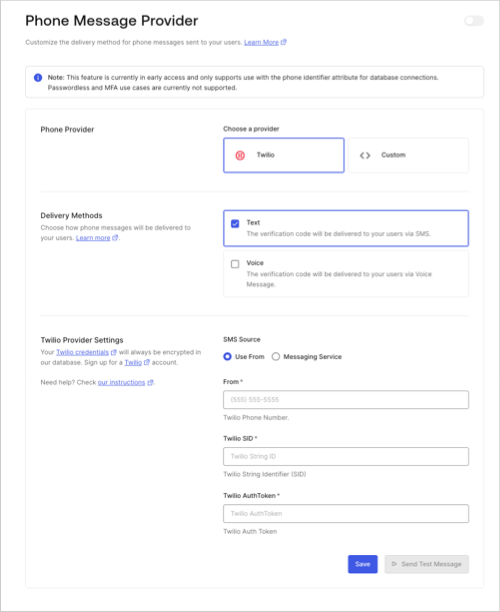 1. Choose Twilio as your phone provider.
2. Choose your delivery methods.
3. Enter Twilio settings.
Desired MFA factors must be a subset of the delivery methods you configure at the tenant-level.
3. **Save** your changes.
4. Select **Send Test Message** to test the tenant-level provider before using it in a production environment.
5. Enable a tenant-level provider.
1. For MFA, navigate to [**Security > Multi-factor Auth > Phone Message**.](https://manage.auth0.com/#/security/mfa)
2. Select **Use Tenant-level Messaging Provider**.
If no toggle exists in your tenant, you are already using the Unified Phone experience.
6. **Save** your changes.
### Configure a custom provider with Auth0 Actions
The Unified Phone Experience uses the `custom-phone-provider` Actions Trigger for phone notifications rather than the `send-phone-message` Actions Trigger for custom phone notifications.
You cannot directly migrate your `send-phone-message` Actions trigger to the `custom-phone-provider` Actions trigger because:
* There is no 1:1 mapping between message and notification types.
* Migrating secrets and dependencies associated with the send-phone-message Actions trigger could cause security concerns or break the tenant experience.
* Actions can support more than one trigger and could be difficult to migrate. For example, Actions can support both the `send-phone-message` and `post-login` triggers.
* The `send-phone-message` and `custom-phone-provider` Actions triggers support different event types:
* `send-phone-message` supports the SMS and Voice message types. To learn more, read [Action triggers: send-phone-message Event Object](/docs/customize/actions/explore-triggers/mfa-notifications-trigger/send-phone-message-event-object).
* `custom-phone-provider` supports the `otp_verify`, `otp_enroll`, `blocked_account`, `change_password`, and `password_breach` notification types. To learn more, read [Actions triggers: custom-phone-provider Event Object](/docs/customize/phone-messages/configure-phone-messaging-providers/configure-a-custom-phone-provider/actions-triggers-custom-phone-provider-event-object).
* You can only set one Action per custom phone provider. If you have already set an Action for a custom phone provider, you **must** disable it before associating it with a new Action.
As a result, you need to translate your existing `send-phone-message` into a new `custom-phone-provider` using the new contextual variables:
| `send-phone-message` context object | `custom-phone-provider` context object | Status |
| ----------------------------------- | ------------------------------------------------------------------------------------------------------------------------------------------------------ | ------- |
| `text` | `notification.as_text` and `notification.as_voice` | Updated |
| `message_type` | `notification.message_type`
1. Choose Twilio as your phone provider.
2. Choose your delivery methods.
3. Enter Twilio settings.
Desired MFA factors must be a subset of the delivery methods you configure at the tenant-level.
3. **Save** your changes.
4. Select **Send Test Message** to test the tenant-level provider before using it in a production environment.
5. Enable a tenant-level provider.
1. For MFA, navigate to [**Security > Multi-factor Auth > Phone Message**.](https://manage.auth0.com/#/security/mfa)
2. Select **Use Tenant-level Messaging Provider**.
If no toggle exists in your tenant, you are already using the Unified Phone experience.
6. **Save** your changes.
### Configure a custom provider with Auth0 Actions
The Unified Phone Experience uses the `custom-phone-provider` Actions Trigger for phone notifications rather than the `send-phone-message` Actions Trigger for custom phone notifications.
You cannot directly migrate your `send-phone-message` Actions trigger to the `custom-phone-provider` Actions trigger because:
* There is no 1:1 mapping between message and notification types.
* Migrating secrets and dependencies associated with the send-phone-message Actions trigger could cause security concerns or break the tenant experience.
* Actions can support more than one trigger and could be difficult to migrate. For example, Actions can support both the `send-phone-message` and `post-login` triggers.
* The `send-phone-message` and `custom-phone-provider` Actions triggers support different event types:
* `send-phone-message` supports the SMS and Voice message types. To learn more, read [Action triggers: send-phone-message Event Object](/docs/customize/actions/explore-triggers/mfa-notifications-trigger/send-phone-message-event-object).
* `custom-phone-provider` supports the `otp_verify`, `otp_enroll`, `blocked_account`, `change_password`, and `password_breach` notification types. To learn more, read [Actions triggers: custom-phone-provider Event Object](/docs/customize/phone-messages/configure-phone-messaging-providers/configure-a-custom-phone-provider/actions-triggers-custom-phone-provider-event-object).
* You can only set one Action per custom phone provider. If you have already set an Action for a custom phone provider, you **must** disable it before associating it with a new Action.
As a result, you need to translate your existing `send-phone-message` into a new `custom-phone-provider` using the new contextual variables:
| `send-phone-message` context object | `custom-phone-provider` context object | Status |
| ----------------------------------- | ------------------------------------------------------------------------------------------------------------------------------------------------------ | ------- |
| `text` | `notification.as_text` and `notification.as_voice` | Updated |
| `message_type` | `notification.message_type` - Note the difference in values: `second-factor-authentication` vs `otp_enroll`, `verify` vs `otp_verify`)
| Updated |
| `action` | `notification.delivery_method` | Updated |
| `language` | `notification.locale` | Updated |
| `code` | `notification.code` | Updated |
| `recipient` | `notification.recipient` | Updated |
| `send-phone-message` context object | Tenant-level provider context object | Status |
| ----------------------------------- | ------------------------------------ | --------- |
| `ip` | `ip` | Unchanged |
| `user_agent` | `user_agent` | Unchanged |
| `language` | `language` | Updated |
| `method` | `method` optional | Updated |
| `hostname` | `hostname` optional | Updated |
| `geoip` | `geoip` | Updated |
| `send-phone-message` context object | Tenant-level provider context object | Status |
| ----------------------------------- | ------------------------------------ | ------- |
| `tenant.id` | `tenant` | Updated |
| N/A | `tenant.home_url` | New |
| N/A | `tenant.logo_url` | New |
| N/A | `tenant.support_email` | New |
| N/A | `tenant.support_url` | New |
| `send-phone-message` context object | Tenant-level provider context object | Status |
| ----------------------------------- | ------------------------------------ | --------- |
| `client.client_metadata` | `client.metadata` | Updated |
| `client.client_id` | `client.client_id` | Unchanged |
| `client.name` | `client.name` | Unchanged |
| `send-phone-message` context object | Tenant-level provider context object | Status |
| ----------------------------------- | ------------------------------------ | --------- |
| `user.user_id` | `user.user_id` | Unchanged |
| `user.name` | `user.name` | Unchanged |
| `user.email` | `user.email` | Unchanged |
| `user.app_metadata` | `user.app_metadata` | Unchanged |
| `user.user_metadata` | `user.user_metadata` | Unchanged |
| `user.email_verified` | `user.email_verified` | Unchanged |
| `user.phone_number` | `user.phone_number` | Unchanged |
| `user.phone_verified` | `user.phone_verified` | Unchanged |
| `user.picture` | `user.picture` | Unchanged |
| `user.created_at` | `user.created_at` | Unchanged |
| `user.updated_at` | `user.updated_at` | Unchanged |
| `user.multifactor` | `user.multifactor` | Unchanged |
| `user.identities` | N/A | Removed |
| `user.family_name` | `user.family_name` | Unchanged |
| `user.given_name` | `user.given_name` | Unchanged |
| `user.nickname` | `user.nickname` | Unchanged |
| `user.username` | `user.username` | Unchanged |
| N/A | `user.login_count` | New |
For a complete list of the contextual variables, read [Customize Phone Templates](/docs/customize/phone-messages/phone-templates/customize).
Review the custom phone provider example:
```javascript lines expandable theme={null}
const { fetch } = require('undici');
/**
* Handler to be executed while sending a phone notification
* @param {Event} event - Details about the user and the context in which they are logging in.
* @param {CustomPhoneProviderAPI} api - Methods and utilities to help change the behavior of sending a phone notification.
*/
exports.onExecuteCustomPhoneProvider = async (event, api) => {
if (event.notification.message_type.startsWith('otp')) {
const body = {
from: event.notification.from,
action: event.notification.message_type === 'otp_verify' ? 'second-factor-authenticator' : 'enrollment',
language: event.notification.locale,
recipient: event.notification.recipient,
message_type: event.notification.delivery_method,
text: event.notification.as_text,
code: event.notification.code,
};
const response = await fetch(event.secrets['MY_ENDPOINT'], {
method: 'POST',
headers: {
authorization: `Bearer ${event.secrets['MY_SECRET']}`,
},
body: JSON.stringify(body),
});
console.log(response.status); // 200
console.log(await response.text()); // request's response body!
}
return;
};
```
#### Configure MFA custom-phone-provider
To continue and configure your MFA `custom-phone-provider` trigger:
1. Navigate to [**Branding > Phone Provider**](https://manage.auth0.com/#/phone/templates/phone/provider).
2. Select your provider:
1. Choose **Custom**.
2. Under **Provider Configuration**, add your translated `send-phone-message` Action code in the embedded code editor.
3. **Save** your changes.
4. Select **Send Test Message** to test the tenant-level provider before using it in a production environment.
5. Navigate back to [**Security > Multi-factor Auth > Phone Message**](https://manage.auth0.com/#/security/mfa) to enable the **Use Tenant-level Messaging Provider**.
6. **Save** your changes.
### Update MFA phone factors and delivery methods
If you have not enabled a tenant-level provider in the Auth0 Dashboard, you won’t be able to configure phone SMS and voice phone factors for MFA.
 If you want to update the current notification MFA factor(s) to a different type during the migration to the Unified Phone Experience, some configuration changes may be necessary.
| Current MFA Phone factors | Desired MFA factors | Tenant-level delivery method | User action |
| ------------------------- | ------------------- | ---------------------------- | ---------------------------------------------------------------------------- |
| SMS | Voice | SMS | User must update tenant-level provider to allow for desired MFA phone factor |
| SMS | Voice | SMS + Voice | None |
| SMS | SMS + Voice | SMS | User must update tenant-level provider to allow for desired MFA phone factor |
| SMS | SMS + Voice | SMS + Voice | None |
| Voice | SMS | SMS + Voice | User must update tenant-level provider to allow for desired MFA phone factor |
| Voice | SMS | SMS + Voice | None |
| Voice | SMS + Voice | Voice | User must update tenant-level provider to allow for desired MFA phone factor |
| Voice | SMS + Voice | SMS + Voice | None |
| SMS + Voice | SMS | SMS + Voice | None |
| SMS + Voice | Voice | SMS + Voice | None |
If you want to update the current tenant-level phone provider delivery method(s) to a different type during the migration to the Unified Phone Experience, some configuration changes may be necessary.
| MFA Phone factors | Current tenant-level delivery method | Desired tenant-level delivery method | User action |
| ----------------- | ------------------------------------ | ------------------------------------ | --------------------------------------------------------------------------------------------------------------- |
| SMS | SMS | SMS + Voice | None |
| SMS | SMS | Voice | User must update MFA phone factors to be a subset of the delivery methods enabled for the tenant-level provider |
| SMS | SMS + Voice | Voice | User must update MFA phone factors to be a subset of the delivery methods enabled for the tenant-level provider |
| SMS | SMS + Voice | SMS | None |
| Voice | Voice | SMS | User must update MFA phone factors to be a subset of the delivery methods enabled for the tenant-level provider |
| Voice | Voice | SMS + Voice | None |
| Voice | SMS + Voice | SMS | User must update MFA phone factors to be a subset of the delivery methods enabled for the tenant-level provider |
| Voice | SMS + Voice | Voice | None |
| SMS + Voice | SMS + Voice | SMS | None |
| SMS + Voice | SMS + Voice | Voice | None |
### Update Guardian endpoints with Management API
The Unified Phone Experience uses specific endpoints for notifications. If you’ve been using [Auth0 Guardian](/docs/secure/multi-factor-authentication/auth0-guardian) for push notifications and one-time passwords, you must update your configuration to use the new Phone Provider Branding endpoints.
The following Guardian endpoints will no longer work with the Unified Phone Experience:
| Send-phone-message Guardian endpoint | Scope |
| ------------------------------------------------------------------------------------------------------------------------------------------------------------------------------------------------------------------------------------------------------------------------------------------- | ------------------------- |
|
If you want to update the current notification MFA factor(s) to a different type during the migration to the Unified Phone Experience, some configuration changes may be necessary.
| Current MFA Phone factors | Desired MFA factors | Tenant-level delivery method | User action |
| ------------------------- | ------------------- | ---------------------------- | ---------------------------------------------------------------------------- |
| SMS | Voice | SMS | User must update tenant-level provider to allow for desired MFA phone factor |
| SMS | Voice | SMS + Voice | None |
| SMS | SMS + Voice | SMS | User must update tenant-level provider to allow for desired MFA phone factor |
| SMS | SMS + Voice | SMS + Voice | None |
| Voice | SMS | SMS + Voice | User must update tenant-level provider to allow for desired MFA phone factor |
| Voice | SMS | SMS + Voice | None |
| Voice | SMS + Voice | Voice | User must update tenant-level provider to allow for desired MFA phone factor |
| Voice | SMS + Voice | SMS + Voice | None |
| SMS + Voice | SMS | SMS + Voice | None |
| SMS + Voice | Voice | SMS + Voice | None |
If you want to update the current tenant-level phone provider delivery method(s) to a different type during the migration to the Unified Phone Experience, some configuration changes may be necessary.
| MFA Phone factors | Current tenant-level delivery method | Desired tenant-level delivery method | User action |
| ----------------- | ------------------------------------ | ------------------------------------ | --------------------------------------------------------------------------------------------------------------- |
| SMS | SMS | SMS + Voice | None |
| SMS | SMS | Voice | User must update MFA phone factors to be a subset of the delivery methods enabled for the tenant-level provider |
| SMS | SMS + Voice | Voice | User must update MFA phone factors to be a subset of the delivery methods enabled for the tenant-level provider |
| SMS | SMS + Voice | SMS | None |
| Voice | Voice | SMS | User must update MFA phone factors to be a subset of the delivery methods enabled for the tenant-level provider |
| Voice | Voice | SMS + Voice | None |
| Voice | SMS + Voice | SMS | User must update MFA phone factors to be a subset of the delivery methods enabled for the tenant-level provider |
| Voice | SMS + Voice | Voice | None |
| SMS + Voice | SMS + Voice | SMS | None |
| SMS + Voice | SMS + Voice | Voice | None |
### Update Guardian endpoints with Management API
The Unified Phone Experience uses specific endpoints for notifications. If you’ve been using [Auth0 Guardian](/docs/secure/multi-factor-authentication/auth0-guardian) for push notifications and one-time passwords, you must update your configuration to use the new Phone Provider Branding endpoints.
The following Guardian endpoints will no longer work with the Unified Phone Experience:
| Send-phone-message Guardian endpoint | Scope |
| ------------------------------------------------------------------------------------------------------------------------------------------------------------------------------------------------------------------------------------------------------------------------------------------- | ------------------------- |
| - [Get Twilio configuration](https://auth0.com/docs/api/management/v2/guardian/get-phone-twilio-factor-provider)
- [Get Twilio SMS configuration](https://auth0.com/docs/api/management/v2/guardian/get-sms-twilio-factor-provider)
| `read:guardian_factors` |
| - [Get phone provider configuration](https://auth0.com/docs/api/management/v2/guardian/get-guardian-phone-providers)
- [Get phone provider SMS configuration](https://auth0.com/docs/api/management/v2/guardian/get-sms-providers)
| `read:guardian_factors` |
| - [Update Twilio configuration](https://auth0.com/docs/api/management/v2/guardian/put-twilio)
- [Update Twilio SMS configuration](https://auth0.com/docs/api/management/v2/guardian/put-sms-twilio-factor-provider)
| `update:guardian_factors` |
| - [Update phone provider configuration](https://auth0.com/docs/api/management/v2/guardian/put-phone-providers)
- [Update SMS configuration](https://auth0.com/docs/api/management/v2/guardian/put-sms-providers)
| `update:guardian_factors` |
| - [Get enrollment and verification phone templates](https://auth0.com/docs/api/management/v2/guardian/get-factor-phone-templates)
- [Get SMS enrollment and verification templates](https://auth0.com/docs/api/management/v2/guardian/get-factor-sms-templates)
| `read:guardian_factors` |
| - [Update enrollment and verification phone templates](https://auth0.com/docs/api/management/v2/guardian/put-factor-phone-templates)
- [Update SMS enrollment and verification templates](https://auth0.com/docs/api/management/v2/guardian/put-factor-sms-templates)
| `update:guardian_factors` |
Replace the Guardian endpoints with the new Phone Provider Branding endpoints and scopes:
| Phone Provider Branding endpoint | Scope |
| ----------------------------------------------------------------------------------------------------------------------------------------------------------------------------------------------------------------------------------------------------- | ------------------------ |
| - [Get the phone providers set for a tenant](https://auth0.com/docs/api/management/v2/branding/get-branding-phone-providers)
- [Get the phone provider](https://auth0.com/docs/api/management/v2/branding/get-phone-provider)
| `read:phone_providers` |
| - [Update the phone provider](https://auth0.com/docs/api/management/v2/branding/update-phone-provider)
| `update:phone_providers` |
| - [Configure the phone provider](https://auth0.com/docs/api/management/v2/branding/create-phone-provider)
| `create:phone_providers` |
| - [Get list of phone notification templates](https://auth0.com/docs/api/management/v2/branding/get-phone-templates)
- [Get a phone notification template](https://auth0.com/docs/api/management/v2/branding/get-phone-template)
| `read:phone_templates` |
| - [Update a phone notification template](https://auth0.com/docs/api/management/v2/branding/update-phone-template)
| `update:phone_templates` |
| - [Create a phone notification template](https://auth0.com/docs/api/management/v2/branding/create-phone-template)
| `create:phone_templates` |
| - [Delete a phone template](https://auth0.com/docs/api/management/v2/branding/delete-phone-provider)
| `delete:phone_templates` |
| - [Delete a phone provider](https://auth0.com/docs/api/management/v2/branding/delete-phone-provider)
| `delete:phone_providers` |
The following Guardian endpoints work with the Unified Phone Experience and will not need to be updated:
| MFA phone factor endpoint | Scope |
| ------------------------------------------------------------------------------------------------------------------------------------ | ------------------------- |
| - [Get enabled phone factors](https://auth0.com/docs/api/management/v2/guardian/get-message-types)
| `read:guardian_factors` |
| - [Update enabled phone factors](https://auth0.com/docs/api/management/v2/guardian/put-message-types)
| `update:guardian_factors` |
| - [Get phone provider configuration](https://auth0.com/docs/api/management/v2/guardian/get-guardian-phone-providers)
| `read:guardian_factors` |
| - [Update phone provider configuration](https://auth0.com/docs/api/management/v2/guardian/put-phone-providers)
| `update:guardian_factors` |
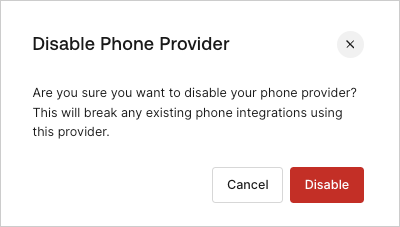
## Disable phone provider
If you configure the Unified Phone Experience and then disable it, existing integrations with your phone provider, including MFA, could break.