> ## Documentation Index
> Fetch the complete documentation index at: https://auth0.com/llms.txt
> Use this file to discover all available pages before exploring further.
> Learn how to run the Auth0 Production Checks to ensure that your Applications are production-ready.
# Run Production Readiness Checks
Review production check results for your tenant before you deploy your production environment.
1. Go to the Auth0 Management Dashboard and log in to your account.
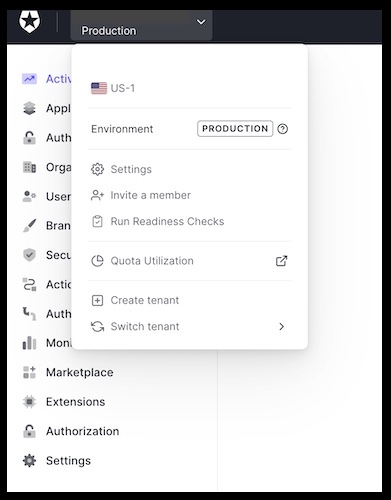
2. From the dropdown, select the tenant for which you want to run the Production Checks
3. From the same dropdown, click **Run Readiness Check** to launch the interface
 Optional:
1. Select one or more [Applications](/docs/get-started/applications) associated with this tenant for which you want checks to run by clicking **Filters.**
2. Click **Apply**.
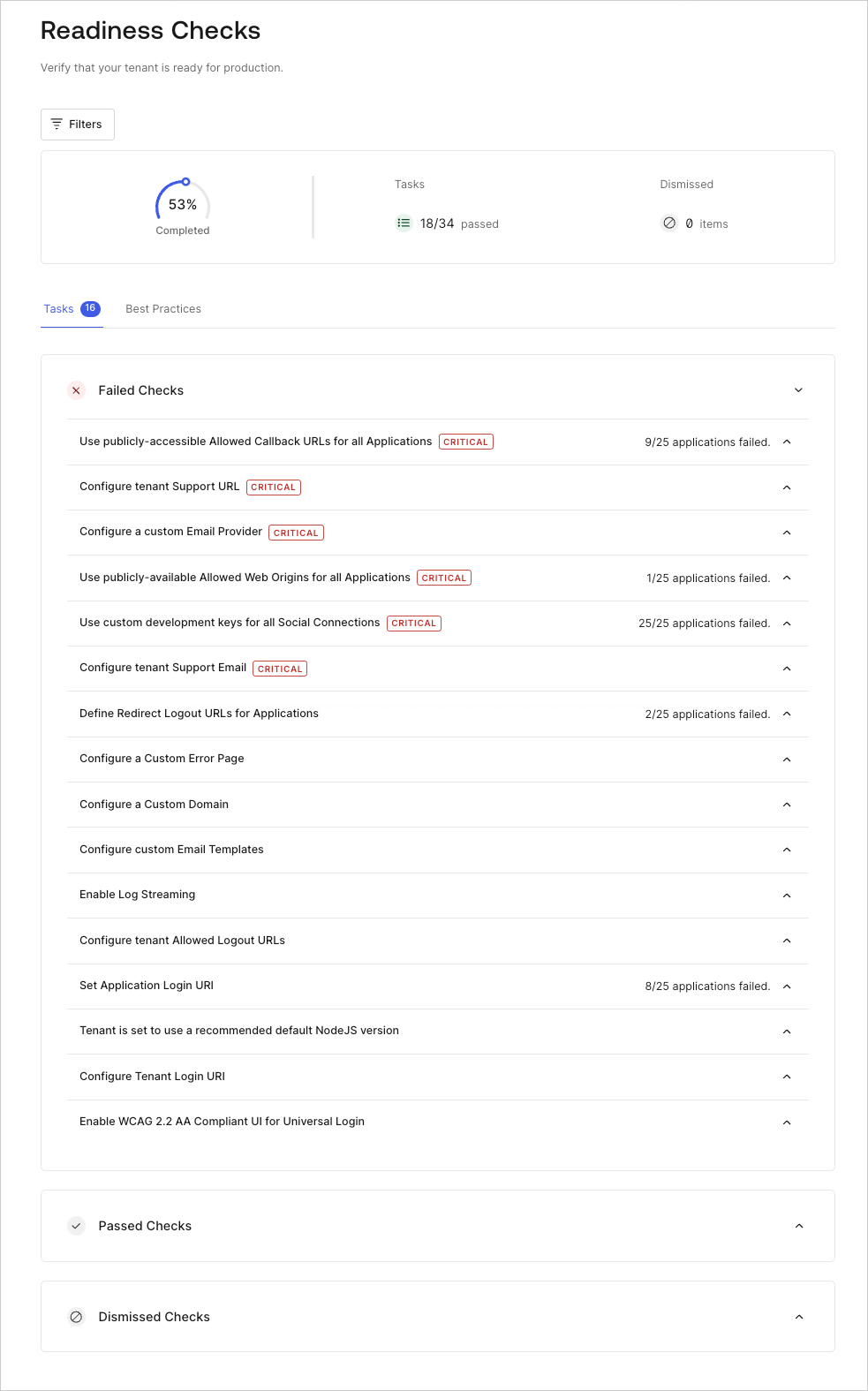
When the test is complete, your screen will automatically refresh to display your check results.
## Production check results
There are three categories of check result fixes:
* [Critical fixes](/docs/deploy-monitor/pre-deployment-checks/production-check-required-fixes)
* [Non-critical fixes](/docs/deploy-monitor/pre-deployment-checks/production-check-recommended-fixes)
* [Best practices](/docs/deploy-monitor/pre-deployment-checks/production-checks-best-practices)
The following are possible results for your check:
* Passed
* Failed
* Best practices
Under each set of results, Auth0 tells you how many checks your application passed, as well as how many checks require review.
If your application **failed** for one or more checks, you'll see:
* The name of the check
* Information on what the check is looking for
* A **Configure** link to the appropriate area where you can make the required fixes so that your Application passes the check
* Hyperlink to corresponding documentation
All of the checks that your application **passed** are grouped together in the passed object of the results set. You can view the name of and information about the check, as well as review the associated documentation and use the hyperlink to go to the corresponding configuration area where you can make changes (if desired).
## Learn more
* [Production Readiness Checks: Critical Fixes](/docs/deploy-monitor/pre-deployment-checks/production-check-required-fixes)
* [Production Readiness Checks: Non-Critical Fixes](/docs/deploy-monitor/pre-deployment-checks/production-check-recommended-fixes)
* [Production Readiness Checks: Best Practices](/docs/deploy-monitor/pre-deployment-checks/production-checks-best-practices)
* [Get Management API Access Tokens for Production](/docs/secure/tokens/access-tokens/management-api-access-tokens/get-management-api-access-tokens-for-production)
Optional:
1. Select one or more [Applications](/docs/get-started/applications) associated with this tenant for which you want checks to run by clicking **Filters.**
2. Click **Apply**.
When the test is complete, your screen will automatically refresh to display your check results.
## Production check results
There are three categories of check result fixes:
* [Critical fixes](/docs/deploy-monitor/pre-deployment-checks/production-check-required-fixes)
* [Non-critical fixes](/docs/deploy-monitor/pre-deployment-checks/production-check-recommended-fixes)
* [Best practices](/docs/deploy-monitor/pre-deployment-checks/production-checks-best-practices)
The following are possible results for your check:
* Passed
* Failed
* Best practices
Under each set of results, Auth0 tells you how many checks your application passed, as well as how many checks require review.
If your application **failed** for one or more checks, you'll see:
* The name of the check
* Information on what the check is looking for
* A **Configure** link to the appropriate area where you can make the required fixes so that your Application passes the check
* Hyperlink to corresponding documentation
All of the checks that your application **passed** are grouped together in the passed object of the results set. You can view the name of and information about the check, as well as review the associated documentation and use the hyperlink to go to the corresponding configuration area where you can make changes (if desired).
## Learn more
* [Production Readiness Checks: Critical Fixes](/docs/deploy-monitor/pre-deployment-checks/production-check-required-fixes)
* [Production Readiness Checks: Non-Critical Fixes](/docs/deploy-monitor/pre-deployment-checks/production-check-recommended-fixes)
* [Production Readiness Checks: Best Practices](/docs/deploy-monitor/pre-deployment-checks/production-checks-best-practices)
* [Get Management API Access Tokens for Production](/docs/secure/tokens/access-tokens/management-api-access-tokens/get-management-api-access-tokens-for-production)