> ## Documentation Index
> Fetch the complete documentation index at: https://auth0.com/llms.txt
> Use this file to discover all available pages before exploring further.
> Learn how to use Rich Authorization Requests with the Client-Initiated Backchannel Flow.
# User Authorization with CIBA
To use Client-Initiated Backchannel Authentication (CIBA) features, you must have an Enterprise Plan or an appropriate add-on. Refer to [Auth0 Pricing](https://auth0.com/pricing/) for details.
[Client-Initiated Backchannel Authentication (CIBA)](/docs/get-started/authentication-and-authorization-flow/client-initiated-backchannel-authentication-flow) is an OAuth 2.0 specification that allows a client application to initiate an authentication and/or authorization flow without requiring direct user interaction on the initiating application. [Rich Authorization Requests (RAR)](/docs/get-started/apis/configure-rich-authorization-requests) is an OAuth 2.0 extension that allows client applications to request for more complex permissions beyond standard OAuth 2.0 scopes in an authorization request.
You can use CIBA with RAR to pass fine-grained authorization data to the authorization server in a backchannel request. The `authorization_details` parameter contains details about the request that you can customize in a consent prompt to show the user.
You can authorize users with CIBA using the following notification channels:
* [Mobile push notifications](/docs/get-started/authentication-and-authorization-flow/client-initiated-backchannel-authentication-flow/mobile-push-notifications-with-ciba) using the Auth0 Guardian app and a custom app integrated with the Auth0 Guardian SDK.
* [Email notifications](/docs/get-started/authentication-and-authorization-flow/client-initiated-backchannel-authentication-flow/email-notifications-with-ciba), which require setting a customized consent prompt.
## Common use cases
Use RAR with the CIBA flow for use cases that require more fine-grained control over resource access. Common use cases include:
1. A payments app prompts the user to confirm a money transfer. The `authorization_details` can be customized to show the transaction details.
2. An AI agent prompts the user with details about a rescheduled doctor’s appointment. The `authorization_details` can be customized to show the new time and date.
## How it works
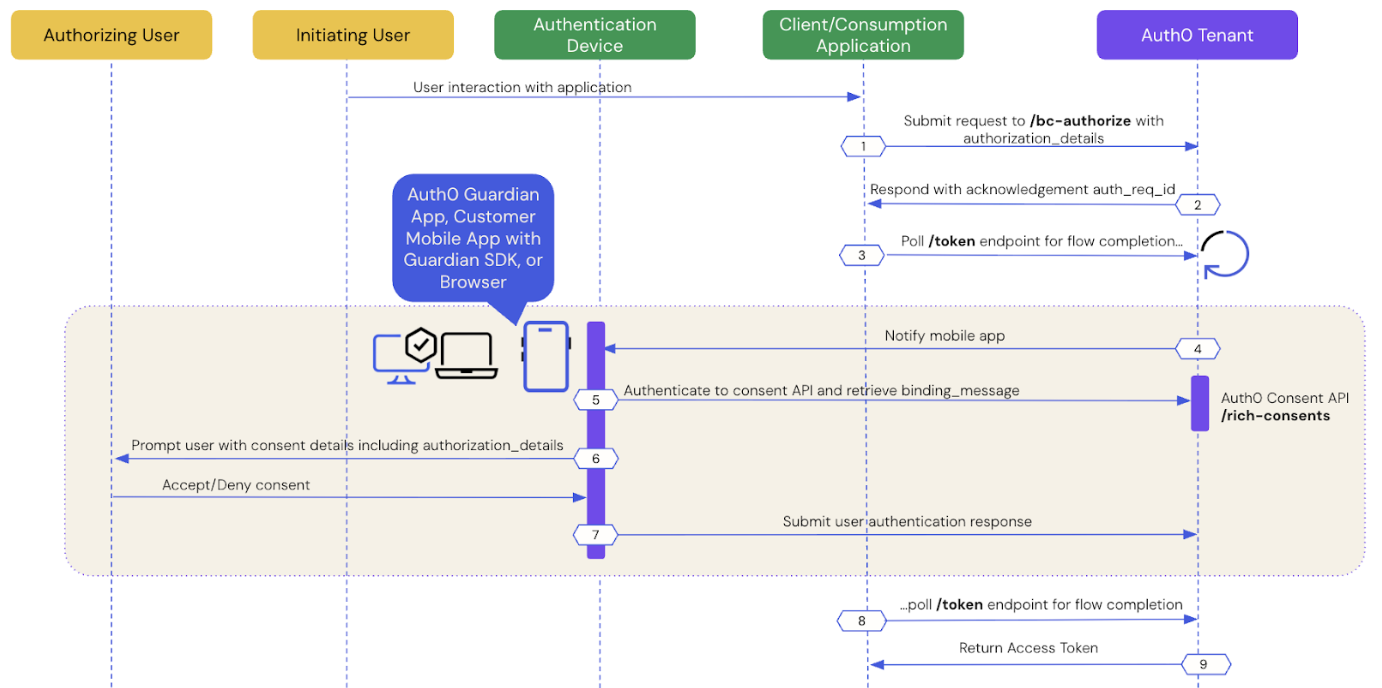
The User Authorization with CIBA flow is similar to the User Authentication with CIBA flow, where RAR support enables clients to pass the `authorization_details` to the authorization server via the `/bc-authorize` endpoint.
The following sequence diagram explains the end-to-end User Authorization with CIBA flow:
The following sections dive step-by-step into how user authorization works with CIBA.
* [Prerequisites](#prerequisites)
* [Step 1: Client application initiates a CIBA request](#step-1%3A-client-application-initiates-a-ciba-request)
* [Step 2: Auth0 tenant acknowledges the CIBA request](#step-2%3A-auth0-tenant-acknowledges-the-ciba-request)
* [Step 3: Client application polls for a response](#step-3%3A-client-application-polls-for-a-response)
* [Step 4: Authentication device receives the push notification](#step-4%3A-authentication-device-receives-the-notification)
* [Step 5: Authentication device retrieves the consent details](#step-5%3A-authentication-device-retrieves-the-consent-details)
* [Step 6: Authentication device presents the consent details to the user](#step-6%3A-authentication-device-presents-the-consent-details-to-the-user)
* [Step 7: Authentication device sends the user response back to Auth0](#step-7%3A-authentication-device-sends-the-user-response-back-to-auth0)
* [Step 8: Auth0 receives user response after the flow completes](#step-8%3A-auth0-receives-user-response-after-the-flow-completes)
* [Step 9: Auth0 returns access token to the client application](#step-9%3A-auth0-returns-access-token-to-client-application)
## Prerequisites
To initiate a CIBA request using Auth0, you must:
* [Configure Client-Initiated Backchannel Authentication](/docs/get-started/applications/configure-client-initiated-backchannel-authentication) for your tenant and application, including your [notification channel](/docs/get-started/applications/configure-client-initiated-backchannel-authentication#configure-notification-channel).
* [Configure Rich Authorization Requests](/docs/get-started/apis/configure-rich-authorization-requests) for your resource server, which includes registering your `authorization_details` types.
* If you're using email notifications with CIBA with RAR, [set a customized consent prompt](/docs/get-started/apis/configure-rich-authorization-requests#set-customized-consent-prompt).
## Step 1: Client application initiates a CIBA request
Use the [User Search APIs](/docs/manage-users/user-search) to find the authorizing user for whom you’d like to initiate a CIBA request and obtain their user ID.
Once you have a user ID for the authorizing user, use the [Authentication API](https://auth0.com/docs/api/authentication/login/start-back-channel-login) to send a CIBA request with the `authorization_details` to the `/bc-authorize` endpoint:
```bash lines theme={null}
curl --location 'https://{YOUR_DOMAIN}.auth0.com/bc-authorize' \
--request POST \
--header 'Content-Type: application/x-www-form-urlencoded' \
--data-urlencode 'client_id={YOUR_CLIENT_ID}' \
--data-urlencode 'client_secret={YOUR_CLIENT_SECRET}' \
--data-urlencode 'login_hint={ "format": "iss_sub", "iss": "https://{YOUR_DOMAIN}.auth0.com/", "sub":"{USER_ID}"}' \
--data-urlencode 'audience=https://api.example.com' \
--data-urlencode 'binding_message=Confirm payment of 2500' \
--data-urlencode 'authorization_details=[{
"type": "money_transfer",
"instructedAmount": {
"amount": 2500,
"currency": "USD"
},
"sourceAccount": "xxxxxxxxxxx1234",
"destinationAccount": "xxxxxxxxxxx9876",
"beneficiary": "Hanna Herwitz",
"subject": "A Lannister Always Pays His Debts"
}]'
```
| Parameters | Description |
| ----------------------- | ------------------------------------------------------------------------------------------------------------------------------------------------------------------------------------------------------------------------------------------------------------------------------------------------------------------------------------------------------------------------------------------------------------------------------------------------------------------------------------------------------------------------------------------------------------------------------------------------------------------------------------------------------------------------- |
| `tenant` | Tenant name that is passed within the `login_hint` structure. It can also be a custom domain. If the `iss_sub` format is used, then the tenant name is passed within the `iss` claim.
**Example**: `login_hint={"format": "iss_sub", "iss": "https://{YOUR_DOMAIN}.auth0.com/", "sub":"{USER_ID"}` |
| `client_id` | Client application identifier. |
| `client_secret` | Client authentication method used for user authentication with CIBA, such as Client Secret, Private Key JWT, or mTLS Authentication. If you're using Private Key JWT or mTLS, you don't need to include the client secret. |
| `scope` | Must include `openid`.
The scope can optionally include `offline_access` to request a refresh token. However, for one-time authorization of a transaction with the CIBA Flow, a refresh token is not needed and does not have any meaning in this context. |
| `user_id` | User ID for the authorizing user that is passed within the `login_hint` structure. If `iss_sub` format is used, then the user ID is passed within the `sub` claim.
The user ID may have a different format depending on the external provider. |
| `requested_expiry` | The CIBA flow's requested expiry is between 1 and 259200 (72 hours) seconds, and it defaults to 300 seconds. Include the `requested_expiry` parameter to set a custom expiry for the CIBA flow.
The `requested_expiry` parameter helps determine which notification channel CIBA uses:
If you set your `requested_expiry` to a value of 300 or lower in seconds, CIBA uses the mobile push notification channel if enabled. If you have not configured MFA for your tenant, the CIBA request fails.
If you set your `requested_expiry` to a value between 301 to 259200 seconds, CIBA uses the email notification channel if enabled.
|
| `binding_message` | Human-readable message used to bind the CIBA flow across the authentication and consumption devices. The binding message is required and up to 64 characters. Use only alphanumeric and `+-_.,:#` characters |
| `audience` | Unique identifier of the audience for the issued token. |
| `authorization_details` | An optional JSON array of objects that describes the permissions to be authorized. You should register each object’s `type` value on the resource server using the resource server’s `authorization_details` parameter. To learn more, read [Configure Rich Authorization Requests](/docs/get-started/apis/configure-rich-authorization-requests). |
## Step 2: Auth0 tenant acknowledges the CIBA request
If the Auth0 tenant successfully receives the `POST` request, you should receive a response containing an `auth-req-id` that references the request:
```json lines theme={null}
{
"auth_req_id": "eyJh...",
"expires_in": 300,
"interval": 5
}
```
The `auth_req_id` value is passed to the `/token` endpoint to poll for the completion of the CIBA flow.
## Step 3: Client application polls for a response
Use the [Authentication API](https://auth0.com/docs/api/authentication/login/start-back-channel-login) to call the `/token` endpoint using the `urn:openid:params:grant-type:ciba` grant type and the `auth_req_id` you received from the `/bc-authorize` endpoint:
```bash lines theme={null}
curl --location 'https://{YOUR_DOMAIN}.auth0.com/oauth/token' \
--header 'Content-Type: application/x-www-form-urlencoded' \
--data-urlencode 'client_id={YOUR_CLIENT_ID}' \
--data-urlencode 'client_secret={YOUR_CLIENT_SECRET}' \
--data-urlencode 'auth_req_id={AUTH_REQ_ID}' \
--data-urlencode 'grant_type=urn:openid:params:grant-type:ciba'
```
```csharp lines theme={null}
var token = await authenticationApiClient.GetTokenAsync(
new ClientInitiatedBackchannelAuthorizationTokenRequest()
{
AuthRequestId = response.AuthRequestId,
ClientId = "your-client-id",
ClientSecret = "your-client-secret"
}
);
```
```go lines theme={null}
token, err := authAPI.OAuth.LoginWithGrant(context.Background(),
"urn:openid:params:grant-type:ciba",
url.Values{
"auth_req_id": []string{resp.AuthReqID},
"client_id": []string{clientID},
"client_secret": []string{clientSecret},
},
oauth.IDTokenValidationOptions{})
```
```java lines theme={null}
Request tokenRequest = auth.getBackChannelLoginStatus(authReqId, "grant-type");
BackChannelTokenResponse tokenResponse = tokenRequest.execute().getBody();
```
Until the authorizing user approves the transaction, you should receive the following response:
```json lines theme={null}
{
"error": "authorization_pending",
"error_description": "The end-user authorization is pending"
}
```
There is approximately a five-second wait interval for polling. If you poll too frequently, you will receive the following response, where the description varies depending on the backoff interval:
```json lines theme={null}
{
"error": "slow_down",
"error_description": "You are polling faster than allowed. Try again in 10 seconds."
"interval": 10
}
```
To resolve the error, wait until the next interval (in seconds) to poll the `/token` endpoint.
## Step 4: Authentication device receives the notification
Depending on the notification channel, Auth0 sends a notification to the authentication device:
* [Mobile push notification](/docs/get-started/authentication-and-authorization-flow/client-initiated-backchannel-authentication-flow/mobile-push-notifications-with-ciba#step-4%3A-mobile-application-receives-the-push-notification): Auth0 sends it to the Auth0 Guardian app or a custom mobile app integrated with the Auth0 Guardian SDK.
* [Email notification](/docs/get-started/authentication-and-authorization-flow/client-initiated-backchannel-authentication-flow/email-notifications-with-ciba#step-4%3A-auth0-sends-a-link-to-the-user’s-email-address): Auth0 sends it to the user’s verified email address.
## Step 5: Authentication device retrieves the consent details
The authentication device retrieves the consent details i.e. the contents of the `binding_message` from the Auth0 Consent API:
* [Mobile push notification](/docs/get-started/authentication-and-authorization-flow/client-initiated-backchannel-authentication-flow/mobile-push-notifications-with-ciba#step-5%3A-mobile-application-retrieves-the-consent-details): The Auth0 Guardian app or a custom app integrated with the Auth0 Guardian SDK calls the Auth0 Consent API to retrieve the consent details.
* [Email notification](/docs/get-started/authentication-and-authorization-flow/client-initiated-backchannel-authentication-flow/email-notifications-with-ciba#step-5%3A-user-authenticates-in-the-browser): When the user clicks on the verification link, they are redirected to the browser, which retrieves the consent details from the Auth0 Consent API.
## Step 6: Authentication device presents the consent details to the user
The Auth0 Consent API responds to the authentication device with the consent details, including the `binding_message`, `scope`, `audience`, and `authorization_details` if configured. The scopes returned to the mobile application are filtered according to your RBAC policy. To learn more, read [Role-Based Access Control](/docs/manage-users/access-control/rbac).
The following code sample is an example response from the Auth0 Consent API:
```json lines theme={null}
{
"id": "cns_2309dsfsd098",
"requested_details": {
"audience": "https://api.example.com",
"scope": ["read:profile", "write:profile"],
"binding_message": "abc123",
"authorization_details": [
{
"type": "money_transfer",
"instructedAmount": {
"amount": 2500,
"currency": "USD"
},
"sourceAccount": "xxxxxxxxxxx1234",
"destinationAccount": "xxxxxxxxxxx9876",
"beneficiary": "Hanna Herwitz",
"subject": "A Lannister Always Pays His Debts"
}
]
},
"created_at": 1632739200,
"expires_at": 1632739200
}
```
The authentication device presents the consent details with the `authorization_details` to the user:
* [Mobile push notification](/docs/get-started/authentication-and-authorization-flow/client-initiated-backchannel-authentication-flow/mobile-push-notifications-with-ciba#step-6%3A-mobile-application-presents-the-consent-details-to-the-user): The Auth0 Guardian app renders the `authorization_details` in a consent screen using a push notification.
* [Email notification](/docs/get-started/authentication-and-authorization-flow/client-initiated-backchannel-authentication-flow/email-notifications-with-ciba#step-6%3A-browser-sends-the-user-response-back-to-auth0): The browser renders the `authorization_details` in a custom consent screen. To learn how to customize the consent screen, read [Set customized consent prompt](/docs/get-started/apis/configure-rich-authorization-requests#set-customized-consent-prompt).
The user can accept or decline the authorization request at this point.
## Step 7: Authentication device sends the user response back to Auth0
After the user accepts or declines the authorization request, the authentication device sends the user response back to Auth0:
* [Mobile push notification](/docs/get-started/authentication-and-authorization-flow/client-initiated-backchannel-authentication-flow/mobile-push-notifications-with-ciba#step-7%3A-mobile-application-sends-the-user-response-back-to-auth0): The Auth0 Guardian app or a custom app integrated with the Auth0 Guardian SDK sends the user response back to Auth0.
* [Email notification](/docs/get-started/authentication-and-authorization-flow/client-initiated-backchannel-authentication-flow/email-notifications-with-ciba#step-6%3A-browser-sends-the-user-response-back-to-auth0): The browser sends the user response back to Auth0.
## Step 8: Auth0 receives user response after the flow completes
The client application completes the polling upon receiving a response from the `/token` endpoint. A CIBA flow always requires a response, either an approval or decline, from the authorizing user, and existing grants are not checked. This means Auth0 treats every CIBA request as a fresh authorization for the authorizing user.
## Step 9: Auth0 returns access token to client application
If the user rejects the push request, Auth0 returns an error response like the following to the client application:
```json lines theme={null}
{
"error": "access_denied",
"error_description": "The end-user denied the authorization request or it has been expired"
}
```
If the user approves the push request, Auth0 returns an access token with the `authorization_details` like the following to the client application:
```json lines theme={null}
{
"id_token": "...",
"access_token": "...",
"expires_in": "...",
"scope": "{SCOPES}",
"authorization_details": [{
"type": "money_transfer",
"instructedAmount": {
"amount": 2500,
"currency": "USD"
},
"sourceAccount": "xxxxxxxxxxx1234",
"destinationAccount": "xxxxxxxxxxx9876",
"beneficiary": "Hanna Herwitz",
"subject": "A Lannister Always Pays His Debts"
}]
}
```
The `refresh_token` will only be present if the `offline_access` scope was included in the initial `/bc-authorize` request.
## Query authorization\_details
At compile time, you can query the type and objects of `authorization_details` from the consent details in a strongly typed manner as you would dynamically query JSON:
```swift lines theme={null}
let requestedDetails: ConsentRequestedDetails = payload.requestedDetails
let myAuthorizationDetailsTypes = requestedDetails.authorizationDetails[0].objectValue!;
let type = myAuthorizationDetailsTypes["type"]?.stringValue // Your pre-registered type value
let stringProperty = myAuthorizationDetailsTypes["string_property"]?.stringValue
let boolProperty = myAuthorizationDetailsTypes["bool_property"]?.boolValue
let numericProperty = myAuthorizationDetailsTypes["numeric_property"]?.doubleValue
let nestedObjectProperty = myAuthorizationDetailsTypes["nested_property"]?.objectValue
let nestedArrayProperty = myAuthorizationDetailsTypes["nested_array_property"]?.arrayValue
```
```kotlin lines theme={null}
RichConsentRequestedDetails requestedDetails = consentDetails.getRequestedDetails();
Map authorizationDetails = requestedDetails.getAuthorizationDetails().get(0);
String type = (String) myAuthorizationDetailsTypes.get("type");
String stringProperty = (String) myAuthorizationDetailsTypes.get("string_property");
boolean booleanProperty = (boolean) myAuthorizationDetailsTypes.get("boolean_property");
int numericProperty = (int) myAuthorizationDetailsTypes.get("numeric_property");
Object nestedObjectProperty = myAuthorizationDetailsTypes.get("nested_property");
List
If you define a custom type to represent your object, you can use the `filterAuthorizationDetailsByType()` function to return all `authorization_details` objects that match the desired type.
The following code sample queries `authorization_details` with the `payment` type:
```swift lines theme={null}
// Must implement AuthorizationDetailsType
struct Payment : AuthorizationDetailsType {
static let type = "payment";
let amount: Double;
let currency: String;
}
...
let requestedDetails: ConsentRequestedDetails = payload.requestedDetails
let payments = requestedDetails.filterAuthorizationDetailsByType(Payment.self)
let firstPayment = payments.first!
let type: String = firstPayment.type // "payment"
let amount: Double = firstPayment.amount
let currency: String = firstPayment.currency
```
```kotlin lines expandable theme={null}
@AuthorizatioDetailsType("payment")
class Payment {
private String type;
private int amount;
private String currency;
public Payment(String type, int amount, String currency) {
this.type = type;
this.amount = amount;
this.currency = currency;
}
public String getType() {
return type;
}
public int getAmount() {
return amount;
}
public String getCurrency() {
return currency;
}
}
...
RichConsentRequestedDetails requestedDetails = consentDetails.getRequestedDetails();
List payments = requestedDetails.filterAuthorizationDetailsByType(Payment.class);
Payment firstPayment = payments.get(0);
String type = firstPayment.getType();
int amount = firstPayment.getAmount();
String currency = firstPayment.getCurrency();
```
`filterAuthorizationDetailsByType()` only returns objects matching the specified `authorization_details` type. As a result, your mobile application should present all relevant `authorization_details` to the user for consent, regardless of their type, to ensure a complete understanding of the request
You can also query the `authorization_details` when the AI agent or application polls the `/oauth/token`endpoint for a response:
```bash lines theme={null}
curl --request POST \
--url "https://{YOUR_DOMAIN}.auth0.com/oauth/token" \
--header "Content-Type: application/x-www-form-urlencoded" \
--data-urlencode "grant_type=urn:openid:params:grant-type:ciba" \
--data-urlencode "client_id={YOUR_CLIENT_ID}" \
--data-urlencode "client_secret={YOUR_CLIENT_SECRET}" \
--data-urlencode "auth_req_id={AUTH_REQ_ID}"
```
| Parameters | Description |
| --------------- | -------------------------------------------------------------------------------------------------- |
| `grant_type` | Set to the CIBA grant type: `urn:openid:params:grant-type:ciba` |
| `client_id` | Set to the application’s client ID. |
| `client_secret` | Set to the application’s client secret. |
| `auth_req_id` | Returned from the Auth0 tenant when it acknowledges the CIBA request. References the CIBA request. |
When the authorizing user approves the request, Auth0 receives the user response, and the CIBA flow completes, returning an access token and `authorization_details` array:
```json lines theme={null}
{
"access_token": "ey...ZQ",
"expires_in": 86400,
"authorization_details": [{
"type": "money_transfer",
"instructedAmount": {
"amount": 2500,
"currency": "USD"
},
"sourceAccount": "xxxxxxxxxxx1234",
"destinationAccount": "xxxxxxxxxxx9876",
"beneficiary": "Hanna Herwitz",
"subject": "A Lannister Always Pays His Debts"
}],
"token_type": "Bearer"
}
```
## Limitations
Auth0 doesn’t support:
* Modifying RAR in Actions for CIBA flows.
* Advertising RAR types for clients to discover, which means you need to pre-register clients with the `authorization_details` types they can send.
* Validating RAR objects beyond checking that they have a `type` property that matches allowed types for the API. Your resource server is responsible for the granular validation of the content within `authorization_details`. For more information, see [Configure RAR](/docs/get-started/apis/configure-rich-authorization-requests).
## Learn more
* [Configure Rich Authorization Requests (RAR)](/docs/get-started/apis/configure-rich-authorization-requests)
* [Authorization Code Flow with Rich Authorization Requests (RAR)](/docs/get-started/authentication-and-authorization-flow/authorization-code-flow/authorization-code-flow-with-rar)
* [Configure Client-Initiated Backchannel Authentication](/docs/get-started/applications/configure-client-initiated-backchannel-authentication)
 The following sections dive step-by-step into how user authorization works with CIBA.
* [Prerequisites](#prerequisites)
* [Step 1: Client application initiates a CIBA request](#step-1%3A-client-application-initiates-a-ciba-request)
* [Step 2: Auth0 tenant acknowledges the CIBA request](#step-2%3A-auth0-tenant-acknowledges-the-ciba-request)
* [Step 3: Client application polls for a response](#step-3%3A-client-application-polls-for-a-response)
* [Step 4: Authentication device receives the push notification](#step-4%3A-authentication-device-receives-the-notification)
* [Step 5: Authentication device retrieves the consent details](#step-5%3A-authentication-device-retrieves-the-consent-details)
* [Step 6: Authentication device presents the consent details to the user](#step-6%3A-authentication-device-presents-the-consent-details-to-the-user)
* [Step 7: Authentication device sends the user response back to Auth0](#step-7%3A-authentication-device-sends-the-user-response-back-to-auth0)
* [Step 8: Auth0 receives user response after the flow completes](#step-8%3A-auth0-receives-user-response-after-the-flow-completes)
* [Step 9: Auth0 returns access token to the client application](#step-9%3A-auth0-returns-access-token-to-client-application)
## Prerequisites
To initiate a CIBA request using Auth0, you must:
* [Configure Client-Initiated Backchannel Authentication](/docs/get-started/applications/configure-client-initiated-backchannel-authentication) for your tenant and application, including your [notification channel](/docs/get-started/applications/configure-client-initiated-backchannel-authentication#configure-notification-channel).
* [Configure Rich Authorization Requests](/docs/get-started/apis/configure-rich-authorization-requests) for your
The following sections dive step-by-step into how user authorization works with CIBA.
* [Prerequisites](#prerequisites)
* [Step 1: Client application initiates a CIBA request](#step-1%3A-client-application-initiates-a-ciba-request)
* [Step 2: Auth0 tenant acknowledges the CIBA request](#step-2%3A-auth0-tenant-acknowledges-the-ciba-request)
* [Step 3: Client application polls for a response](#step-3%3A-client-application-polls-for-a-response)
* [Step 4: Authentication device receives the push notification](#step-4%3A-authentication-device-receives-the-notification)
* [Step 5: Authentication device retrieves the consent details](#step-5%3A-authentication-device-retrieves-the-consent-details)
* [Step 6: Authentication device presents the consent details to the user](#step-6%3A-authentication-device-presents-the-consent-details-to-the-user)
* [Step 7: Authentication device sends the user response back to Auth0](#step-7%3A-authentication-device-sends-the-user-response-back-to-auth0)
* [Step 8: Auth0 receives user response after the flow completes](#step-8%3A-auth0-receives-user-response-after-the-flow-completes)
* [Step 9: Auth0 returns access token to the client application](#step-9%3A-auth0-returns-access-token-to-client-application)
## Prerequisites
To initiate a CIBA request using Auth0, you must:
* [Configure Client-Initiated Backchannel Authentication](/docs/get-started/applications/configure-client-initiated-backchannel-authentication) for your tenant and application, including your [notification channel](/docs/get-started/applications/configure-client-initiated-backchannel-authentication#configure-notification-channel).
* [Configure Rich Authorization Requests](/docs/get-started/apis/configure-rich-authorization-requests) for your