> ## Documentation Index
> Fetch the complete documentation index at: https://auth0.com/llms.txt
> Use this file to discover all available pages before exploring further.
> Describes how to view client secrets and signing keys using the Auth0 Dashboard or the Management API.
# View Signing Certificates
export const AuthCodeGroup = ({children, dropdown}) => {
const [processedChildren, setProcessedChildren] = useState(children);
useEffect(() => {
let unsubscribe = null;
function init() {
unsubscribe = window.autorun(() => {
const processChildren = node => {
if (typeof node === "string") {
let processedNode = node;
for (const [key, value] of window.rootStore.variableStore.values.entries()) {
const escapedKey = key.replaceAll(/[.*+?^${}()|[\]\\]/g, (String.raw)`\$&`);
processedNode = processedNode.replaceAll(new RegExp(escapedKey, "g"), value);
}
return processedNode;
} else if (Array.isArray(node)) {
return node.map(processChildren);
} else if (node && node.props && node.props.children) {
return {
...node,
props: {
...node.props,
children: processChildren(node.props.children)
}
};
}
return node;
};
setProcessedChildren(processChildren(children));
});
}
if (window.rootStore) {
init();
} else {
window.addEventListener("adu:storeReady", init);
}
return () => {
window.removeEventListener("adu:storeReady", init);
unsubscribe?.();
};
}, [children]);
return {processedChildren};
};
export const AuthCodeBlock = ({filename, icon, language, highlight, children}) => {
const [displayText, setDisplayText] = useState(children);
const [copyText, setCopyText] = useState(children);
const wrapperRef = React.useRef(null);
useEffect(() => {
let unsubscribe = null;
function init() {
if (!window.autorun || !window.rootStore) {
return;
}
unsubscribe = window.autorun(() => {
let processedChildrenForDisplay = children;
let processedChildrenForCopy = children;
for (const [key, value] of window.rootStore.variableStore.values.entries()) {
const escapedKey = key.replaceAll(/[.*+?^${}()|[\]\\]/g, (String.raw)`\$&`);
let displayValue = value;
if (key === "{yourClientSecret}" && value !== "{yourClientSecret}") {
displayValue = value.substring(0, 3) + "*****MASKED*****";
}
processedChildrenForDisplay = processedChildrenForDisplay.replaceAll(new RegExp(escapedKey, "g"), displayValue);
processedChildrenForCopy = processedChildrenForCopy.replaceAll(new RegExp(escapedKey, "g"), value);
}
setDisplayText(processedChildrenForDisplay);
setCopyText(processedChildrenForCopy);
});
}
if (window.rootStore) {
init();
} else {
window.addEventListener("adu:storeReady", init);
}
return () => {
window.removeEventListener("adu:storeReady", init);
unsubscribe?.();
};
}, [children]);
useEffect(() => {
if (!wrapperRef.current) return;
const originalWriteText = navigator.clipboard.writeText.bind(navigator.clipboard);
let isOverriding = false;
const handleClick = e => {
const button = e.target.closest('[data-testid="copy-code-button"]');
if (!button || !wrapperRef.current.contains(button)) return;
isOverriding = true;
navigator.clipboard.writeText = text => {
if (isOverriding) {
isOverriding = false;
navigator.clipboard.writeText = originalWriteText;
return originalWriteText(copyText);
}
return originalWriteText(text);
};
setTimeout(() => {
if (isOverriding) {
isOverriding = false;
navigator.clipboard.writeText = originalWriteText;
}
}, 100);
};
const wrapper = wrapperRef.current;
wrapper.addEventListener('click', handleClick, true);
return () => {
wrapper.removeEventListener('click', handleClick, true);
if (navigator.clipboard.writeText !== originalWriteText) {
navigator.clipboard.writeText = originalWriteText;
}
};
}, [copyText]);
return
{displayText}
;
};
You can view your tenant's application client secrets and signing keys using the Auth0 Dashboard or the Management API. The application signing key is used to sign ID tokens, access tokens, SAML assertions, and WS-Fed assertions sent to your application. These keys are different from those used to sign interactions with connections, including signing SAML requests to identity providers (IdPs) and encrypting responses from IdPs. By default, SAML assertions for IdP connections are signed, which we recommend. To learn more, read [SAML Identity Provider Configuration Settings](/docs/authenticate/protocols/saml/saml-identity-provider-configuration-settings).
## Use the Dashboard
### Tenant settings
1. Go to [Dashboard > Settings > Signing Keys](https://manage.auth0.com/#/tenant/signing_keys).
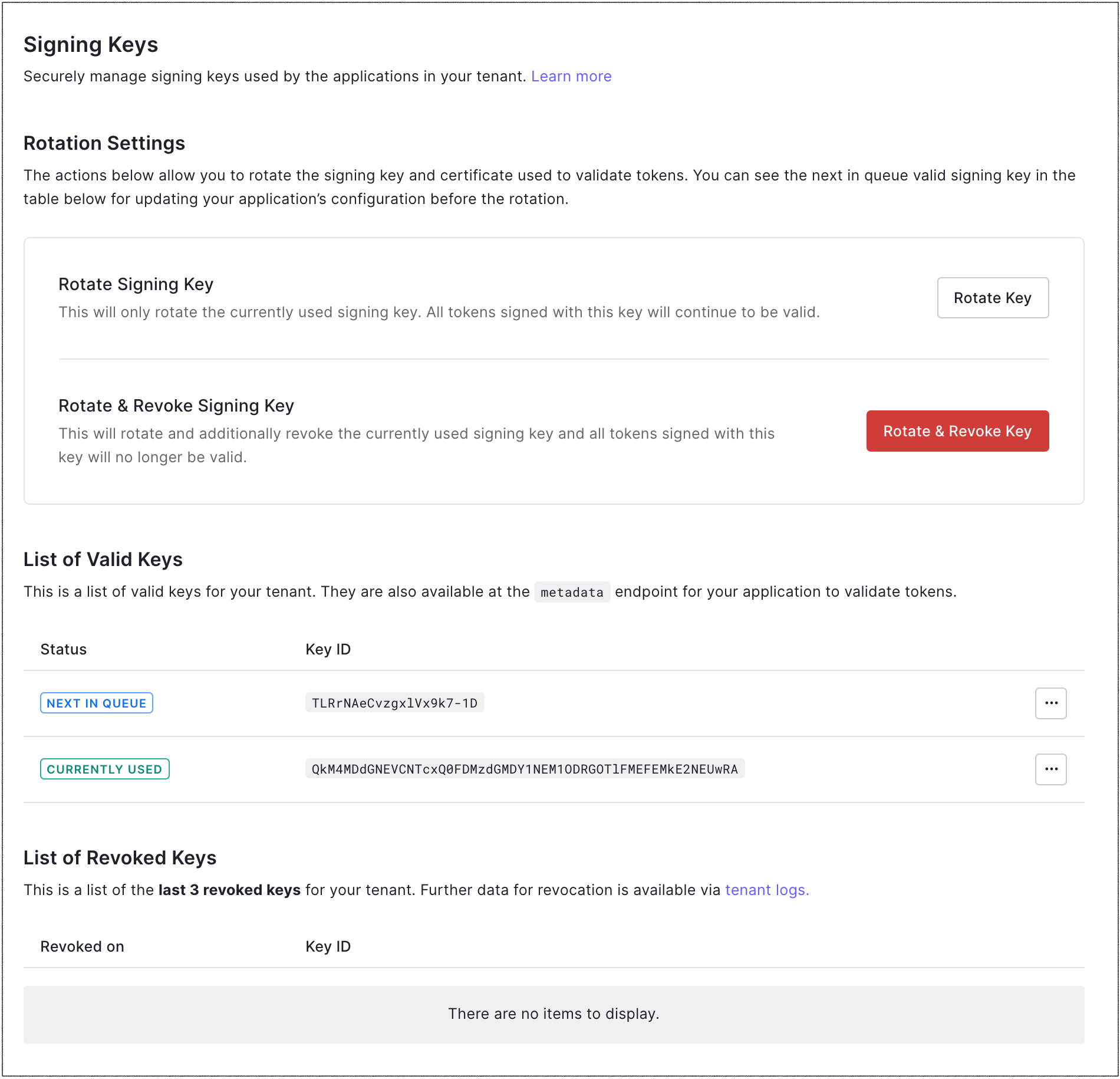 2. In the **Rotation Settings** section, locate **List of Valid Keys** and **List of Revoked Keys**.
1. The **List of Valid Keys** section lists the current signing key being used by your tenant, plus the next signing key that will be assigned should you choose to rotate your signing keys. If you have previously rotated signing keys, this section also lists the previously-used keys.
2. The **List of Revoked Keys** section lists the last three revoked keys for your tenant.
### Application settings
You can also view an application's signing key and/or client secret depending on the type of signing algorithm you are using.
#### If using the RS256 signing algorithm
1. Go to [Dashboard > Applications](https://manage.auth0.com/#/applications), and select the name of the application to view.
2. Scroll to the bottom of the **Settings** tab, and select **Advanced Settings**.
3. Go to the **Certificates** tab and locate the **Signing Certificate** field.
2. In the **Rotation Settings** section, locate **List of Valid Keys** and **List of Revoked Keys**.
1. The **List of Valid Keys** section lists the current signing key being used by your tenant, plus the next signing key that will be assigned should you choose to rotate your signing keys. If you have previously rotated signing keys, this section also lists the previously-used keys.
2. The **List of Revoked Keys** section lists the last three revoked keys for your tenant.
### Application settings
You can also view an application's signing key and/or client secret depending on the type of signing algorithm you are using.
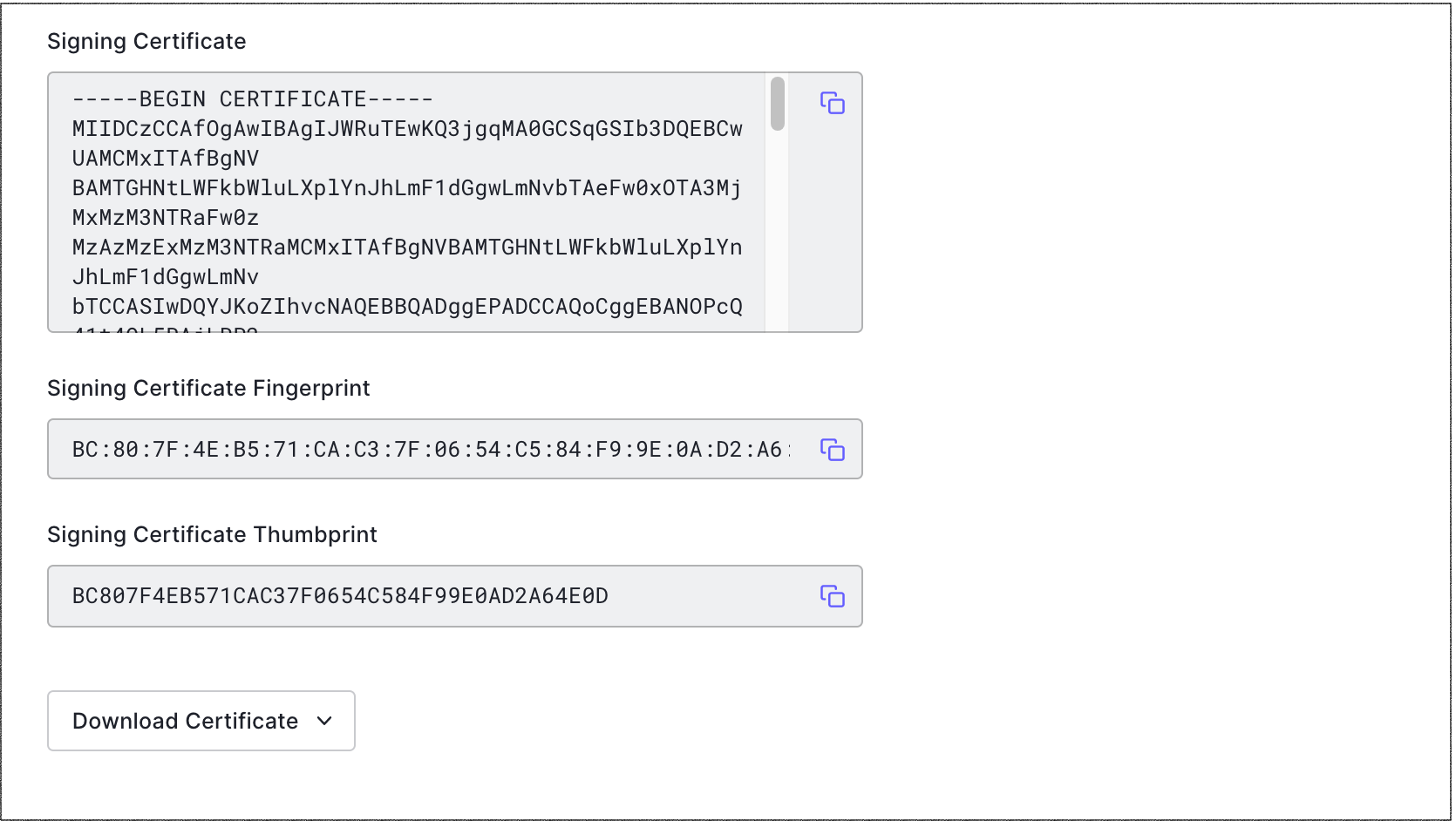
#### If using the RS256 signing algorithm
1. Go to [Dashboard > Applications](https://manage.auth0.com/#/applications), and select the name of the application to view.
2. Scroll to the bottom of the **Settings** tab, and select **Advanced Settings**.
3. Go to the **Certificates** tab and locate the **Signing Certificate** field.
 #### If using the HS256 signing algorithm
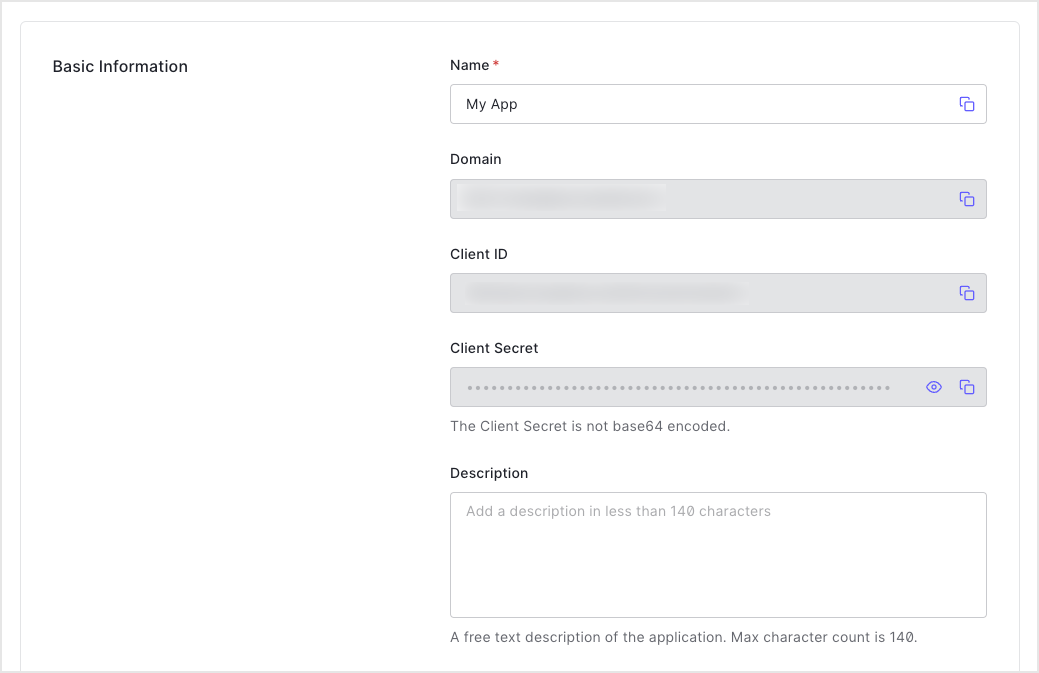
1. Go to [Dashboard > Applications](https://manage.auth0.com/#/applications), and select the name of the application to view.
2. Under **Basic Information**, locate the **Client Secret** field for the client secret.
#### If using the HS256 signing algorithm
1. Go to [Dashboard > Applications](https://manage.auth0.com/#/applications), and select the name of the application to view.
2. Under **Basic Information**, locate the **Client Secret** field for the client secret.
 ## Use the Management API
### Get all signing keys
Make a `GET` call to the [`/signing_keys/get_signing_keys`](https://auth0.com/docs/api/management/v2#!/signing_keys/get_signing_keys) endpoint. Be sure to replace the `{yourMgmtApiAccessToken}` placeholder value with your Management API Access Token.
```bash cURL theme={null}
curl --request GET \
--url 'https://{yourDomain}/api/v2/keys/signing' \
--header 'authorization: Bearer {yourMgmtApiAccessToken}'
```
```csharp C# theme={null}
var client = new RestClient("https://{yourDomain}/api/v2/keys/signing");
var request = new RestRequest(Method.GET);
request.AddHeader("authorization", "Bearer {yourMgmtApiAccessToken}");
IRestResponse response = client.Execute(request);
```
```go Go theme={null}
package main
import (
"fmt"
"net/http"
"io/ioutil"
)
func main() {
url := "https://{yourDomain}/api/v2/keys/signing"
req, _ := http.NewRequest("GET", url, nil)
req.Header.Add("authorization", "Bearer {yourMgmtApiAccessToken}")
res, _ := http.DefaultClient.Do(req)
defer res.Body.Close()
body, _ := ioutil.ReadAll(res.Body)
fmt.Println(res)
fmt.Println(string(body))
}
```
```java Java theme={null}
HttpResponse response = Unirest.get("https://{yourDomain}/api/v2/keys/signing")
.header("authorization", "Bearer {yourMgmtApiAccessToken}")
.asString();
```
```javascript Node.JS theme={null}
var axios = require("axios").default;
var options = {
method: 'GET',
url: 'https://{yourDomain}/api/v2/keys/signing',
headers: {authorization: 'Bearer {yourMgmtApiAccessToken}'}
};
axios.request(options).then(function (response) {
console.log(response.data);
}).catch(function (error) {
console.error(error);
});
```
```php PHP theme={null}
$curl = curl_init();
curl_setopt_array($curl, [
CURLOPT_URL => "https://{yourDomain}/api/v2/keys/signing",
CURLOPT_RETURNTRANSFER => true,
CURLOPT_ENCODING => "",
CURLOPT_MAXREDIRS => 10,
CURLOPT_TIMEOUT => 30,
CURLOPT_HTTP_VERSION => CURL_HTTP_VERSION_1_1,
CURLOPT_CUSTOMREQUEST => "GET",
CURLOPT_HTTPHEADER => [
"authorization: Bearer {yourMgmtApiAccessToken}"
],
]);
$response = curl_exec($curl);
$err = curl_error($curl);
curl_close($curl);
if ($err) {
echo "cURL Error #:" . $err;
} else {
echo $response;
}
```
```python Python theme={null}
import http.client
conn = http.client.HTTPSConnection("")
headers = { 'authorization': "Bearer {yourMgmtApiAccessToken}" }
conn.request("GET", "/{yourDomain}/api/v2/keys/signing", headers=headers)
res = conn.getresponse()
data = res.read()
print(data.decode("utf-8"))
```
```ruby Ruby theme={null}
require 'uri'
require 'net/http'
require 'openssl'
url = URI("https://{yourDomain}/api/v2/keys/signing")
http = Net::HTTP.new(url.host, url.port)
http.use_ssl = true
http.verify_mode = OpenSSL::SSL::VERIFY_NONE
request = Net::HTTP::Get.new(url)
request["authorization"] = 'Bearer {yourMgmtApiAccessToken}'
response = http.request(request)
puts response.read_body
```
| Value | Description |
| ----------------------- | -------------------------------------------------------------------------------------------------------------------------- |
| `MGMT_API_ACCESS_TOKEN` | [Access Token for the Management API](https://auth0.com/docs/api/management/v2/tokens) with the scope `read:signing_keys`. |
### Get a single signing key
Make a `GET` call to the [`/signing_keys/get_signing_key`](https://auth0.com/docs/api/management/v2#!/signing_keys/get_signing_key) endpoint. Be sure to replace the `{yourKeyId}` and `{yourMgmtApiAccessToken}` placeholder values with your signing key's ID and Management API Access Token, respectively.
```bash cURL theme={null}
curl --request GET \
--url 'https://{yourDomain}/api/v2/keys/signing/%7ByourKeyId%7D' \
--header 'authorization: Bearer {yourMgmtApiAccessToken}'
```
```csharp C# theme={null}
var client = new RestClient("https://{yourDomain}/api/v2/keys/signing/%7ByourKeyId%7D");
var request = new RestRequest(Method.GET);
request.AddHeader("authorization", "Bearer {yourMgmtApiAccessToken}");
IRestResponse response = client.Execute(request);
```
```go Go theme={null}
package main
import (
"fmt"
"net/http"
"io/ioutil"
)
func main() {
url := "https://{yourDomain}/api/v2/keys/signing/%7ByourKeyId%7D"
req, _ := http.NewRequest("GET", url, nil)
req.Header.Add("authorization", "Bearer {yourMgmtApiAccessToken}")
res, _ := http.DefaultClient.Do(req)
defer res.Body.Close()
body, _ := ioutil.ReadAll(res.Body)
fmt.Println(res)
fmt.Println(string(body))
}
```
```java Java theme={null}
HttpResponse response = Unirest.get("https://{yourDomain}/api/v2/keys/signing/%7ByourKeyId%7D")
.header("authorization", "Bearer {yourMgmtApiAccessToken}")
.asString();
```
```javascript Node.JS theme={null}
var axios = require("axios").default;
var options = {
method: 'GET',
url: 'https://{yourDomain}/api/v2/keys/signing/%7ByourKeyId%7D',
headers: {authorization: 'Bearer {yourMgmtApiAccessToken}'}
};
axios.request(options).then(function (response) {
console.log(response.data);
}).catch(function (error) {
console.error(error);
});
```
```php PHP theme={null}
$curl = curl_init();
curl_setopt_array($curl, [
CURLOPT_URL => "https://{yourDomain}/api/v2/keys/signing/%7ByourKeyId%7D",
CURLOPT_RETURNTRANSFER => true,
CURLOPT_ENCODING => "",
CURLOPT_MAXREDIRS => 10,
CURLOPT_TIMEOUT => 30,
CURLOPT_HTTP_VERSION => CURL_HTTP_VERSION_1_1,
CURLOPT_CUSTOMREQUEST => "GET",
CURLOPT_HTTPHEADER => [
"authorization: Bearer {yourMgmtApiAccessToken}"
],
]);
$response = curl_exec($curl);
$err = curl_error($curl);
curl_close($curl);
if ($err) {
echo "cURL Error #:" . $err;
} else {
echo $response;
}
```
```python Python theme={null}
import http.client
conn = http.client.HTTPSConnection("")
headers = { 'authorization': "Bearer {yourMgmtApiAccessToken}" }
conn.request("GET", "/{yourDomain}/api/v2/keys/signing/%7ByourKeyId%7D", headers=headers)
res = conn.getresponse()
data = res.read()
print(data.decode("utf-8"))
```
```ruby Ruby theme={null}
require 'uri'
require 'net/http'
require 'openssl'
url = URI("https://{yourDomain}/api/v2/keys/signing/%7ByourKeyId%7D")
http = Net::HTTP.new(url.host, url.port)
http.use_ssl = true
http.verify_mode = OpenSSL::SSL::VERIFY_NONE
request = Net::HTTP::Get.new(url)
request["authorization"] = 'Bearer {yourMgmtApiAccessToken}'
response = http.request(request)
puts response.read_body
```
| Value | Description |
| ----------------------- | --------------------------------------------------------------------------------------------------------------------------------------------------------------------------- |
| `YOUR_KEY_ID` | ID of the signing key to be viewed. To learn how to find your signing key ID, see [Locate JSON Web Key Sets](/docs/secure/tokens/json-web-tokens/locate-json-web-key-sets). |
| `MGMT_API_ACCESS_TOKEN` | [Access Token for the Management API](https://auth0.com/docs/api/management/v2/tokens) with the scope `read:signing_keys`. |
## Learn more
* [Revoke Signing Keys](/docs/get-started/tenant-settings/signing-keys/revoke-signing-keys)
* [Rotate Signing Keys](/docs/get-started/tenant-settings/signing-keys/rotate-signing-keys)
* [Signing Algorithms](/docs/get-started/applications/signing-algorithms)
* [Change Application Signing Algorithms](/docs/get-started/applications/change-application-signing-algorithms)
## Use the Management API
### Get all signing keys
Make a `GET` call to the [`/signing_keys/get_signing_keys`](https://auth0.com/docs/api/management/v2#!/signing_keys/get_signing_keys) endpoint. Be sure to replace the `{yourMgmtApiAccessToken}` placeholder value with your Management API Access Token.
```bash cURL theme={null}
curl --request GET \
--url 'https://{yourDomain}/api/v2/keys/signing' \
--header 'authorization: Bearer {yourMgmtApiAccessToken}'
```
```csharp C# theme={null}
var client = new RestClient("https://{yourDomain}/api/v2/keys/signing");
var request = new RestRequest(Method.GET);
request.AddHeader("authorization", "Bearer {yourMgmtApiAccessToken}");
IRestResponse response = client.Execute(request);
```
```go Go theme={null}
package main
import (
"fmt"
"net/http"
"io/ioutil"
)
func main() {
url := "https://{yourDomain}/api/v2/keys/signing"
req, _ := http.NewRequest("GET", url, nil)
req.Header.Add("authorization", "Bearer {yourMgmtApiAccessToken}")
res, _ := http.DefaultClient.Do(req)
defer res.Body.Close()
body, _ := ioutil.ReadAll(res.Body)
fmt.Println(res)
fmt.Println(string(body))
}
```
```java Java theme={null}
HttpResponse response = Unirest.get("https://{yourDomain}/api/v2/keys/signing")
.header("authorization", "Bearer {yourMgmtApiAccessToken}")
.asString();
```
```javascript Node.JS theme={null}
var axios = require("axios").default;
var options = {
method: 'GET',
url: 'https://{yourDomain}/api/v2/keys/signing',
headers: {authorization: 'Bearer {yourMgmtApiAccessToken}'}
};
axios.request(options).then(function (response) {
console.log(response.data);
}).catch(function (error) {
console.error(error);
});
```
```php PHP theme={null}
$curl = curl_init();
curl_setopt_array($curl, [
CURLOPT_URL => "https://{yourDomain}/api/v2/keys/signing",
CURLOPT_RETURNTRANSFER => true,
CURLOPT_ENCODING => "",
CURLOPT_MAXREDIRS => 10,
CURLOPT_TIMEOUT => 30,
CURLOPT_HTTP_VERSION => CURL_HTTP_VERSION_1_1,
CURLOPT_CUSTOMREQUEST => "GET",
CURLOPT_HTTPHEADER => [
"authorization: Bearer {yourMgmtApiAccessToken}"
],
]);
$response = curl_exec($curl);
$err = curl_error($curl);
curl_close($curl);
if ($err) {
echo "cURL Error #:" . $err;
} else {
echo $response;
}
```
```python Python theme={null}
import http.client
conn = http.client.HTTPSConnection("")
headers = { 'authorization': "Bearer {yourMgmtApiAccessToken}" }
conn.request("GET", "/{yourDomain}/api/v2/keys/signing", headers=headers)
res = conn.getresponse()
data = res.read()
print(data.decode("utf-8"))
```
```ruby Ruby theme={null}
require 'uri'
require 'net/http'
require 'openssl'
url = URI("https://{yourDomain}/api/v2/keys/signing")
http = Net::HTTP.new(url.host, url.port)
http.use_ssl = true
http.verify_mode = OpenSSL::SSL::VERIFY_NONE
request = Net::HTTP::Get.new(url)
request["authorization"] = 'Bearer {yourMgmtApiAccessToken}'
response = http.request(request)
puts response.read_body
```
| Value | Description |
| ----------------------- | -------------------------------------------------------------------------------------------------------------------------- |
| `MGMT_API_ACCESS_TOKEN` | [Access Token for the Management API](https://auth0.com/docs/api/management/v2/tokens) with the scope `read:signing_keys`. |
### Get a single signing key
Make a `GET` call to the [`/signing_keys/get_signing_key`](https://auth0.com/docs/api/management/v2#!/signing_keys/get_signing_key) endpoint. Be sure to replace the `{yourKeyId}` and `{yourMgmtApiAccessToken}` placeholder values with your signing key's ID and Management API Access Token, respectively.
```bash cURL theme={null}
curl --request GET \
--url 'https://{yourDomain}/api/v2/keys/signing/%7ByourKeyId%7D' \
--header 'authorization: Bearer {yourMgmtApiAccessToken}'
```
```csharp C# theme={null}
var client = new RestClient("https://{yourDomain}/api/v2/keys/signing/%7ByourKeyId%7D");
var request = new RestRequest(Method.GET);
request.AddHeader("authorization", "Bearer {yourMgmtApiAccessToken}");
IRestResponse response = client.Execute(request);
```
```go Go theme={null}
package main
import (
"fmt"
"net/http"
"io/ioutil"
)
func main() {
url := "https://{yourDomain}/api/v2/keys/signing/%7ByourKeyId%7D"
req, _ := http.NewRequest("GET", url, nil)
req.Header.Add("authorization", "Bearer {yourMgmtApiAccessToken}")
res, _ := http.DefaultClient.Do(req)
defer res.Body.Close()
body, _ := ioutil.ReadAll(res.Body)
fmt.Println(res)
fmt.Println(string(body))
}
```
```java Java theme={null}
HttpResponse response = Unirest.get("https://{yourDomain}/api/v2/keys/signing/%7ByourKeyId%7D")
.header("authorization", "Bearer {yourMgmtApiAccessToken}")
.asString();
```
```javascript Node.JS theme={null}
var axios = require("axios").default;
var options = {
method: 'GET',
url: 'https://{yourDomain}/api/v2/keys/signing/%7ByourKeyId%7D',
headers: {authorization: 'Bearer {yourMgmtApiAccessToken}'}
};
axios.request(options).then(function (response) {
console.log(response.data);
}).catch(function (error) {
console.error(error);
});
```
```php PHP theme={null}
$curl = curl_init();
curl_setopt_array($curl, [
CURLOPT_URL => "https://{yourDomain}/api/v2/keys/signing/%7ByourKeyId%7D",
CURLOPT_RETURNTRANSFER => true,
CURLOPT_ENCODING => "",
CURLOPT_MAXREDIRS => 10,
CURLOPT_TIMEOUT => 30,
CURLOPT_HTTP_VERSION => CURL_HTTP_VERSION_1_1,
CURLOPT_CUSTOMREQUEST => "GET",
CURLOPT_HTTPHEADER => [
"authorization: Bearer {yourMgmtApiAccessToken}"
],
]);
$response = curl_exec($curl);
$err = curl_error($curl);
curl_close($curl);
if ($err) {
echo "cURL Error #:" . $err;
} else {
echo $response;
}
```
```python Python theme={null}
import http.client
conn = http.client.HTTPSConnection("")
headers = { 'authorization': "Bearer {yourMgmtApiAccessToken}" }
conn.request("GET", "/{yourDomain}/api/v2/keys/signing/%7ByourKeyId%7D", headers=headers)
res = conn.getresponse()
data = res.read()
print(data.decode("utf-8"))
```
```ruby Ruby theme={null}
require 'uri'
require 'net/http'
require 'openssl'
url = URI("https://{yourDomain}/api/v2/keys/signing/%7ByourKeyId%7D")
http = Net::HTTP.new(url.host, url.port)
http.use_ssl = true
http.verify_mode = OpenSSL::SSL::VERIFY_NONE
request = Net::HTTP::Get.new(url)
request["authorization"] = 'Bearer {yourMgmtApiAccessToken}'
response = http.request(request)
puts response.read_body
```
| Value | Description |
| ----------------------- | --------------------------------------------------------------------------------------------------------------------------------------------------------------------------- |
| `YOUR_KEY_ID` | ID of the signing key to be viewed. To learn how to find your signing key ID, see [Locate JSON Web Key Sets](/docs/secure/tokens/json-web-tokens/locate-json-web-key-sets). |
| `MGMT_API_ACCESS_TOKEN` | [Access Token for the Management API](https://auth0.com/docs/api/management/v2/tokens) with the scope `read:signing_keys`. |
## Learn more
* [Revoke Signing Keys](/docs/get-started/tenant-settings/signing-keys/revoke-signing-keys)
* [Rotate Signing Keys](/docs/get-started/tenant-settings/signing-keys/rotate-signing-keys)
* [Signing Algorithms](/docs/get-started/applications/signing-algorithms)
* [Change Application Signing Algorithms](/docs/get-started/applications/change-application-signing-algorithms)