> ## Documentation Index
> Fetch the complete documentation index at: https://auth0.com/llms.txt
> Use this file to discover all available pages before exploring further.
> Learn how to search for Organizations using the Auth0 Dashboard.
# Search for Organizations
From the Organizations section of your [Auth0 Dashboard](https://manage.auth0.com/#/organizations), you can search for [organizations](/docs/manage-users/organizations/organizations-overview) by name or display name.
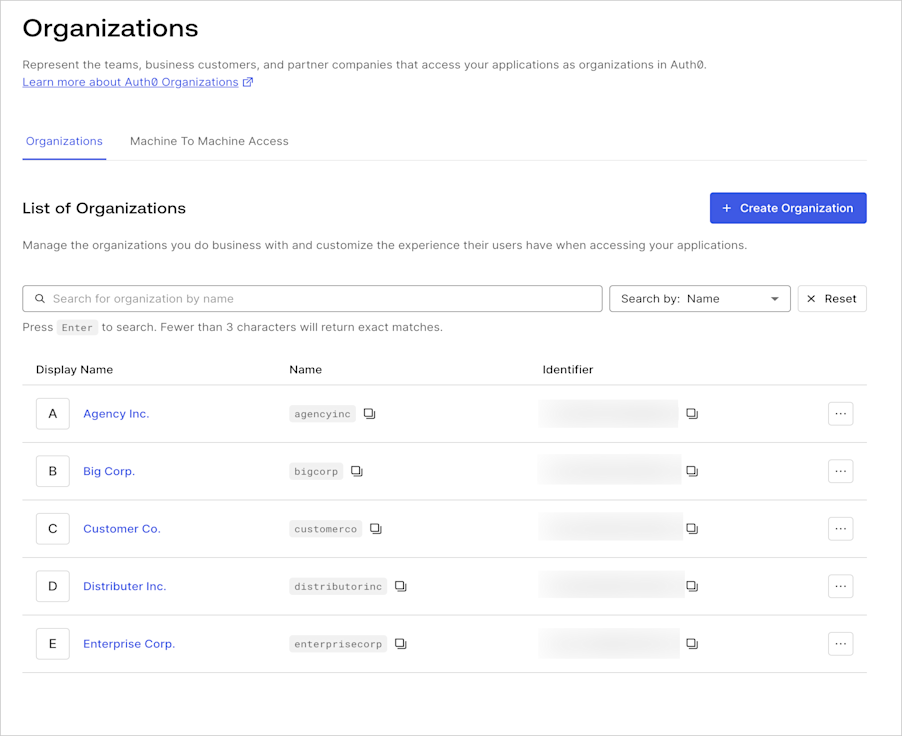 The dropdown menu beside the search bar allows you to search by Name or Display Name. Entering three or fewer characters into the search bar will return exact matches only. If you enter four or more characters, fuzzy matches containing the string provided will be returned. For example, if you have an organization named "Big Holdings, Co.", and you enter the search terms `hold` or `ings`, the Big Holdings, Co. organization will be returned.
Searches return a maximum of 50 results. If the desired result isn’t found, try using a more specific search term.
The organization search employs eventual consistency. Recently created or modified organizations may not immediately display in search results; however, the results will eventually accurately reflect the entities within your tenant.
The dropdown menu beside the search bar allows you to search by Name or Display Name. Entering three or fewer characters into the search bar will return exact matches only. If you enter four or more characters, fuzzy matches containing the string provided will be returned. For example, if you have an organization named "Big Holdings, Co.", and you enter the search terms `hold` or `ings`, the Big Holdings, Co. organization will be returned.
Searches return a maximum of 50 results. If the desired result isn’t found, try using a more specific search term.
The organization search employs eventual consistency. Recently created or modified organizations may not immediately display in search results; however, the results will eventually accurately reflect the entities within your tenant.