> ## Documentation Index
> Fetch the complete documentation index at: https://auth0.com/llms.txt
> Use this file to discover all available pages before exploring further.
> Learn how to audit M2M access for an application.
# Audit M2M Access
export const AuthCodeBlock = ({filename, icon, language, highlight, children}) => {
const [displayText, setDisplayText] = useState(children);
const [copyText, setCopyText] = useState(children);
const wrapperRef = React.useRef(null);
useEffect(() => {
let unsubscribe = null;
function init() {
if (!window.autorun || !window.rootStore) {
return;
}
unsubscribe = window.autorun(() => {
let processedChildrenForDisplay = children;
let processedChildrenForCopy = children;
for (const [key, value] of window.rootStore.variableStore.values.entries()) {
const escapedKey = key.replaceAll(/[.*+?^${}()|[\]\\]/g, (String.raw)`\$&`);
let displayValue = value;
if (key === "{yourClientSecret}" && value !== "{yourClientSecret}") {
displayValue = value.substring(0, 3) + "*****MASKED*****";
}
processedChildrenForDisplay = processedChildrenForDisplay.replaceAll(new RegExp(escapedKey, "g"), displayValue);
processedChildrenForCopy = processedChildrenForCopy.replaceAll(new RegExp(escapedKey, "g"), value);
}
setDisplayText(processedChildrenForDisplay);
setCopyText(processedChildrenForCopy);
});
}
if (window.rootStore) {
init();
} else {
window.addEventListener("adu:storeReady", init);
}
return () => {
window.removeEventListener("adu:storeReady", init);
unsubscribe?.();
};
}, [children]);
useEffect(() => {
if (!wrapperRef.current) return;
const originalWriteText = navigator.clipboard.writeText.bind(navigator.clipboard);
let isOverriding = false;
const handleClick = e => {
const button = e.target.closest('[data-testid="copy-code-button"]');
if (!button || !wrapperRef.current.contains(button)) return;
isOverriding = true;
navigator.clipboard.writeText = text => {
if (isOverriding) {
isOverriding = false;
navigator.clipboard.writeText = originalWriteText;
return originalWriteText(copyText);
}
return originalWriteText(text);
};
setTimeout(() => {
if (isOverriding) {
isOverriding = false;
navigator.clipboard.writeText = originalWriteText;
}
}, 100);
};
const wrapper = wrapperRef.current;
wrapper.addEventListener('click', handleClick, true);
return () => {
wrapper.removeEventListener('click', handleClick, true);
if (navigator.clipboard.writeText !== originalWriteText) {
navigator.clipboard.writeText = originalWriteText;
}
};
}, [copyText]);
return
{displayText}
;
};
export const codeExample1 = `curl -X GET --location "https://{yourDomain}/api/v2/organizations/{ORG_id}/client-grants/" \
--header 'authorization: Bearer MGMT_API_ACCESS_TOKEN'`;
export const codeExample2 = `curl -X GET --location "https://{yourDomain}/api/v2/clients?q=client_grant.organization_id%3Aorganization_id" \
--header 'authorization: Bearer MGMT_API_ACCESS_TOKEN'`;
export const codeExample3 = `curl -X GET --location "https://{yourDomain}/api/v2/client-grants?allow_any_organization=true" \
--header 'authorization: Bearer MGMT_API_ACCESS_TOKEN'`;
export const codeExample4 = `curl -X GET --location "https://{yourDomain}/api/v2/clients?q=client_grant.allow_any_organization%3Atrue" \
--header 'authorization: Bearer MGMT_API_ACCESS_TOKEN'`;
Machine-to-Machine Access to Organizations can be granted by directly associating a client grant to an organization or allowing access to any organization in the client grant settings. Both scenarios can be audited via the Auth0 Dashboard or the Management API, where you can view or retrieve a list of client grants associated with an organization for an application. To learn more about how M2M access to Organizations permissions work, read [Configure Your Application for M2M Access](/docs/manage-users/organizations/organizations-for-m2m-applications/configure-your-application-for-m2m-access) and [Authorize M2M Access](/docs/manage-users/organizations/organizations-for-m2m-applications/authorize-m2m-access).
## Access granted via direct association
Use the [Auth0 Dashboard](https://manage.auth0.com/) and [Management API](https://auth0.com/docs/api/management/v2) to audit M2M access for client grants that are directly associated to an organization.
To view the application client grants that have been authorized for a specific organization on the Auth0 Dashboard:
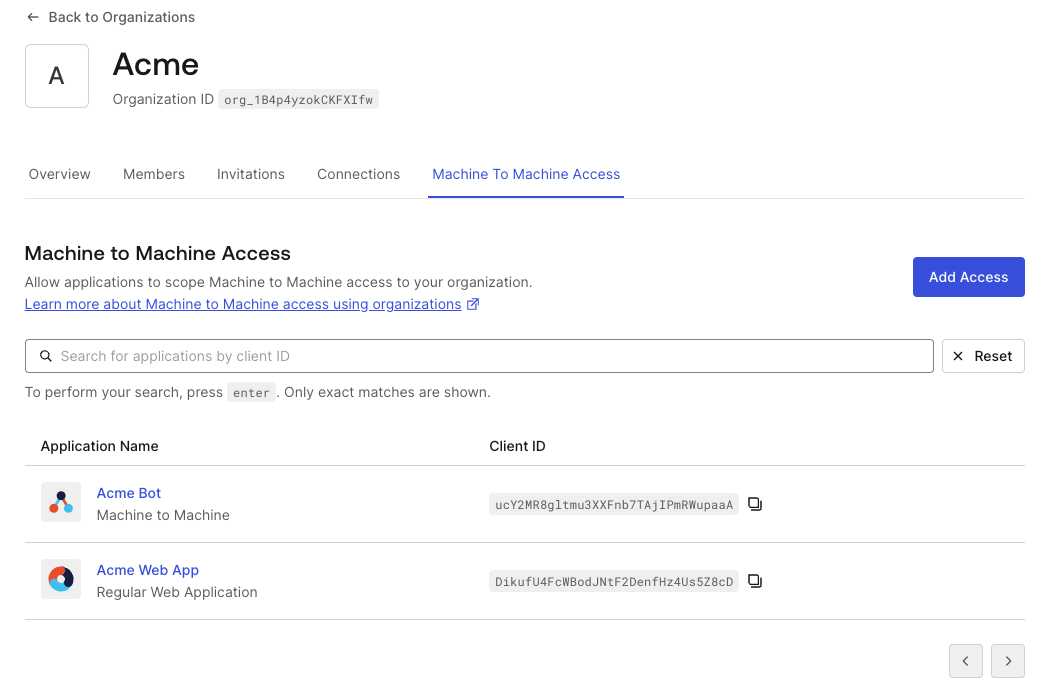
1. Navigate to **Organizations** and choose the organization you wish to inspect.
2. Select the **Machine-to-Machine Access** tab. You will get a paginated list of all the applications that can access an API for this organization via direct association.
3. Choose an applicationto review the authorized APIs listed for that application.
 Client grants associated with an organization can be retrieved via the [Organization Client Grants](https://auth0.com/docs/api/management/v2/organizations/get-organization-client-grants) API endpoint:
Alternatively, if you want to retrieve information on applications that can access at least one of the API for an organization, you can use the `q` query parameter on the [Get Clients API endpoint](https://auth0.com/docs/api/management/v2/clients/get-clients) with the search term `client_grant.organization_id:{organization_id}`. Use the Lucene syntax, which is similar to the [User Search Query Syntax](/docs/manage-users/user-search/user-search-query-syntax).
## Access granted to any organization
Use the [Auth0 Dashboard](https://manage.auth0.com/) and [Management API](https://auth0.com/docs/api/management/v2) to audit M2M access for applications that have access granted to any organization.
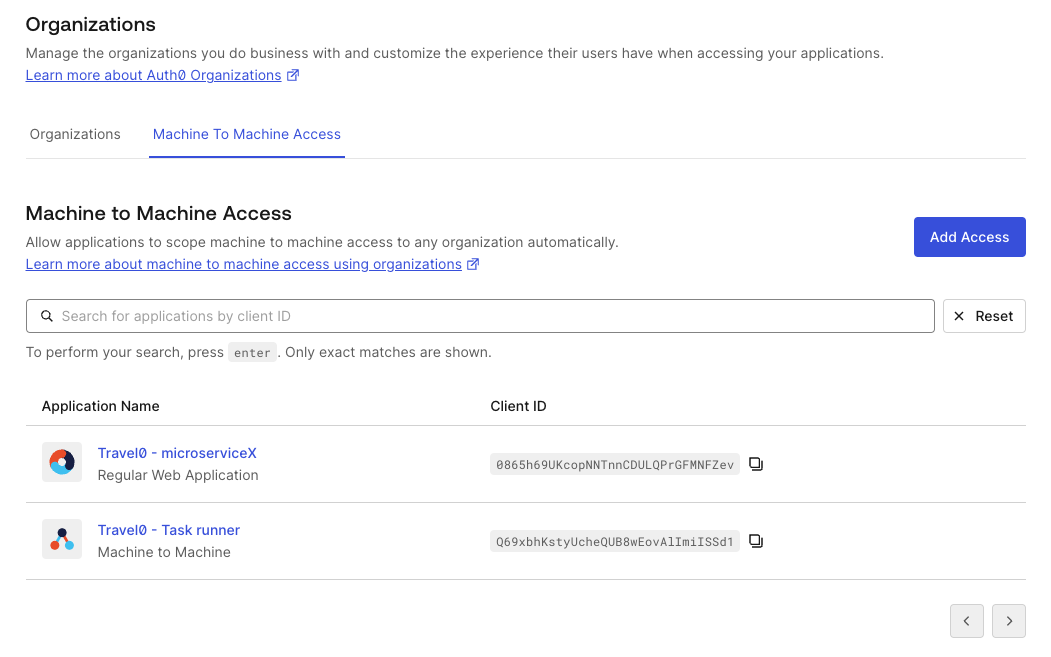
1. Navigate to **Organizations**.
2. Select the **Machine to Machine Access** tab. You will get a paginated list of all the applications that can access at least one of the API for an organization.
3. Choose an application to review the authorized APIs listed for that application.
Client grants associated with an organization can be retrieved via the [Organization Client Grants](https://auth0.com/docs/api/management/v2/organizations/get-organization-client-grants) API endpoint:
Alternatively, if you want to retrieve information on applications that can access at least one of the API for an organization, you can use the `q` query parameter on the [Get Clients API endpoint](https://auth0.com/docs/api/management/v2/clients/get-clients) with the search term `client_grant.organization_id:{organization_id}`. Use the Lucene syntax, which is similar to the [User Search Query Syntax](/docs/manage-users/user-search/user-search-query-syntax).
## Access granted to any organization
Use the [Auth0 Dashboard](https://manage.auth0.com/) and [Management API](https://auth0.com/docs/api/management/v2) to audit M2M access for applications that have access granted to any organization.
1. Navigate to **Organizations**.
2. Select the **Machine to Machine Access** tab. You will get a paginated list of all the applications that can access at least one of the API for an organization.
3. Choose an application to review the authorized APIs listed for that application.
 Client grants with the `allow_any_organization` parameter can be retrieved via the [Get Client Grants](https://auth0.com/docs/api/management/v2/client-grants/get-client-grants) API endpoint:
Alternatively, if you want to retrieve information on applications that can access at least one of the APIs for any organization, you can use the `q` query parameter on the [Get Client Grants](https://auth0.com/docs/api/management/v2/client-grants/get-client-grants) API endpoint with the search term `client_grant.allow_any_organization:true`. Use the Lucene syntax, which is similar to the [User Search Query Syntax](/docs/manage-users/user-search/user-search-query-syntax).
## Search applications based on organization access
Search results are eventually consistent.
The following table shows the search terms supported to query applications with the `q` parameter on the `/clients` endpoint:
| **Field** | **Description** |
| ------------------------------------------------ | --------------------------------------------------------------------------------------------- |
| `client_grant.organization_id:{organization_id}` | Use to search for applications that can access at least one of the APIs for an organization. |
| `client_grant.allow_any_organization:true` | Use to search for applications that can access at least one of the APIs for any organization. |
## Tenant logs
Machine-to-Machine Access for Organizations is also reflected in tenant logs. You can check the `organization` associated to the request in the corresponding `seccft` tenant log.
The following code sample is an example `seccft` tenant log with organization information:
```json lines theme={null}
{
"date": "2024-10-24T19:06:17.460Z",
"type": "seccft",
"description": "Client Credentials for Access Token",
"connection_id": "",
"client_id": "qoQKtXuhdSibs1jUeXk3mmCwXoAafGnO",
"client_name": "jwt.io (Test Application)",
"ip": "130.41.219.72",
"user_agent": "Other 0.0.0 / Other 0.0.0",
"hostname": "david-test.test-aws-abundant-lobster-6004.auth0c.com",
"user_id": "",
"user_name": "",
"organization_id": "org_mPdwToiiHHOtz0SH",
"organization_name": "cc_test",
"audience": "https://jwt.io.com",
"scope": "read:data",
"$event_schema": {
"version": "1.0.0"
},
"log_id": "90020241024190617517817000000000000001223372036854775862",
"tenant_name": "david-test",
"_id": "90020241024190617517817000000000000001223372036854775862",
"isMobile": false,
"id": "90020241024190617517817000000000000001223372036854775862"
}
```
Client grants with the `allow_any_organization` parameter can be retrieved via the [Get Client Grants](https://auth0.com/docs/api/management/v2/client-grants/get-client-grants) API endpoint:
Alternatively, if you want to retrieve information on applications that can access at least one of the APIs for any organization, you can use the `q` query parameter on the [Get Client Grants](https://auth0.com/docs/api/management/v2/client-grants/get-client-grants) API endpoint with the search term `client_grant.allow_any_organization:true`. Use the Lucene syntax, which is similar to the [User Search Query Syntax](/docs/manage-users/user-search/user-search-query-syntax).
## Search applications based on organization access
Search results are eventually consistent.
The following table shows the search terms supported to query applications with the `q` parameter on the `/clients` endpoint:
| **Field** | **Description** |
| ------------------------------------------------ | --------------------------------------------------------------------------------------------- |
| `client_grant.organization_id:{organization_id}` | Use to search for applications that can access at least one of the APIs for an organization. |
| `client_grant.allow_any_organization:true` | Use to search for applications that can access at least one of the APIs for any organization. |
## Tenant logs
Machine-to-Machine Access for Organizations is also reflected in tenant logs. You can check the `organization` associated to the request in the corresponding `seccft` tenant log.
The following code sample is an example `seccft` tenant log with organization information:
```json lines theme={null}
{
"date": "2024-10-24T19:06:17.460Z",
"type": "seccft",
"description": "Client Credentials for Access Token",
"connection_id": "",
"client_id": "qoQKtXuhdSibs1jUeXk3mmCwXoAafGnO",
"client_name": "jwt.io (Test Application)",
"ip": "130.41.219.72",
"user_agent": "Other 0.0.0 / Other 0.0.0",
"hostname": "david-test.test-aws-abundant-lobster-6004.auth0c.com",
"user_id": "",
"user_name": "",
"organization_id": "org_mPdwToiiHHOtz0SH",
"organization_name": "cc_test",
"audience": "https://jwt.io.com",
"scope": "read:data",
"$event_schema": {
"version": "1.0.0"
},
"log_id": "90020241024190617517817000000000000001223372036854775862",
"tenant_name": "david-test",
"_id": "90020241024190617517817000000000000001223372036854775862",
"isMobile": false,
"id": "90020241024190617517817000000000000001223372036854775862"
}
```