> ## Documentation Index
> Fetch the complete documentation index at: https://auth0.com/llms.txt
> Use this file to discover all available pages before exploring further.
> Learn how to revoke M2M access for an application.
# Revoke M2M Access
To revoke M2M access, or remove access to an organization for your application, you must delete the association between its client grant(s) and the organization. Once this association is deleted, the application will no longer be permitted to use the organization when requesting new tokens for the API defined in the grant.
Revoking M2M access does not impact applications that have been granted access to any organization. To learn more, read [Define Organization Behavior](/docs/manage-users/organizations/organizations-for-m2m-applications/configure-your-application-for-m2m-access#define-organization-behavior).
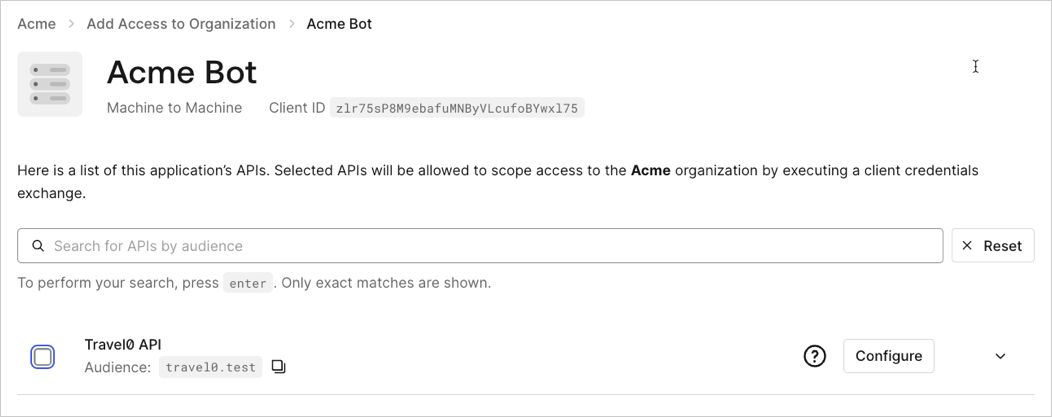
To remove the association between an application’s client grant and an organization via the [Auth0 Dashboard](https://manage.auth0.com/):
1. Navigate to **Organizations** and choose the organization you wish to remove the association from.
2. Select the **Machine-to-Machine Access** tab.
3. Choose an application.
4. Uncheck the box next to the APIs you wish to disassociate with the organization.
5. Click **Save**.
 Associations between application client grants and organizations can be deleted via the [Disassociate client grants from organizations](https://auth0.com/docs/api/management/v2/organizations/delete-client-grants-by-grant-id) endpoint:
```bash lines theme={null}
curl -X DELETE --location "https://{yourDomain}/api/v2/organizations/{ORG_id}/client-grants/{GRANT_ID}" \
--header 'authorization: Bearer MGMT_API_ACCESS_TOKEN' ;
```
Associations between application client grants and organizations can be deleted via the [Disassociate client grants from organizations](https://auth0.com/docs/api/management/v2/organizations/delete-client-grants-by-grant-id) endpoint:
```bash lines theme={null}
curl -X DELETE --location "https://{yourDomain}/api/v2/organizations/{ORG_id}/client-grants/{GRANT_ID}" \
--header 'authorization: Bearer MGMT_API_ACCESS_TOKEN' ;
```