> ## Documentation Index
> Fetch the complete documentation index at: https://auth0.com/llms.txt
> Use this file to discover all available pages before exploring further.
> Describes how to link user accounts with a regular web app using server-side code using a sample scenario.
# User Account Linking: Server-Side Implementation
Auth0 supports the linking of user accounts from various identity providers. You can use server-side code to link accounts on a regular web application, engaging the user and asking them for permission before proceeding. Your code will authenticate users and search for and identify users using their email addresses. Your application will then prompt the user to link their accounts by authenticating with the target account's credentials, and later link the accounts.
You can find the full source of this sample application [on GitHub](https://github.com/auth0-samples/auth0-link-accounts-sample/tree/master/RegularWebApp).
1. Log the user into your application.
The user authenticates to your application using [Universal Login](/docs/authenticate/login/auth0-universal-login). To learn more, read the [Regular Web App Quickstart](/docs/quickstart/webapp), asking for a token for the Auth0 Management API audience (audience=`https://{yourDomain}/api/v2/`).
2. Search for users with identical email addresses.
You can get the user profile and the list of users with the same verified email.
```javascript lines expandable theme={null}
router.get("/", async (req, res) => {
const { sub, email_verified } = req.openid.user;
//fetch user profile containing the user_metadata and app_metadata properties
try {
let getUsersWithSameVerifiedEmail = [];
const getUserProfile = auth0Client.getUser(sub);
if (email_verified)
// account linking is only offered verified email
getUsersWithSameVerifiedEmail = auth0Client.getUsersWithSameVerifiedEmail(
req.openid.user
);
const [user, suggestedUsers] = await Promise.all([
getUserProfile,
getUsersWithSameVerifiedEmail,
]);
const flashError = clear(req);
res.render("user", {
user,
suggestedUsers,
wrongAccountError: flashError && flashError === Errors.WrongAccount,
});
} catch (err) {
debug("GET /user[s] failed: %o", err);
res.render("error", err);
}
});
```
To get a list of all of the user records with the same email address, your application calls the Auth0 Management API's [Get Users By Email endpoint](https://auth0.com/docs/api/v2#!/users-by-email/get_users_by_email) using a [Management API Access Token](/docs/secure/tokens/access-tokens/management-api-access-tokens) with the `read:users` scope.
```javascript lines theme={null}
const request = require('request');
class Auth0Client {
...
async getUsersWithSameVerifiedEmail({ sub, email }) {
return await this.request({
url: `${process.env.ISSUER_BASE_URL}/api/v2/users-by-email?email=${email}`,
});
}
```
3. Prompt the user to link accounts.
1. If Auth0 returns one or more records with matching email addresses, the user will see the list along with the following message prompting them to link the accounts.
2. If the user wants to link a given account, they can click **Link** next to the appropriate account.
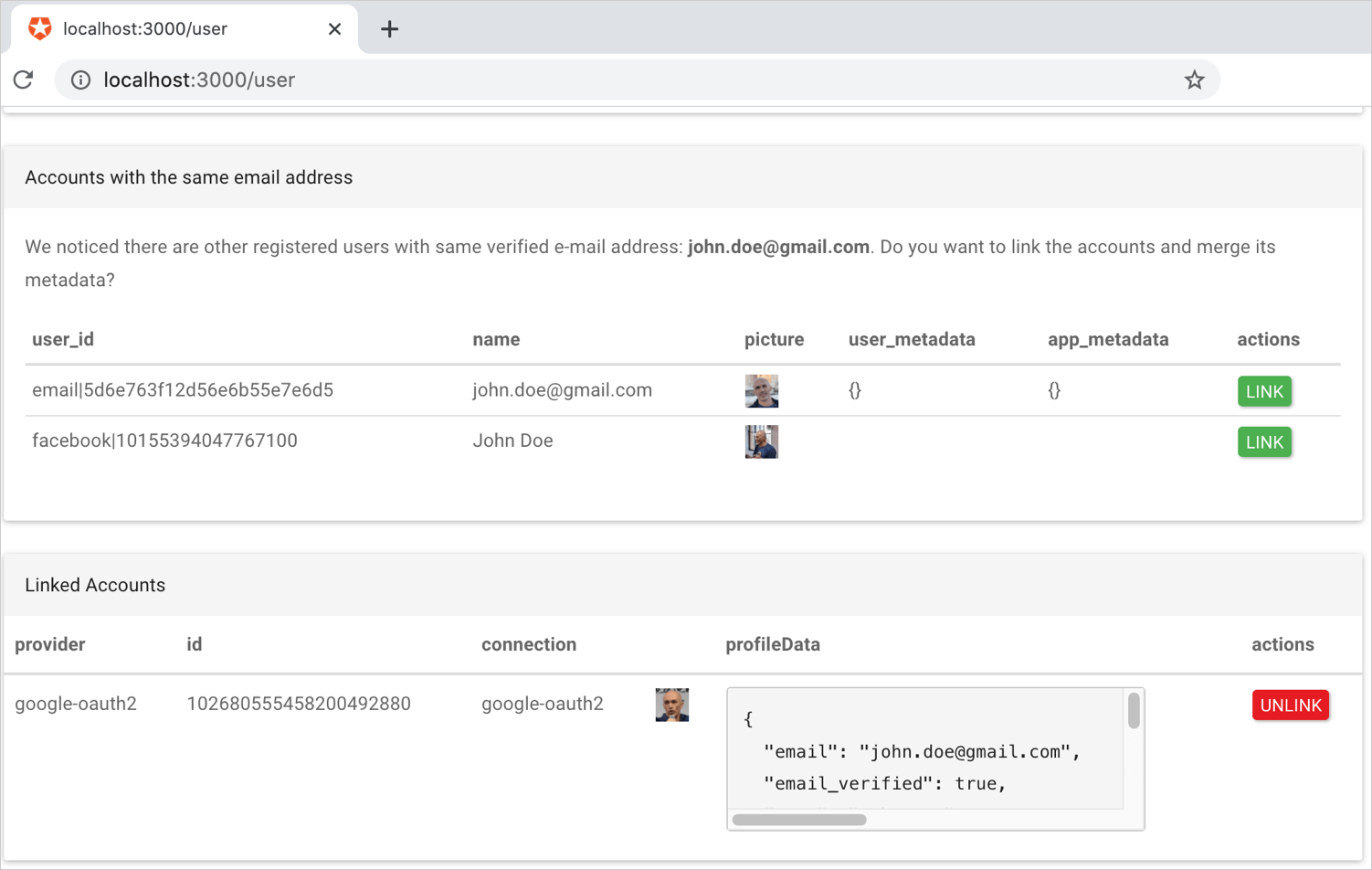 4. When the user clicks **Link**, your application will ask the user to authenticate with the target account, and then perform account linking.
To retain and merge the `user_metadata` from the secondary account, you must retrieve and merge it into the metadata for the primary account before calling the API endpoint. After the accounts are linked, the metadata for the secondary account is discarded.
When you initiate account linking, you can select which identity will be used as the primary account and which as the secondary. This choice will depend on which set of attributes you want to retain in the primary profile.
The following code snippet shows how to verify and merge metadata:
```javascript lines expandable theme={null}
async function accountLink(req, res, next) {
const {
linking: { targetUserId },
} = req.appSession;
const { sub: authenticatedTargetUserId } = req.openidTokens.claims();
if (authenticatedTargetUserId !== targetUserId) {
debug(
"Skipping account linking as the authenticated user(%s) is different than target linking user (%s)",
authenticatedTargetUserId,
targetUserId
);
set(req, Errors.WrongAccount);
return next();
}
debug(
"User %s succesfully authenticated. Account linking with %s... ",
authenticatedTargetUserId,
targetUserId
);
const { id_token: targetIdToken } = req.openidTokens;
const { sub: primaryUserId } = req.appSession.claims;
try {
await mergeMetadata(primaryUserId, authenticatedTargetUserId);
await auth0Client.linkAccounts(primaryUserId, targetIdToken);
debug("Accounts linked.");
} catch (err) {
debug("Linking failed %o", err);
} finally {
next();
}
}
```
5. Your application calls the Auth0 Management API's [Link a User Account endpoint](https://auth0.com/docs/api/v2#!/Users/post_identities) using a [Management API Access Token](/docs/secure/tokens/access-tokens/management-api-access-tokens) with the `update:users` scope.
## Metadata merge example
The following example shows explicitly how the `user_metadata` and `app_metadata` from the secondary account gets merged into the primary account using the [Node.js Auth0 SDK for API V2](https://github.com/auth0/node-auth0).
```javascript lines expandable theme={null}
/*
* Recursively merges user_metadata and app_metadata from secondary into primary user.
* Data of primary user takes preponderance.
* Array fields are joined.
*/
async function mergeMetadata(primaryUserId, secondaryUserId) {
// load both users with metedata.
const [primaryUser, secondaryUser] = await Promise.all(
[primaryUserId, secondaryUserId].map((uid) => auth0Client.getUser(uid))
);
const customizerCallback = function (objectValue, sourceValue) {
if (_.isArray(objectValue)) {
return sourceValue.concat(objectValue);
}
};
const mergedUserMetadata = _.merge(
{},
secondaryUser.user_metadata,
primaryUser.user_metadata,
customizerCallback
);
const mergedAppMetadata = _.merge(
{},
secondaryUser.app_metadata,
primaryUser.app_metadata,
customizerCallback
);
await auth0Client.updateUser(primaryUserId, {
user_metadata: mergedUserMetadata,
app_metadata: mergedAppMetadata,
});
}
```
4. When the user clicks **Link**, your application will ask the user to authenticate with the target account, and then perform account linking.
To retain and merge the `user_metadata` from the secondary account, you must retrieve and merge it into the metadata for the primary account before calling the API endpoint. After the accounts are linked, the metadata for the secondary account is discarded.
When you initiate account linking, you can select which identity will be used as the primary account and which as the secondary. This choice will depend on which set of attributes you want to retain in the primary profile.
The following code snippet shows how to verify and merge metadata:
```javascript lines expandable theme={null}
async function accountLink(req, res, next) {
const {
linking: { targetUserId },
} = req.appSession;
const { sub: authenticatedTargetUserId } = req.openidTokens.claims();
if (authenticatedTargetUserId !== targetUserId) {
debug(
"Skipping account linking as the authenticated user(%s) is different than target linking user (%s)",
authenticatedTargetUserId,
targetUserId
);
set(req, Errors.WrongAccount);
return next();
}
debug(
"User %s succesfully authenticated. Account linking with %s... ",
authenticatedTargetUserId,
targetUserId
);
const { id_token: targetIdToken } = req.openidTokens;
const { sub: primaryUserId } = req.appSession.claims;
try {
await mergeMetadata(primaryUserId, authenticatedTargetUserId);
await auth0Client.linkAccounts(primaryUserId, targetIdToken);
debug("Accounts linked.");
} catch (err) {
debug("Linking failed %o", err);
} finally {
next();
}
}
```
5. Your application calls the Auth0 Management API's [Link a User Account endpoint](https://auth0.com/docs/api/v2#!/Users/post_identities) using a [Management API Access Token](/docs/secure/tokens/access-tokens/management-api-access-tokens) with the `update:users` scope.
## Metadata merge example
The following example shows explicitly how the `user_metadata` and `app_metadata` from the secondary account gets merged into the primary account using the [Node.js Auth0 SDK for API V2](https://github.com/auth0/node-auth0).
```javascript lines expandable theme={null}
/*
* Recursively merges user_metadata and app_metadata from secondary into primary user.
* Data of primary user takes preponderance.
* Array fields are joined.
*/
async function mergeMetadata(primaryUserId, secondaryUserId) {
// load both users with metedata.
const [primaryUser, secondaryUser] = await Promise.all(
[primaryUserId, secondaryUserId].map((uid) => auth0Client.getUser(uid))
);
const customizerCallback = function (objectValue, sourceValue) {
if (_.isArray(objectValue)) {
return sourceValue.concat(objectValue);
}
};
const mergedUserMetadata = _.merge(
{},
secondaryUser.user_metadata,
primaryUser.user_metadata,
customizerCallback
);
const mergedAppMetadata = _.merge(
{},
secondaryUser.app_metadata,
primaryUser.app_metadata,
customizerCallback
);
await auth0Client.updateUser(primaryUserId, {
user_metadata: mergedUserMetadata,
app_metadata: mergedAppMetadata,
});
}
```