> ## Documentation Index
> Fetch the complete documentation index at: https://auth0.com/llms.txt
> Use this file to discover all available pages before exploring further.
> Describes how to configure SMS and voice notifications for MFA.
# Configure SMS and Voice Notifications for MFA
export const AuthCodeGroup = ({children, dropdown}) => {
const [processedChildren, setProcessedChildren] = useState(children);
useEffect(() => {
let unsubscribe = null;
function init() {
unsubscribe = window.autorun(() => {
const processChildren = node => {
if (typeof node === "string") {
let processedNode = node;
for (const [key, value] of window.rootStore.variableStore.values.entries()) {
const escapedKey = key.replaceAll(/[.*+?^${}()|[\]\\]/g, (String.raw)`\$&`);
processedNode = processedNode.replaceAll(new RegExp(escapedKey, "g"), value);
}
return processedNode;
} else if (Array.isArray(node)) {
return node.map(processChildren);
} else if (node && node.props && node.props.children) {
return {
...node,
props: {
...node.props,
children: processChildren(node.props.children)
}
};
}
return node;
};
setProcessedChildren(processChildren(children));
});
}
if (window.rootStore) {
init();
} else {
window.addEventListener("adu:storeReady", init);
}
return () => {
window.removeEventListener("adu:storeReady", init);
unsubscribe?.();
};
}, [children]);
return {processedChildren};
};
export const AuthCodeBlock = ({filename, icon, language, highlight, children}) => {
const [displayText, setDisplayText] = useState(children);
const [copyText, setCopyText] = useState(children);
const wrapperRef = React.useRef(null);
useEffect(() => {
let unsubscribe = null;
function init() {
if (!window.autorun || !window.rootStore) {
return;
}
unsubscribe = window.autorun(() => {
let processedChildrenForDisplay = children;
let processedChildrenForCopy = children;
for (const [key, value] of window.rootStore.variableStore.values.entries()) {
const escapedKey = key.replaceAll(/[.*+?^${}()|[\]\\]/g, (String.raw)`\$&`);
let displayValue = value;
if (key === "{yourClientSecret}" && value !== "{yourClientSecret}") {
displayValue = value.substring(0, 3) + "*****MASKED*****";
}
processedChildrenForDisplay = processedChildrenForDisplay.replaceAll(new RegExp(escapedKey, "g"), displayValue);
processedChildrenForCopy = processedChildrenForCopy.replaceAll(new RegExp(escapedKey, "g"), value);
}
setDisplayText(processedChildrenForDisplay);
setCopyText(processedChildrenForCopy);
});
}
if (window.rootStore) {
init();
} else {
window.addEventListener("adu:storeReady", init);
}
return () => {
window.removeEventListener("adu:storeReady", init);
unsubscribe?.();
};
}, [children]);
useEffect(() => {
if (!wrapperRef.current) return;
const originalWriteText = navigator.clipboard.writeText.bind(navigator.clipboard);
let isOverriding = false;
const handleClick = e => {
const button = e.target.closest('[data-testid="copy-code-button"]');
if (!button || !wrapperRef.current.contains(button)) return;
isOverriding = true;
navigator.clipboard.writeText = text => {
if (isOverriding) {
isOverriding = false;
navigator.clipboard.writeText = originalWriteText;
return originalWriteText(copyText);
}
return originalWriteText(text);
};
setTimeout(() => {
if (isOverriding) {
isOverriding = false;
navigator.clipboard.writeText = originalWriteText;
}
}, 100);
};
const wrapper = wrapperRef.current;
wrapper.addEventListener('click', handleClick, true);
return () => {
wrapper.removeEventListener('click', handleClick, true);
if (navigator.clipboard.writeText !== originalWriteText) {
navigator.clipboard.writeText = originalWriteText;
}
};
}, [copyText]);
return
{displayText}
;
};
The Unified Phone Experience centralizes all your phone provider configurations in one place in your tenant, so you don’t need to configure the same phone provider multiple times for various phone authentication factors. To learn more, read [Use Auth0's Unified Phone Experience for Multi-Factor Authentication](/docs/customize/phone-messages/unified-phone/use-auth0s-unified-phone-experience-for-multi-factor-authentication).
If you use SMS or voice as authentication factors, when an end user attempts to authenticate with your application, they are sent a code via SMS or voice, which they will have to enter to complete the transaction. This implies that they both know their login credentials and are in possession of the device that they have registered for MFA use.
You can configure the SMS and Voice factor using the Dashboard or the Management API to send messages through SMS, voice, or to let the end users choose how they want the code to be delivered. You can configure your delivery provider using Actions, configure your Twilio account, or if you want to send customers SMS only, configure Auth0's default message delivery service. You must use the Universal Login experience to enable voice notifications for MFA.
Both your specific login implementation and your Auth0 plan or custom agreement affect whether this feature is available. To learn more, read [Pricing](https://auth0.com/pricing).
## How it works
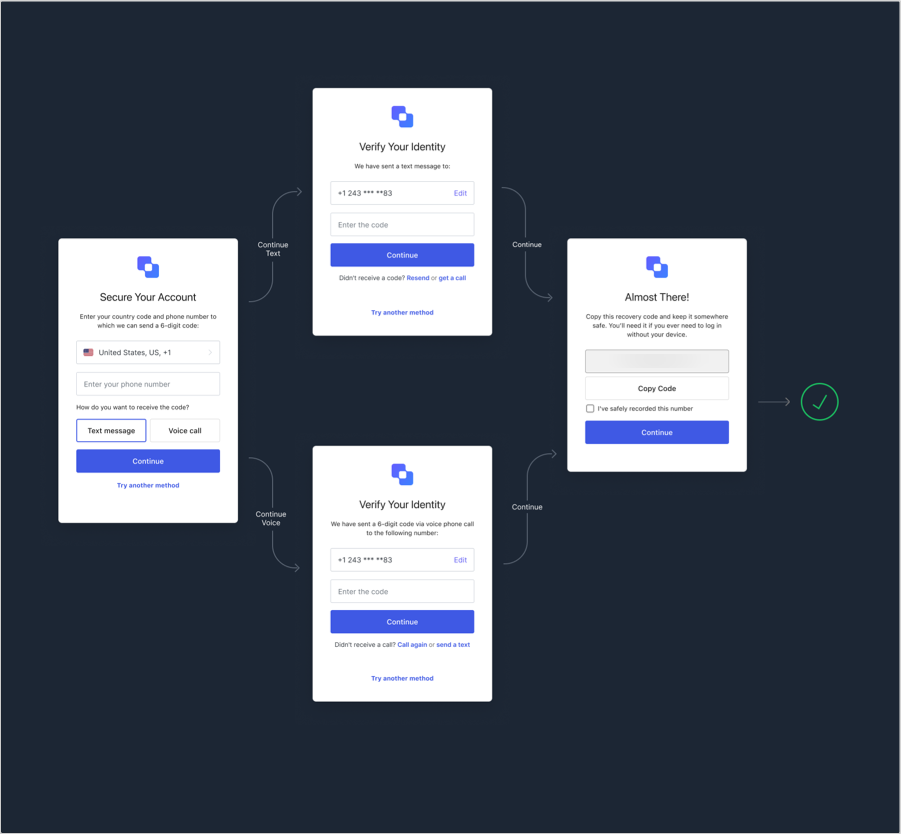
When SMS and Voice are enabled, users are given the option to enroll by getting the code sent by SMS or voice:
 When you only enable SMS, the flow is simpler:
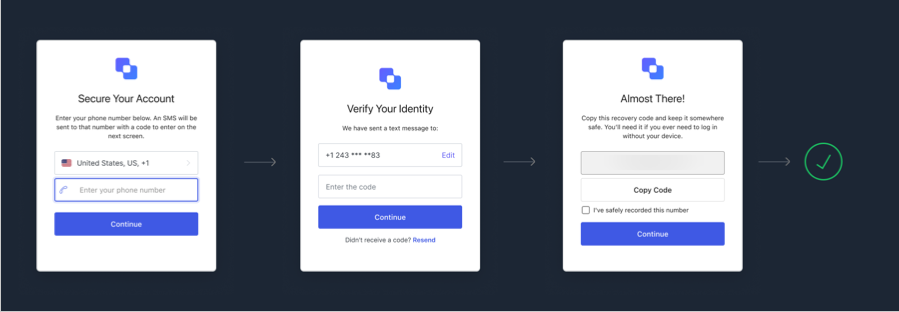 After users are enrolled, the next time they authenticate they will get the voice or SMS message at their registered phone.
## Use the Dashboard
1. Go to [Dashboard > Security > Multi-factor Auth](https://manage.auth0.com/#/multifactor-auth).
2. Click **Phone Message** and enable the toggle switch at the top.
3. Select your preferred message delivery provider.
4. To allow users to authenticate with SMS and voice, you must enable the SMS and voice factors and select your preferred delivery method:
1. **Auth0**: You can't use this provider to send voice messages. Sends SMS messages using Auth0's internally-configured SMS delivery provider. It can be used for evaluation and testing purposes only, and there is a maximum of 100 messages per tenant during the entire tenant lifetime. New codes are not received after reaching the 100 message limit.
2. **Twilio**: Sends the messages using the [Twilio Programmable SMS API](https://www.twilio.com/sms) for SMS or [Twilio Programmable Voice API](https://www.twilio.com/voice) for voice. Use Twilio Life Credentials, not Test Credentials, which are only meant to send messages in a production environment.
3. **Custom**: Sends the messages by invoking an Action in the [Send Phone Message Flow](/docs/customize/actions/explore-triggers/mfa-notifications-trigger).
You can also choose to give users the option of getting SMS text messages, voice calls, or both.
### Twilio configuration
Be advised, Twilio may take up to eight (8) weeks to port and verify bulk imports. To learn more, visit the [Twilio Help Center](https://help.twilio.com/articles/223179468-How-long-does-it-take-to-port-a-number-to-Twilio).
If you choose to deliver SMS via Twilio, follow these steps to configure your SMS factor.
1. Open an account with Twilio. You will need a [Twilio Account SID](https://www.twilio.com/help/faq/twilio-basics/what-is-an-application-sid) and a [Twilio Auth Token](https://www.twilio.com/help/faq/twilio-basics/what-is-the-auth-token-and-how-can-i-change-it). These are the Twilio API credentials that Auth0 will use to send an SMS to the user.
2. You may also need to enable permissions for your geographic region for [SMS](https://support.twilio.com/hc/en-us/articles/223181108-How-International-SMS-Permissions-work) or [voice](https://www.twilio.com/console/voice/calls/geo-permissions). If you use voice, your account needs to have a Twilio phone number enabled to make voice calls. This can be an external phone number [verified with Twilio](https://support.twilio.com/hc/en-us/articles/223180048-Adding-a-Verified-Phone-Number-or-Caller-ID-with-Twilio) or you can purchase and set up a Twilio phone number from within your account.
3. Configure the connection. Go to [Dashboard > Security - Multi-factor Auth](https://manage.auth0.com/#/security/mfa) and choose **Phone Message**.
4. Under **Choose your delivery provider**, choose **Twilio** and choose a delivery method.
5. Enter your **Twilio Account SID** and **Twilio Auth Token** in the appropriate fields.
6. Choose your **SMS Source**.
1. If you choose **Use From**, you will need to enter the **From** phone number that users will see as the sender of the SMS. You may also configure this in Twilio.
2. If you choose **Use Messaging Services**, you will need to enter a [Messaging Service SID](https://www.twilio.com/docs/sms/services/services-send-messages).
3. If you are using voice, you always need to configure **From** even if you are using **Message Services** for SMS. Make sure the phone number is configured to send both SMS and voice messages.
7. Click **Save**.
### Customize SMS or voice message templates
You can customize your SMS and voice message templates. To learn more, read [Customize SMS and Voice Messages](/docs/customize/customize-sms-or-voice-messages).
## Use the Management API
You can use the Management API to configure which message delivery methods are enabled by using the `/api/v2/guardian/factors/phone/message-types` endpoint. The `message_types` parameter is an array that can have `["sms"]`, `["voice"]`, or `["sms", "voice"]`. You need a [Management API access token](/docs/secure/tokens/access-tokens/management-api-access-tokens) with the `update:guardian_factors` scope as a bearer token to call the API:
```bash cURL theme={null}
curl --request PUT \
--url 'https://{yourDomain}/api/v2/guardian/factors/phone/message-types' \
--header 'authorization: Bearer MGMT_API_ACCESS_TOKEN' \
--header 'content-type: application/json' \
--data '{ "message_types": ["sms", "voice"] }'
```
```csharp C# theme={null}
var client = new RestClient("https://{yourDomain}/api/v2/guardian/factors/phone/message-types");
var request = new RestRequest(Method.PUT);
request.AddHeader("content-type", "application/json");
request.AddHeader("authorization", "Bearer MGMT_API_ACCESS_TOKEN");
request.AddParameter("application/json", "{ "message_types": ["sms", "voice"] }", ParameterType.RequestBody);
IRestResponse response = client.Execute(request);
```
```go Go theme={null}
package main
import (
"fmt"
"strings"
"net/http"
"io/ioutil"
)
func main() {
url := "https://{yourDomain}/api/v2/guardian/factors/phone/message-types"
payload := strings.NewReader("{ "message_types": ["sms", "voice"] }")
req, _ := http.NewRequest("PUT", url, payload)
req.Header.Add("content-type", "application/json")
req.Header.Add("authorization", "Bearer MGMT_API_ACCESS_TOKEN")
res, _ := http.DefaultClient.Do(req)
defer res.Body.Close()
body, _ := ioutil.ReadAll(res.Body)
fmt.Println(res)
fmt.Println(string(body))
}
```
```java Java theme={null}
HttpResponse response = Unirest.put("https://{yourDomain}/api/v2/guardian/factors/phone/message-types")
.header("content-type", "application/json")
.header("authorization", "Bearer MGMT_API_ACCESS_TOKEN")
.body("{ "message_types": ["sms", "voice"] }")
.asString();
```
```javascript Node.JS theme={null}
var axios = require("axios").default;
var options = {
method: 'PUT',
url: 'https://{yourDomain}/api/v2/guardian/factors/phone/message-types',
headers: {
'content-type': 'application/json',
authorization: 'Bearer MGMT_API_ACCESS_TOKEN'
},
data: {message_types: ['sms', 'voice']}
};
axios.request(options).then(function (response) {
console.log(response.data);
}).catch(function (error) {
console.error(error);
});
```
```php PHP theme={null}
$curl = curl_init();
curl_setopt_array($curl, [
CURLOPT_URL => "https://{yourDomain}/api/v2/guardian/factors/phone/message-types",
CURLOPT_RETURNTRANSFER => true,
CURLOPT_ENCODING => "",
CURLOPT_MAXREDIRS => 10,
CURLOPT_TIMEOUT => 30,
CURLOPT_HTTP_VERSION => CURL_HTTP_VERSION_1_1,
CURLOPT_CUSTOMREQUEST => "PUT",
CURLOPT_POSTFIELDS => "{ "message_types": ["sms", "voice"] }",
CURLOPT_HTTPHEADER => [
"authorization: Bearer MGMT_API_ACCESS_TOKEN",
"content-type: application/json"
],
]);
$response = curl_exec($curl);
$err = curl_error($curl);
curl_close($curl);
if ($err) {
echo "cURL Error #:" . $err;
} else {
echo $response;
}
```
```python Python theme={null}
import http.client
conn = http.client.HTTPSConnection("")
payload = "{ "message_types": ["sms", "voice"] }"
headers = {
'content-type': "application/json",
'authorization': "Bearer MGMT_API_ACCESS_TOKEN"
}
conn.request("PUT", "/{yourDomain}/api/v2/guardian/factors/phone/message-types", payload, headers)
res = conn.getresponse()
data = res.read()
print(data.decode("utf-8"))
```
```ruby Ruby theme={null}
require 'uri'
require 'net/http'
require 'openssl'
url = URI("https://{yourDomain}/api/v2/guardian/factors/phone/message-types")
http = Net::HTTP.new(url.host, url.port)
http.use_ssl = true
http.verify_mode = OpenSSL::SSL::VERIFY_NONE
request = Net::HTTP::Put.new(url)
request["content-type"] = 'application/json'
request["authorization"] = 'Bearer MGMT_API_ACCESS_TOKEN'
request.body = "{ "message_types": ["sms", "voice"] }"
response = http.request(request)
puts response.read_body
```
## Integrated SMS messaging providers
Auth0 defaults to support for sending messages through Twilio. However, you can use a different SMS provider, and add specific logic before sending a message or send a different message depending on the user or the application. To do this, you configure SMS MFA to use one of our integrated [Actions](/docs/customize/actions) in the [Send Phone Message Flow](/docs/customize/actions/explore-triggers/mfa-notifications-trigger).
Integrated SMS messaging providers include:
* [Amazon SNS](https://marketplace.auth0.com/integrations/amazon-sms-provider)
* [ClickSend](https://marketplace.auth0.com/integrations/clicksend-sms)
* [Esendex](https://marketplace.auth0.com/integrations/esendex-sms-provider)
* [Infobip](https://marketplace.auth0.com/integrations/infobip-sms-provider)
* [Mitto](https://marketplace.auth0.com/integrations/mitto-sms-provider)
* [Telesign](https://marketplace.auth0.com/integrations/telesign-sms-verification)
## Custom phone providers
You can also configure custom phone providers using Actions. To learn more, read [Configure a Custom Phone Provider](/docs/customize/phone-messages/configure-phone-messaging-providers/configure-a-custom-phone-provider).
## Security considerations
When using any phone messaging provider, be aware that attackers abusing the signup flow could cause you financial damage.
Auth0 limits a single user to send up to 10 SMS or voice messages per hour, and OTP flows via email or authenticators are limited to five requests every five minutes. (The burst rate is 10 but only 1 voice message per hour will be sent for new requests.) To further protect your account, consider:
* Enabling [Suspicious IP Throttling](/docs/secure/attack-protection/suspicious-ip-throttling#signup-attempts). Auth0 will block an IP if it attempts to do more than 50 signup requests per minute.
* Enabling [Log Streaming](/docs/customize/log-streams) and creating alerts using your favorite monitoring tool when you see spikes in the number of `gd_send_voice`, `gd_send_voice_failure`, `gd_send_sms`, or `gd_send_sms_failure` [log events](/docs/deploy-monitor/logs/log-event-type-codes).
Phone Messaging providers have additional protections. If you are using Twilio, read the [Twilio's Anti-Fraud Developer Guide](https://www.twilio.com/docs/usage/anti-fraud-developer-guide). Consider the following options:
* Limit the countries that you will send messages for [SMS](https://support.twilio.com/hc/en-us/articles/223181108-How-International-SMS-Permissions-work) and [Voice](https://support.twilio.com/hc/en-us/articles/223180228-International-Voice-Dialing-Geographic-Permissions-Geo-Permissions-and-How-They-Work). This is particularly useful if there are countries with a higher risk of [toll fraud](https://www.twilio.com/learn/voice-and-video/toll-fraud) or more expensive calling rates in which you do not typically do business.
* Enable Twilio [usage triggers](https://support.twilio.com/hc/en-us/articles/223132387-Protect-your-Twilio-project-from-Fraud-with-Usage-Triggers) to protect your account against fraud and coding mistakes.
## Learn more
* [Enroll and Challenge SMS and Voice Authenticators](/docs/secure/multi-factor-authentication/authenticate-using-ropg-flow-with-mfa/enroll-challenge-sms-voice-authenticators)
* [Attack Protection](/docs/secure/attack-protection)
* [Log Streams](/docs/customize/log-streams)
After users are enrolled, the next time they authenticate they will get the voice or SMS message at their registered phone.
## Use the Dashboard
1. Go to [Dashboard > Security > Multi-factor Auth](https://manage.auth0.com/#/multifactor-auth).
2. Click **Phone Message** and enable the toggle switch at the top.
3. Select your preferred message delivery provider.
4. To allow users to authenticate with SMS and voice, you must enable the SMS and voice factors and select your preferred delivery method:
1. **Auth0**: You can't use this provider to send voice messages. Sends SMS messages using Auth0's internally-configured SMS delivery provider. It can be used for evaluation and testing purposes only, and there is a maximum of 100 messages per tenant during the entire tenant lifetime. New codes are not received after reaching the 100 message limit.
2. **Twilio**: Sends the messages using the [Twilio Programmable SMS API](https://www.twilio.com/sms) for SMS or [Twilio Programmable Voice API](https://www.twilio.com/voice) for voice. Use Twilio Life Credentials, not Test Credentials, which are only meant to send messages in a production environment.
3. **Custom**: Sends the messages by invoking an Action in the [Send Phone Message Flow](/docs/customize/actions/explore-triggers/mfa-notifications-trigger).
You can also choose to give users the option of getting SMS text messages, voice calls, or both.
### Twilio configuration
Be advised, Twilio may take up to eight (8) weeks to port and verify bulk imports. To learn more, visit the [Twilio Help Center](https://help.twilio.com/articles/223179468-How-long-does-it-take-to-port-a-number-to-Twilio).
If you choose to deliver SMS via Twilio, follow these steps to configure your SMS factor.
1. Open an account with Twilio. You will need a [Twilio Account SID](https://www.twilio.com/help/faq/twilio-basics/what-is-an-application-sid) and a [Twilio Auth Token](https://www.twilio.com/help/faq/twilio-basics/what-is-the-auth-token-and-how-can-i-change-it). These are the Twilio API credentials that Auth0 will use to send an SMS to the user.
2. You may also need to enable permissions for your geographic region for [SMS](https://support.twilio.com/hc/en-us/articles/223181108-How-International-SMS-Permissions-work) or [voice](https://www.twilio.com/console/voice/calls/geo-permissions). If you use voice, your account needs to have a Twilio phone number enabled to make voice calls. This can be an external phone number [verified with Twilio](https://support.twilio.com/hc/en-us/articles/223180048-Adding-a-Verified-Phone-Number-or-Caller-ID-with-Twilio) or you can purchase and set up a Twilio phone number from within your account.
3. Configure the connection. Go to [Dashboard > Security - Multi-factor Auth](https://manage.auth0.com/#/security/mfa) and choose **Phone Message**.
4. Under **Choose your delivery provider**, choose **Twilio** and choose a delivery method.
5. Enter your **Twilio Account SID** and **Twilio Auth Token** in the appropriate fields.
6. Choose your **SMS Source**.
1. If you choose **Use From**, you will need to enter the **From** phone number that users will see as the sender of the SMS. You may also configure this in Twilio.
2. If you choose **Use Messaging Services**, you will need to enter a [Messaging Service SID](https://www.twilio.com/docs/sms/services/services-send-messages).
3. If you are using voice, you always need to configure **From** even if you are using **Message Services** for SMS. Make sure the phone number is configured to send both SMS and voice messages.
7. Click **Save**.
### Customize SMS or voice message templates
You can customize your SMS and voice message templates. To learn more, read [Customize SMS and Voice Messages](/docs/customize/customize-sms-or-voice-messages).
## Use the Management API
You can use the Management API to configure which message delivery methods are enabled by using the `/api/v2/guardian/factors/phone/message-types` endpoint. The `message_types` parameter is an array that can have `["sms"]`, `["voice"]`, or `["sms", "voice"]`. You need a [Management API access token](/docs/secure/tokens/access-tokens/management-api-access-tokens) with the `update:guardian_factors` scope as a bearer token to call the API:
```bash cURL theme={null}
curl --request PUT \
--url 'https://{yourDomain}/api/v2/guardian/factors/phone/message-types' \
--header 'authorization: Bearer MGMT_API_ACCESS_TOKEN' \
--header 'content-type: application/json' \
--data '{ "message_types": ["sms", "voice"] }'
```
```csharp C# theme={null}
var client = new RestClient("https://{yourDomain}/api/v2/guardian/factors/phone/message-types");
var request = new RestRequest(Method.PUT);
request.AddHeader("content-type", "application/json");
request.AddHeader("authorization", "Bearer MGMT_API_ACCESS_TOKEN");
request.AddParameter("application/json", "{ "message_types": ["sms", "voice"] }", ParameterType.RequestBody);
IRestResponse response = client.Execute(request);
```
```go Go theme={null}
package main
import (
"fmt"
"strings"
"net/http"
"io/ioutil"
)
func main() {
url := "https://{yourDomain}/api/v2/guardian/factors/phone/message-types"
payload := strings.NewReader("{ "message_types": ["sms", "voice"] }")
req, _ := http.NewRequest("PUT", url, payload)
req.Header.Add("content-type", "application/json")
req.Header.Add("authorization", "Bearer MGMT_API_ACCESS_TOKEN")
res, _ := http.DefaultClient.Do(req)
defer res.Body.Close()
body, _ := ioutil.ReadAll(res.Body)
fmt.Println(res)
fmt.Println(string(body))
}
```
```java Java theme={null}
HttpResponse response = Unirest.put("https://{yourDomain}/api/v2/guardian/factors/phone/message-types")
.header("content-type", "application/json")
.header("authorization", "Bearer MGMT_API_ACCESS_TOKEN")
.body("{ "message_types": ["sms", "voice"] }")
.asString();
```
```javascript Node.JS theme={null}
var axios = require("axios").default;
var options = {
method: 'PUT',
url: 'https://{yourDomain}/api/v2/guardian/factors/phone/message-types',
headers: {
'content-type': 'application/json',
authorization: 'Bearer MGMT_API_ACCESS_TOKEN'
},
data: {message_types: ['sms', 'voice']}
};
axios.request(options).then(function (response) {
console.log(response.data);
}).catch(function (error) {
console.error(error);
});
```
```php PHP theme={null}
$curl = curl_init();
curl_setopt_array($curl, [
CURLOPT_URL => "https://{yourDomain}/api/v2/guardian/factors/phone/message-types",
CURLOPT_RETURNTRANSFER => true,
CURLOPT_ENCODING => "",
CURLOPT_MAXREDIRS => 10,
CURLOPT_TIMEOUT => 30,
CURLOPT_HTTP_VERSION => CURL_HTTP_VERSION_1_1,
CURLOPT_CUSTOMREQUEST => "PUT",
CURLOPT_POSTFIELDS => "{ "message_types": ["sms", "voice"] }",
CURLOPT_HTTPHEADER => [
"authorization: Bearer MGMT_API_ACCESS_TOKEN",
"content-type: application/json"
],
]);
$response = curl_exec($curl);
$err = curl_error($curl);
curl_close($curl);
if ($err) {
echo "cURL Error #:" . $err;
} else {
echo $response;
}
```
```python Python theme={null}
import http.client
conn = http.client.HTTPSConnection("")
payload = "{ "message_types": ["sms", "voice"] }"
headers = {
'content-type': "application/json",
'authorization': "Bearer MGMT_API_ACCESS_TOKEN"
}
conn.request("PUT", "/{yourDomain}/api/v2/guardian/factors/phone/message-types", payload, headers)
res = conn.getresponse()
data = res.read()
print(data.decode("utf-8"))
```
```ruby Ruby theme={null}
require 'uri'
require 'net/http'
require 'openssl'
url = URI("https://{yourDomain}/api/v2/guardian/factors/phone/message-types")
http = Net::HTTP.new(url.host, url.port)
http.use_ssl = true
http.verify_mode = OpenSSL::SSL::VERIFY_NONE
request = Net::HTTP::Put.new(url)
request["content-type"] = 'application/json'
request["authorization"] = 'Bearer MGMT_API_ACCESS_TOKEN'
request.body = "{ "message_types": ["sms", "voice"] }"
response = http.request(request)
puts response.read_body
```
## Integrated SMS messaging providers
Auth0 defaults to support for sending messages through Twilio. However, you can use a different SMS provider, and add specific logic before sending a message or send a different message depending on the user or the application. To do this, you configure SMS MFA to use one of our integrated [Actions](/docs/customize/actions) in the [Send Phone Message Flow](/docs/customize/actions/explore-triggers/mfa-notifications-trigger).
Integrated SMS messaging providers include:
* [Amazon SNS](https://marketplace.auth0.com/integrations/amazon-sms-provider)
* [ClickSend](https://marketplace.auth0.com/integrations/clicksend-sms)
* [Esendex](https://marketplace.auth0.com/integrations/esendex-sms-provider)
* [Infobip](https://marketplace.auth0.com/integrations/infobip-sms-provider)
* [Mitto](https://marketplace.auth0.com/integrations/mitto-sms-provider)
* [Telesign](https://marketplace.auth0.com/integrations/telesign-sms-verification)
## Custom phone providers
You can also configure custom phone providers using Actions. To learn more, read [Configure a Custom Phone Provider](/docs/customize/phone-messages/configure-phone-messaging-providers/configure-a-custom-phone-provider).
## Security considerations
When using any phone messaging provider, be aware that attackers abusing the signup flow could cause you financial damage.
Auth0 limits a single user to send up to 10 SMS or voice messages per hour, and OTP flows via email or authenticators are limited to five requests every five minutes. (The burst rate is 10 but only 1 voice message per hour will be sent for new requests.) To further protect your account, consider:
* Enabling [Suspicious IP Throttling](/docs/secure/attack-protection/suspicious-ip-throttling#signup-attempts). Auth0 will block an IP if it attempts to do more than 50 signup requests per minute.
* Enabling [Log Streaming](/docs/customize/log-streams) and creating alerts using your favorite monitoring tool when you see spikes in the number of `gd_send_voice`, `gd_send_voice_failure`, `gd_send_sms`, or `gd_send_sms_failure` [log events](/docs/deploy-monitor/logs/log-event-type-codes).
Phone Messaging providers have additional protections. If you are using Twilio, read the [Twilio's Anti-Fraud Developer Guide](https://www.twilio.com/docs/usage/anti-fraud-developer-guide). Consider the following options:
* Limit the countries that you will send messages for [SMS](https://support.twilio.com/hc/en-us/articles/223181108-How-International-SMS-Permissions-work) and [Voice](https://support.twilio.com/hc/en-us/articles/223180228-International-Voice-Dialing-Geographic-Permissions-Geo-Permissions-and-How-They-Work). This is particularly useful if there are countries with a higher risk of [toll fraud](https://www.twilio.com/learn/voice-and-video/toll-fraud) or more expensive calling rates in which you do not typically do business.
* Enable Twilio [usage triggers](https://support.twilio.com/hc/en-us/articles/223132387-Protect-your-Twilio-project-from-Fraud-with-Usage-Triggers) to protect your account against fraud and coding mistakes.
## Learn more
* [Enroll and Challenge SMS and Voice Authenticators](/docs/secure/multi-factor-authentication/authenticate-using-ropg-flow-with-mfa/enroll-challenge-sms-voice-authenticators)
* [Attack Protection](/docs/secure/attack-protection)
* [Log Streams](/docs/customize/log-streams)