> ## Documentation Index
> Fetch the complete documentation index at: https://auth0.com/llms.txt
> Use this file to discover all available pages before exploring further.
> Learn how to use Demonstrating Proof-of-Possession (DPoP) to sender constrain access tokens in Auth0.
# Demonstrating Proof-of-Possession (DPoP)
Demonstrating Proof-of-Possession (DPoP) is an [OAuth 2.0 framework extension](https://datatracker.ietf.org/doc/draft-ietf-oauth-dpop/) that binds or [sender constrains](/docs/secure/sender-constraining) access tokens using asymmetric cryptography and JSON Web Tokens (JWTs) at the application layer. DPoP ensures that only the client application that requested the access token, which possesses the private key, can use it. This prevents the misuse of stolen tokens.
DPoP uses a public/private key to create a DPoP Proof as a signed JSON Web Token (JWT). The DPoP Proof contains:
* The client’s public key (`jwk`).
* The payload referencing the access token request, including the method (`htm`) and URI (`htu`).
* A signature created using the client’s private key.
* A unique ID (`jti`) for replay prevention.
* For every API request, a base64url-encoded SHA-256 hash (`ath`) of the access token.
* Optional: For public clients, a `nonce` claim to ensure the client application recently generated the DPoP Proof JWT.
The client application sends the DPoP Proof JWT in an access token request to the Auth0 Authorization Server. After the Auth0 Authorization Server validates the DPoP Proof JWT, it binds the issued access token to the client’s public key.
## Common use cases
Learn about some common DPoP use cases:
* **Single Page Applications (SPAs) and mobile applications:** As public clients, SPAs and mobile applications lack a trusted, confidential environment like a backend server to securely store client secrets, which makes them vulnerable to token theft. DPoP addresses this security vulnerability by binding access tokens to the client application’s public key, creating a DPoP Proof JWT. The client application signs the DPoP Proof JWT with its private key and sends in an authorization request. The Auth0 Authorization Server validates the DPoP Proof JWT, and, if valid, binds the issued access token to the client’s public key.
* **Third-party API integrations:** If an AI agent integrated with your client application calls a third-party API on the user’s behalf using a DPoP Proof JWT, then the resource server can cryptographically validate that the request is coming from the AI agent and not an unauthorized third party.
## Supported application grant types
Auth0 supports the following [application grant types](/docs/get-started/applications/application-grant-types) for sender constraining with DPoP:
| Grant type | Description |
| ----------------------------------------------------- | -------------------------------------------------------------------------------------------------------------------------- |
| `authorization_code` | Authorization Code Grant |
| `client_credentials` | Client Credentials Grant |
| `password` | Resource Owner Password Grant |
| `refresh_token` | Refresh Token Grant |
| `urn:ietf:params:oauth:grant-type:device_code` | Device Authorization Grant |
| `http://auth0.com/oauth/grant-type/password-realm` | Use an extension grant similar to the Resource Owner Password Grant that includes the ability to indicate a specific realm |
| `http://auth0.com/oauth/grant-type/passwordless/otp` | Passwordless Grant Request |
| `http://auth0.com/oauth/grant-type/mfa-oob` | Multi-factor Authentication OOB Grant Request |
| `http://auth0.com/oauth/grant-type/mfa-otp` | Multi-factor Authentication OTP Grant Request |
| `http://auth0.com/oauth/grant-type/mfa-recovery-code` | Multi-factor Authentication Recovery Grant Request |
| `urn:ietf:params:oauth:grant-type:token-exchange` | Custom Token Exchange Grant Request |
| `urn:okta:params:oauth:grant-type:webauthn` | WebAuthn Grant Request |
## How it works
The following sequence diagram illustrates the high-level steps in the Auth0 DPoP flow:
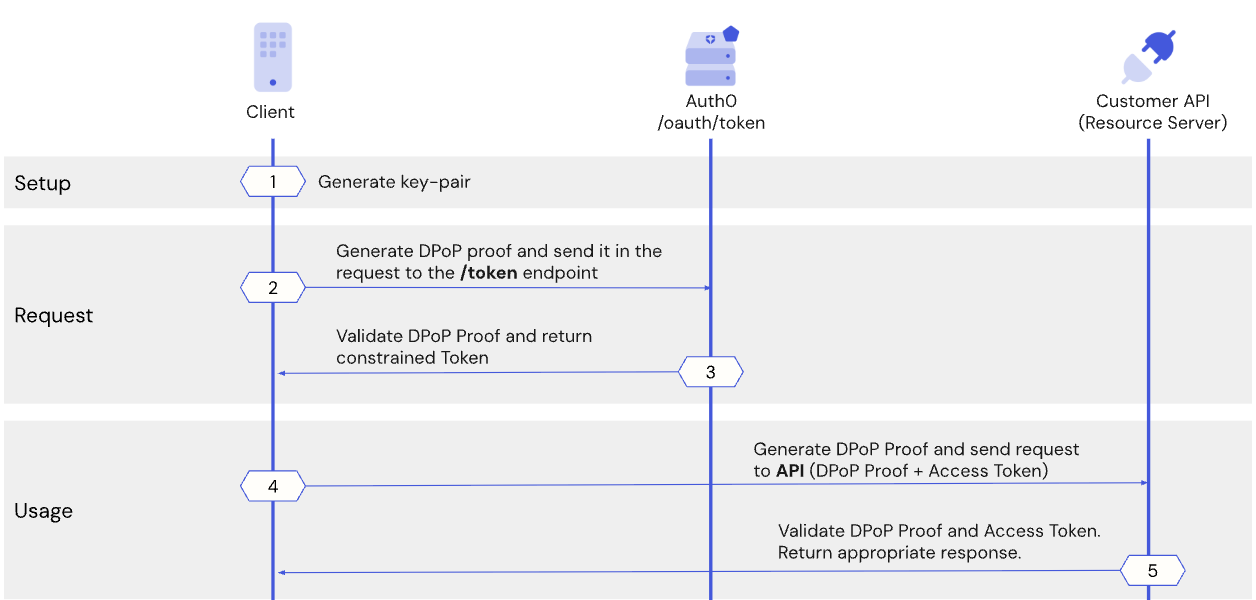 1. When requesting an access token from the Auth0 Authorization Server, the client application generates a unique cryptographic key pair and uses the public key to prove its possession of the private key.
2. The client application generates the DPoP Proof JWT and sends it to the /token endpoint on the Auth0 Authorization Server.
3. The Auth0 Authorization Server verifies the DPoP Proof JWT, and if valid, issues the access token and binds it to the client's public key.
4. Before calling the Customer API, the client application generates a new DPoP Proof JWT to prove it possesses the private key associated with the token. The client application sends the DPoP Proof JWT and the sender-constrained access token to the resource server.
5. The resource server verifies the DPoP Proof JWT, ensuring that only the valid owner of the token, or the original client application,can successfully use it to access protected resources. To request an access token from a refresh token, the client application generates a new DPoP Proof JWT, ensuring the refresh token is bound to the client's public key.
## Sender constrain tokens using DPoP in Auth0
The following diagram shows the end-to-end flow for sender constraining tokens using DPoP in Auth0:
1. When requesting an access token from the Auth0 Authorization Server, the client application generates a unique cryptographic key pair and uses the public key to prove its possession of the private key.
2. The client application generates the DPoP Proof JWT and sends it to the /token endpoint on the Auth0 Authorization Server.
3. The Auth0 Authorization Server verifies the DPoP Proof JWT, and if valid, issues the access token and binds it to the client's public key.
4. Before calling the Customer API, the client application generates a new DPoP Proof JWT to prove it possesses the private key associated with the token. The client application sends the DPoP Proof JWT and the sender-constrained access token to the resource server.
5. The resource server verifies the DPoP Proof JWT, ensuring that only the valid owner of the token, or the original client application,can successfully use it to access protected resources. To request an access token from a refresh token, the client application generates a new DPoP Proof JWT, ensuring the refresh token is bound to the client's public key.
## Sender constrain tokens using DPoP in Auth0
The following diagram shows the end-to-end flow for sender constraining tokens using DPoP in Auth0:
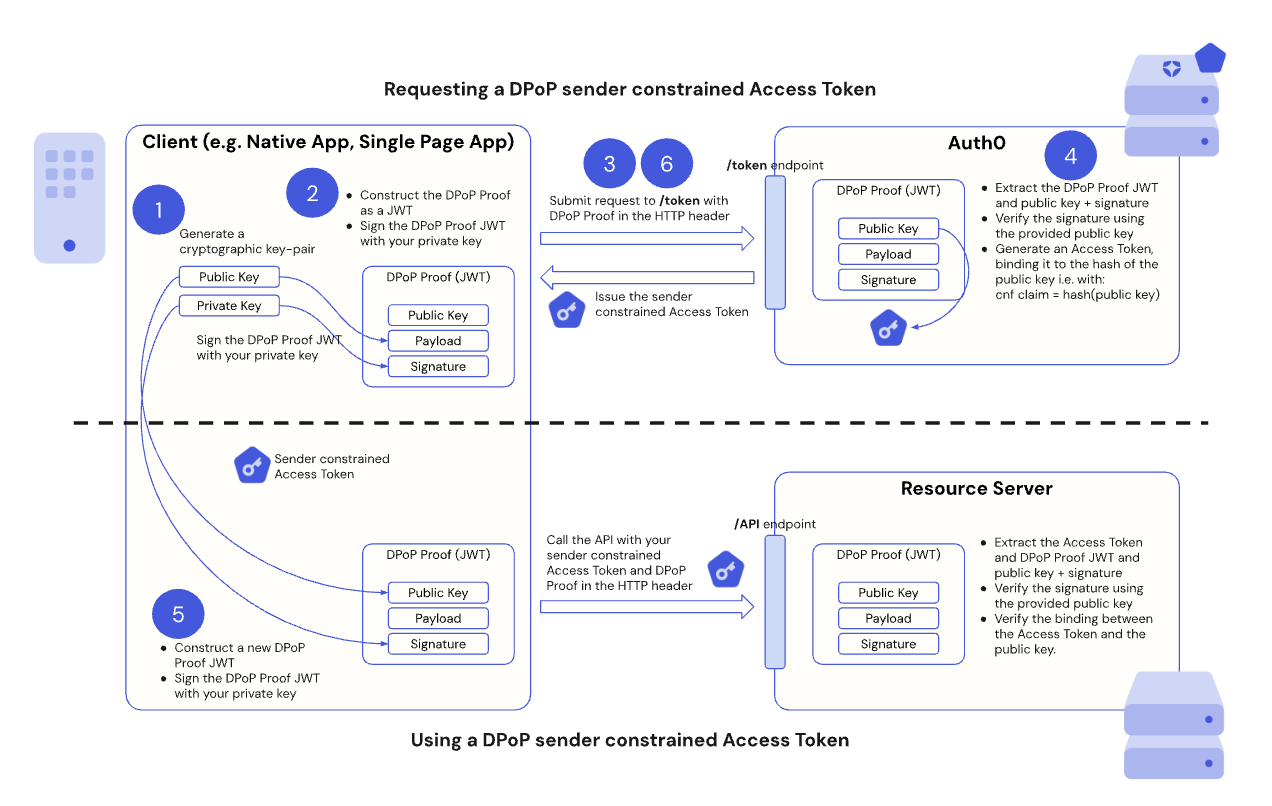 The following sections walk you step-by-step through the DPoP in Auth0 flow with code samples for implementation:
* [Prerequisites](#prerequisites)
* [Step 1: Client application generates a DPoP key pair](#step-1-client-application-generates-a-dpop-key-pair)
* [Step 2: Client application creates DPoP Proof JWT](#step-2-client-application-creates-a-dpop-proof-jwt)
* [Step 3: Client application requests a DPoP-bound token](#step-3-client-application-requests-a-dpop-bound-token)
* [Step 4: Auth0 Authorization Server validates the DPoP Proof JWT](#step-4-auth0-authorization-server-validates-the-dpop-proof-jwt)
* [Step 5: Client application calls API with the DPoP-bound token and DPoP Proof JWT](#step-5-client-application-calls-api-with-the-dpop-bound-token-and-dpop-proof-jwt)
* [Step 6: Handle token refresh with DPoP](#step-6-handle-token-refresh-with-dpop)
## Prerequisites
Before you begin, make sure you:
* [Configure sender constraining](/docs/secure/sender-constraining/configure-sender-constraining) for your client application and resource server.
## Step 1: Client application generates a DPoP key pair
For DPoP, the client application must generate an asymmetric cryptographic key pair. Auth0 supports the use of Elliptic Curve, such as in ES256 keys. This key pair is unique to your client application and should be securely stored, for example, in a hardware-backed keystore.
The client application keeps the private key secret while including the public key in the DPoP Proof JSON Web Token (JWT) that serves as the “proof of possession” in [Step 2](#step-2-client-application-creates-a-dpop-proof-jwt).
## Step 2: Client application creates a DPoP Proof JWT
Before requesting a DPoP-bound access token from the Auth0 Authorization Server’s `/token` endpoint, your client application must create a DPoP Proof JWT. A DPoP Proof JWT is a JSON Web Token (JWT) signed by your client's private key that serves as the “proof of possession.”
The DPoP Proof JWT consists of a JWT header and payload that contains [claims](/docs/secure/tokens/json-web-tokens/json-web-token-claims) linked to the token request:
### JWT header claims
| DPoP Proof JWT Claim | Description |
| -------------------- | ------------------------------------------------------------------ |
| `typ` | Set to `dpop+jwt`. |
| `alg` | The asymmetric signing algorithm used, such as `RS256` or `ES256`. |
| `jwk` | A JSON Web Key (JWK) representation of your client's public key. |
### JWT payload claims
| DPoP Proof JWT Claim | Description |
| -------------------- | ------------------------------------------------------------------------------------------------------------------------------------------------------------------------------------------------------ |
| `jti` | A unique identifier for the JWT to prevent replay attacks. |
| `htm` | The HTTP method of the request the DPoP proof is for, such as `POST` for token requests and `GET` for API calls. |
| `htu` | The HTTP URI of the request the DPoP Proof JWT is for, without the fragment and query parameters. For example: `https://api.example.com/data?param=1#section1` becomes `https://api.example.com/data`. |
| `iat` | The creation timestamp of the JWT. |
| `ath` | For API calls with an access token, a base64url-encoded SHA-256 hash of the access token. |
| `nonce` | For public clients requiring a `nonce`, a server-provided `nonce` value. |
Once the client application creates the DPoP Proof JWT, it signs the DPoP Proof JWT with the private key generated in [Step 1](#step-1-client-application-generates-a-dpop-key-pair).
The following code sample shows how to create and sign a DPoP Proof JWT in your client application:
```jsx lines theme={null}
import { generateKeyPairSync, randomBytes } from 'node:crypto';
import jwt from 'jsonwebtoken';
// Generate a DPoP Key Pair
const keyPair = generateKeyPairSync('ec', {
namedCurve: 'P-256',
});
// Construct the DPoP Proof JWT for the token request
const jti = randomBytes(16).toString('base64url');
const jwk = keyPair.publicKey.export({ format: 'jwk' });
const dpopHeader = jwt.sign({
jti,
htm: 'POST',
htu: 'https://[TENANT]/oauth/token',
iat: Date.now() / 1000,
},
keyPair.privateKey,
{
algorithm: 'ES256',
header: {
typ: 'dpop+jwt',
jwk,
},
});
```
## Step 3: Client application requests a DPoP-bound token
When your client application requests an access token from the Auth0 Authorization Server’s `/token` endpoint, it includes the DPoP Proof JWT in the HTTP header of the request:
```http lines theme={null}
DPoP: {DPoP_proof_JWT_value}
```
The following is an example access token request that includes the DPoP HTTP header populated with a DPoP Proof JWT:
```http lines theme={null}
POST /oauth/token HTTP/1.1
Host: auth.example.com
Content-Type: application/x-www-form-urlencoded
DPoP: {DPoP Proof JWT}
Authorization: Basic Y2xpZW50MTIzOm15c2VjcmV0
Cache-Control: no-cache
grant_type=client_credentials&client_id=client123
```
To implement how to request a DPoP-bound access token in your client application, use the following code sample, which does the following:
1. Populates the DPoP HTTP header with a signed DPoP Proof JWT.
2. Sends the DPoP HTTP header with a signed DPoP Proof JWT in an access token request to the `/token` endpoint.
3. Processes the response from the Auth0 Authorization Server.
```javascript lines theme={null}
// Make the request to the /oauth/token endpoint
// Replace [...] with your actual grant_type, client_id, and tenant URL
const response = await fetch('https://[TENANT]/oauth/token', {
method: 'POST',
body: new URLSearchParams({
grant_type: '...',
client_id: '...',
// Other body parameters here
}),
headers: {
"Content-Type": "application/x-www-form-urlencoded",
// Add the DPoP header
dpop: dpopHeader
}
});
// Process the response from the Auth0 Authorization Server
const result = await response.json();
console.log('Initial token request result:', result);
```
### Public clients
If a public client, such as a single-page application (SPA) or mobile app, requests a DPoP-bound access token, you won’t have a client secret or other client authentication parameters. In this case, and in accordance with [RFC 9449](https://datatracker.ietf.org/doc/html/rfc9449#section-8), Auth0 requires your DPoP HTTP header to have a nonce value to ensure the client application recently generated the DPoP Proof JWT. This is expected behavior as it allows the Authorization Server to ensure the DPoP proof is fresh and limits the window in which a proof can be used.
If a public client makes a `/token` request and doesn’t include a `nonce` value in the DPoP HTTP header, Auth0 responds with an `HTTP 400` code and an error message like the following:
```js lines theme={null}
{
error: 'use_dpop_nonce',
error_description: 'Authorization server requires nonce in DPoP proof'
}
```
Auth0 includes a `DPoP-Nonce` header in the response headers. This follows the standard "challenge-response" flow defined in the [DPoP specification](https://datatracker.ietf.org/doc/html/rfc9449). You must use the value of the `DPoP-Nonce` header and regenerate the DPoP proof (as in [Step 2](#step-2-client-application-creates-a-dpop-proof-jwt)), include a `nonce` claim with that value, and resubmit the request to the `/token` endpoint.
The following code sample shows the end-to-end flow when making and then retrying a `/token` request with a nonce claim from a public client:
```jsx lines expandable theme={null}
import { generateKeyPairSync, randomBytes } from 'node:crypto';
import jwt from 'jsonwebtoken';
// Generate a DPoP Key Pair
const keyPair = generateKeyPairSync('ec', {
namedCurve: 'P-256',
});
/**
* Helper function to generate a DPoP Proof JWT.
* @param {string} method - HTTP method (e.g., 'POST', 'GET').
* @param {string} url - Full URL of the request.
* @param {string} [nonce] - Optional DPoP-Nonce value from the server.
* @param {string} [accessToken] - Optional access token to hash for 'ath' claim.
* @returns {string} The signed DPoP Proof JWT.
*/
function generateDPoPHeader(method, url, nonce) {
const jti = randomBytes(16).toString('base64url');
const jwk = keyPair.publicKey.export({ format: 'jwk' });
return jwt.sign({
jti,
htm: method,
htu: url,
iat: Date.now() / 1000,
nonce
},
keyPair.privateKey,
{
algorithm: 'ES256',
header: {
typ: 'dpop+jwt',
jwk,
},
});
}
// Request access token the first time without nonce
async function getTokens(nonce) {
const response = await fetch('https://[TENANT]/oauth/token', {
method: 'POST',
body: new URLSearchParams({
grant_type: '...',
client_id: '...',
// Other body parameters here
}),
headers: {
"Content-Type": "application/x-www-form-urlencoded",
dpop: generateDPoPHeader('POST', 'https://[TENANT]/oauth/token', nonce),
}
});
const result = await response.json();
return { response, result };
}
// The first time we request tokens, we won't have a nonce
let { response, result } = await getTokens();
console.log('Initial token request result:', result);
if (response.status === 400 && result.error === 'use_dpop_nonce') {
const nonce = response.headers.get('dpop-nonce');
console.log('Received nonce:', nonce);
// Retry with the nonce
({ response, result } = await getTokens(nonce));
console.log('Tokens received:', result);
}
```
## Step 4: Auth0 Authorization Server validates the DPoP Proof JWT
When the Auth0 Authorization Server receives the token request, it does the following:
* Extracts the DPoP Proof JWT, its public key, and signature.
* Verifies the signature using the provided public key.
* Validates the `htm`, `htu`, `jti,` and `iat` claims.
* If valid, it issues an access token. The Auth0 Authorization Server includes a confirmation claim, `cnf`, in the access token. The `cnf` claim contains the thumbprint (hash) of the public key taken from the DPoP Proof JWT. By including it in the access token, the Auth0 Authorization Server binds the access token to that specific public key, or “sender-constrains” the access token.
* Sets the `token_type` in the `Authorization` header to `DPoP` instead of `Bearer` in the token response. Traditionally, when the access token is passed in the `Authorization` header, it is set to `Bearer`. However, because we’re passing an access token bound to a public key using DPoP, it is set to `DPoP` instead.
* The Auth0 Authorization Server then issues the DPoP sender-constrained access token to your client application.
## Step 5: Client application calls API with the DPoP-bound token and DPoP Proof JWT
For every API call to a resource server that enforces DPoP, your client application must present both the DPoP-bound access token and a new DPoP Proof JWT.
By requiring a DPoP Proof JWT with every API request, DPoP ensures that only the client application that possesses the private key can use the access token.
For a new API request, the client application:
1. Generates a new DPoP Proof JWT with the following claims:
* The `htm` claim is the API request's `HTTP` method, such as `GET` or `POST`.
* The `htu` claim is the API request's URI.
* The `ath` claim is the base64url-encoded SHA-256 hash of the DPoP-bound access token you received in [Step 3](#step-3-client-application-requests-a-dpop-bound-token).
2. Cryptographically signs the new DPoP Proof JWT with the client's private key.
3. Includes the DPoP-bound access token in the `Authorization` header using the `DPoP` authentication scheme:
```javascript lines theme={null}
// The DPoP scheme aligns with the token_type received from the Authorization Server
Authorization: DPoP {access_token}
```
4. Includes the newly generated DPoP Proof JWT in the `DPoP` HTTP header:
```http lines theme={null}
DPoP: {new_dpop_proof_jwt}
```
The `DPoP` HTTP header must include an additional `ath` claim. The `ath` claim is a base64url encoded SHA256 hash of the issued access token.
The resource server:
* Receives the API request and extracts the access token, DPoP JWT proof, public key, and signature.
* Verifies the DPoP Proof JWT's signature using the public key from its `jwk` header.
* Validates the `htm`, `htu`, `jti`, `iat`, and `ath` claims.
* Verifies that the public key indicated in the DPoP Proof JWT via its `jwk` header matches the public key bound to the access token via the `cnf.jkt` claim in the access token.
The resource server is responsible for implementing `jti` replay protection; not all Auth0 SDKs enforce `jti` replay protection out of the box.
If all checks pass, the resource server authorizes the request. If not, it rejects the request, and access is denied.
The following code sample requests an access token from Auth0 using DPoP and then calls the `/userinfo` endpoint using a DPoP-bound access token:
```jsx lines expandable theme={null}
import { generateKeyPairSync, randomBytes, createHash } from 'node:crypto';
import jwt from 'jsonwebtoken';
const keyPair = generateKeyPairSync('ec', {
namedCurve: 'P-256',
});
function hashToken(token) {
return createHash('sha256').update(token).digest('base64url');
}
function generateDPoPHeader(method, url, nonce, accessToken) {
const jti = randomBytes(16).toString('base64url');
const jwk = keyPair.publicKey.export({ format: 'jwk' });
return jwt.sign({
jti,
htm: method,
htu: url,
iat: Date.now() / 1000,
nonce,
// Optionally include an `ath` claim containing an access token hash
...(accessToken ? { ath: hashToken(accessToken) } : {}),
},
keyPair.privateKey,
{
algorithm: 'ES256',
header: {
typ: 'dpop+jwt',
jwk,
},
});
}
async function getTokens(nonce) {
const response = await fetch('https://[TENANT]/oauth/token', {
method: 'POST',
body: new URLSearchParams({
grant_type: '...',
client_id: '...',
// Other body parameters here
}),
headers: {
"Content-Type": "application/x-www-form-urlencoded",
dpop: generateDPoPHeader('POST', 'https://test1.local.dev.auth0.com/oauth/token', nonce),
}
});
const result = await response.json();
return { response, result };
}
// The first time we do this, we won't have a nonce
let { response, result } = await getTokens();
console.log('Initial token request result:', result);
if (response.status === 400 && result.error === 'use_dpop_nonce') {
const nonce = response.headers.get('dpop-nonce');
console.log('Received nonce:', nonce);
({ response, result } = await getTokens(nonce)); // Retry with the nonce
console.log('Tokens received:', result);
}
// Now call /userinfo with DPoP
const userInfoResponse = await fetch('https://[TENANT]/userinfo', {
method: 'GET',
headers: {
// Pass our access token using the DPoP authorization scheme
Authorization: `DPoP ${result.access_token}`,
// Include a DPoP header, this time with access token hash
dpop: generateDPoPHeader('GET', 'https://[TENANT]/userinfo', nonce, result.access_token),
},
});
console.log('User info response status:', userInfoResponse.status);
console.log('User info result:', await userInfoResponse.json());
```
## Step 6: Handle token refresh with DPoP
When your DPoP-bound access token expires, you can use a refresh token to get a new one. A refresh token request requires a DPoP Proof JWT generated using the same key pair used in the original token request.
The following describes the refresh token flow with DPop in Auth0:
The client application:
* Makes a refresh token request to the Auth0 Authorization Server’s `/token` endpoint.
* Generates a DPoP Proof JWT for the refresh token request (similar to [Step 2](#step-2-client-application-creates-a-dpop-proof-jwt), with `htm` as `POST` and `htu` as the token endpoint URI).
* Includes the DPoP Proof JWT in the `DPoP` HTTP header.
The Auth0 Authorization Server:
* Validates the DPoP Proof JWT (like in [Step 4](#step-4-auth0-authorization-server-validates-the-dpop-proof-jwt)) and issues a new DPoP-bound access token.
## Important considerations
When implementing DPoP in your client applications, consider the following:
* **Private key security:** The security of your DPoP implementation depends on the security of your client's private key, so you must protect it from unauthorized access. Private keys should be generated and stored in a hardware-backed medium and marked as non-exportable.
* **Replay protection (**`jti`\*\* and **`dpop-nonce`**):\*\* The `jti` claim in the DPoP Proof JWT helps prevent replay attacks for protected resources, such as the [`/userinfo`](https://auth0.com/docs/api/authentication/user-profile/get-user-info) endpoint. The Auth0 Authorization Server issues a `DPoP-Nonce` HTTP header in its response, which public clients must include as a `nonce` claim in subsequent DPoP Proof JWTs for enhanced replay protection.
* **Rate Limits:** Because the DPoP challenge-response flow can sometimes require an initial request followed by a retry with the server-provided nonce, each exchange effectively counts as two requests toward your [Auth0 tenant rate limits](https://auth0.com/docs/troubleshoot/customer-support/operational-policies/rate-limit-policy). Ensure your application's request volume accounts for this overhead.
* **Error handling:** You are responsible for implementing logic to handle DPoP-specific errors from the Auth0 Authorization Server or resource server, such as `invalid_dpop_proof` or `use_dpop_nonce`.
* **Client types:** Use DPoP for public clients, such as Single Page Applications (SPAs) or mobile apps that cannot securely store a client secret. For confidential clients, such as backend services with client secrets, DPoP adds a layer of security, but they already have other sender-constraining mechanisms.
* **Performance:** Because generating and signing DPoP Proof JWTs for every API call adds a small overhead, ensure your client application’s cryptographic operations are efficient.
* **Key rotation:** Implement a strategy for rotating your DPoP key pairs for enhanced security. Make sure you use the same key pair for the same session.
* **Persistence:** For client applications that need to maintain a session and reuse DPoP-bound access tokens, such as long-lived SPAs, securely persist and retrieve the original generated key pair across application reloads. If a new key pair is generated or a different key pair is used, the DPoP-bound access token becomes invalid, as it is cryptographically tied to the public key of the original pair. You can persist the key pair, for example, in a browser's `IndexedDB` or a mobile app's secure storage.
## Learn more
* [Configure Sender Constraining](/docs/secure/sender-constraining/configure-sender-constraining)
The following sections walk you step-by-step through the DPoP in Auth0 flow with code samples for implementation:
* [Prerequisites](#prerequisites)
* [Step 1: Client application generates a DPoP key pair](#step-1-client-application-generates-a-dpop-key-pair)
* [Step 2: Client application creates DPoP Proof JWT](#step-2-client-application-creates-a-dpop-proof-jwt)
* [Step 3: Client application requests a DPoP-bound token](#step-3-client-application-requests-a-dpop-bound-token)
* [Step 4: Auth0 Authorization Server validates the DPoP Proof JWT](#step-4-auth0-authorization-server-validates-the-dpop-proof-jwt)
* [Step 5: Client application calls API with the DPoP-bound token and DPoP Proof JWT](#step-5-client-application-calls-api-with-the-dpop-bound-token-and-dpop-proof-jwt)
* [Step 6: Handle token refresh with DPoP](#step-6-handle-token-refresh-with-dpop)
## Prerequisites
Before you begin, make sure you:
* [Configure sender constraining](/docs/secure/sender-constraining/configure-sender-constraining) for your client application and resource server.
## Step 1: Client application generates a DPoP key pair
For DPoP, the client application must generate an asymmetric cryptographic key pair. Auth0 supports the use of Elliptic Curve, such as in ES256 keys. This key pair is unique to your client application and should be securely stored, for example, in a hardware-backed keystore.
The client application keeps the private key secret while including the public key in the DPoP Proof JSON Web Token (JWT) that serves as the “proof of possession” in [Step 2](#step-2-client-application-creates-a-dpop-proof-jwt).
## Step 2: Client application creates a DPoP Proof JWT
Before requesting a DPoP-bound access token from the Auth0 Authorization Server’s `/token` endpoint, your client application must create a DPoP Proof JWT. A DPoP Proof JWT is a JSON Web Token (JWT) signed by your client's private key that serves as the “proof of possession.”
The DPoP Proof JWT consists of a JWT header and payload that contains [claims](/docs/secure/tokens/json-web-tokens/json-web-token-claims) linked to the token request:
### JWT header claims
| DPoP Proof JWT Claim | Description |
| -------------------- | ------------------------------------------------------------------ |
| `typ` | Set to `dpop+jwt`. |
| `alg` | The asymmetric signing algorithm used, such as `RS256` or `ES256`. |
| `jwk` | A JSON Web Key (JWK) representation of your client's public key. |
### JWT payload claims
| DPoP Proof JWT Claim | Description |
| -------------------- | ------------------------------------------------------------------------------------------------------------------------------------------------------------------------------------------------------ |
| `jti` | A unique identifier for the JWT to prevent replay attacks. |
| `htm` | The HTTP method of the request the DPoP proof is for, such as `POST` for token requests and `GET` for API calls. |
| `htu` | The HTTP URI of the request the DPoP Proof JWT is for, without the fragment and query parameters. For example: `https://api.example.com/data?param=1#section1` becomes `https://api.example.com/data`. |
| `iat` | The creation timestamp of the JWT. |
| `ath` | For API calls with an access token, a base64url-encoded SHA-256 hash of the access token. |
| `nonce` | For public clients requiring a `nonce`, a server-provided `nonce` value. |
Once the client application creates the DPoP Proof JWT, it signs the DPoP Proof JWT with the private key generated in [Step 1](#step-1-client-application-generates-a-dpop-key-pair).
The following code sample shows how to create and sign a DPoP Proof JWT in your client application:
```jsx lines theme={null}
import { generateKeyPairSync, randomBytes } from 'node:crypto';
import jwt from 'jsonwebtoken';
// Generate a DPoP Key Pair
const keyPair = generateKeyPairSync('ec', {
namedCurve: 'P-256',
});
// Construct the DPoP Proof JWT for the token request
const jti = randomBytes(16).toString('base64url');
const jwk = keyPair.publicKey.export({ format: 'jwk' });
const dpopHeader = jwt.sign({
jti,
htm: 'POST',
htu: 'https://[TENANT]/oauth/token',
iat: Date.now() / 1000,
},
keyPair.privateKey,
{
algorithm: 'ES256',
header: {
typ: 'dpop+jwt',
jwk,
},
});
```
## Step 3: Client application requests a DPoP-bound token
When your client application requests an access token from the Auth0 Authorization Server’s `/token` endpoint, it includes the DPoP Proof JWT in the HTTP header of the request:
```http lines theme={null}
DPoP: {DPoP_proof_JWT_value}
```
The following is an example access token request that includes the DPoP HTTP header populated with a DPoP Proof JWT:
```http lines theme={null}
POST /oauth/token HTTP/1.1
Host: auth.example.com
Content-Type: application/x-www-form-urlencoded
DPoP: {DPoP Proof JWT}
Authorization: Basic Y2xpZW50MTIzOm15c2VjcmV0
Cache-Control: no-cache
grant_type=client_credentials&client_id=client123
```
To implement how to request a DPoP-bound access token in your client application, use the following code sample, which does the following:
1. Populates the DPoP HTTP header with a signed DPoP Proof JWT.
2. Sends the DPoP HTTP header with a signed DPoP Proof JWT in an access token request to the `/token` endpoint.
3. Processes the response from the Auth0 Authorization Server.
```javascript lines theme={null}
// Make the request to the /oauth/token endpoint
// Replace [...] with your actual grant_type, client_id, and tenant URL
const response = await fetch('https://[TENANT]/oauth/token', {
method: 'POST',
body: new URLSearchParams({
grant_type: '...',
client_id: '...',
// Other body parameters here
}),
headers: {
"Content-Type": "application/x-www-form-urlencoded",
// Add the DPoP header
dpop: dpopHeader
}
});
// Process the response from the Auth0 Authorization Server
const result = await response.json();
console.log('Initial token request result:', result);
```
### Public clients
If a public client, such as a single-page application (SPA) or mobile app, requests a DPoP-bound access token, you won’t have a client secret or other client authentication parameters. In this case, and in accordance with [RFC 9449](https://datatracker.ietf.org/doc/html/rfc9449#section-8), Auth0 requires your DPoP HTTP header to have a nonce value to ensure the client application recently generated the DPoP Proof JWT. This is expected behavior as it allows the Authorization Server to ensure the DPoP proof is fresh and limits the window in which a proof can be used.
If a public client makes a `/token` request and doesn’t include a `nonce` value in the DPoP HTTP header, Auth0 responds with an `HTTP 400` code and an error message like the following:
```js lines theme={null}
{
error: 'use_dpop_nonce',
error_description: 'Authorization server requires nonce in DPoP proof'
}
```
Auth0 includes a `DPoP-Nonce` header in the response headers. This follows the standard "challenge-response" flow defined in the [DPoP specification](https://datatracker.ietf.org/doc/html/rfc9449). You must use the value of the `DPoP-Nonce` header and regenerate the DPoP proof (as in [Step 2](#step-2-client-application-creates-a-dpop-proof-jwt)), include a `nonce` claim with that value, and resubmit the request to the `/token` endpoint.
The following code sample shows the end-to-end flow when making and then retrying a `/token` request with a nonce claim from a public client:
```jsx lines expandable theme={null}
import { generateKeyPairSync, randomBytes } from 'node:crypto';
import jwt from 'jsonwebtoken';
// Generate a DPoP Key Pair
const keyPair = generateKeyPairSync('ec', {
namedCurve: 'P-256',
});
/**
* Helper function to generate a DPoP Proof JWT.
* @param {string} method - HTTP method (e.g., 'POST', 'GET').
* @param {string} url - Full URL of the request.
* @param {string} [nonce] - Optional DPoP-Nonce value from the server.
* @param {string} [accessToken] - Optional access token to hash for 'ath' claim.
* @returns {string} The signed DPoP Proof JWT.
*/
function generateDPoPHeader(method, url, nonce) {
const jti = randomBytes(16).toString('base64url');
const jwk = keyPair.publicKey.export({ format: 'jwk' });
return jwt.sign({
jti,
htm: method,
htu: url,
iat: Date.now() / 1000,
nonce
},
keyPair.privateKey,
{
algorithm: 'ES256',
header: {
typ: 'dpop+jwt',
jwk,
},
});
}
// Request access token the first time without nonce
async function getTokens(nonce) {
const response = await fetch('https://[TENANT]/oauth/token', {
method: 'POST',
body: new URLSearchParams({
grant_type: '...',
client_id: '...',
// Other body parameters here
}),
headers: {
"Content-Type": "application/x-www-form-urlencoded",
dpop: generateDPoPHeader('POST', 'https://[TENANT]/oauth/token', nonce),
}
});
const result = await response.json();
return { response, result };
}
// The first time we request tokens, we won't have a nonce
let { response, result } = await getTokens();
console.log('Initial token request result:', result);
if (response.status === 400 && result.error === 'use_dpop_nonce') {
const nonce = response.headers.get('dpop-nonce');
console.log('Received nonce:', nonce);
// Retry with the nonce
({ response, result } = await getTokens(nonce));
console.log('Tokens received:', result);
}
```
## Step 4: Auth0 Authorization Server validates the DPoP Proof JWT
When the Auth0 Authorization Server receives the token request, it does the following:
* Extracts the DPoP Proof JWT, its public key, and signature.
* Verifies the signature using the provided public key.
* Validates the `htm`, `htu`, `jti,` and `iat` claims.
* If valid, it issues an access token. The Auth0 Authorization Server includes a confirmation claim, `cnf`, in the access token. The `cnf` claim contains the thumbprint (hash) of the public key taken from the DPoP Proof JWT. By including it in the access token, the Auth0 Authorization Server binds the access token to that specific public key, or “sender-constrains” the access token.
* Sets the `token_type` in the `Authorization` header to `DPoP` instead of `Bearer` in the token response. Traditionally, when the access token is passed in the `Authorization` header, it is set to `Bearer`. However, because we’re passing an access token bound to a public key using DPoP, it is set to `DPoP` instead.
* The Auth0 Authorization Server then issues the DPoP sender-constrained access token to your client application.
## Step 5: Client application calls API with the DPoP-bound token and DPoP Proof JWT
For every API call to a resource server that enforces DPoP, your client application must present both the DPoP-bound access token and a new DPoP Proof JWT.
By requiring a DPoP Proof JWT with every API request, DPoP ensures that only the client application that possesses the private key can use the access token.
For a new API request, the client application:
1. Generates a new DPoP Proof JWT with the following claims:
* The `htm` claim is the API request's `HTTP` method, such as `GET` or `POST`.
* The `htu` claim is the API request's URI.
* The `ath` claim is the base64url-encoded SHA-256 hash of the DPoP-bound access token you received in [Step 3](#step-3-client-application-requests-a-dpop-bound-token).
2. Cryptographically signs the new DPoP Proof JWT with the client's private key.
3. Includes the DPoP-bound access token in the `Authorization` header using the `DPoP` authentication scheme:
```javascript lines theme={null}
// The DPoP scheme aligns with the token_type received from the Authorization Server
Authorization: DPoP {access_token}
```
4. Includes the newly generated DPoP Proof JWT in the `DPoP` HTTP header:
```http lines theme={null}
DPoP: {new_dpop_proof_jwt}
```
The `DPoP` HTTP header must include an additional `ath` claim. The `ath` claim is a base64url encoded SHA256 hash of the issued access token.
The resource server:
* Receives the API request and extracts the access token, DPoP JWT proof, public key, and signature.
* Verifies the DPoP Proof JWT's signature using the public key from its `jwk` header.
* Validates the `htm`, `htu`, `jti`, `iat`, and `ath` claims.
* Verifies that the public key indicated in the DPoP Proof JWT via its `jwk` header matches the public key bound to the access token via the `cnf.jkt` claim in the access token.
The resource server is responsible for implementing `jti` replay protection; not all Auth0 SDKs enforce `jti` replay protection out of the box.
If all checks pass, the resource server authorizes the request. If not, it rejects the request, and access is denied.
The following code sample requests an access token from Auth0 using DPoP and then calls the `/userinfo` endpoint using a DPoP-bound access token:
```jsx lines expandable theme={null}
import { generateKeyPairSync, randomBytes, createHash } from 'node:crypto';
import jwt from 'jsonwebtoken';
const keyPair = generateKeyPairSync('ec', {
namedCurve: 'P-256',
});
function hashToken(token) {
return createHash('sha256').update(token).digest('base64url');
}
function generateDPoPHeader(method, url, nonce, accessToken) {
const jti = randomBytes(16).toString('base64url');
const jwk = keyPair.publicKey.export({ format: 'jwk' });
return jwt.sign({
jti,
htm: method,
htu: url,
iat: Date.now() / 1000,
nonce,
// Optionally include an `ath` claim containing an access token hash
...(accessToken ? { ath: hashToken(accessToken) } : {}),
},
keyPair.privateKey,
{
algorithm: 'ES256',
header: {
typ: 'dpop+jwt',
jwk,
},
});
}
async function getTokens(nonce) {
const response = await fetch('https://[TENANT]/oauth/token', {
method: 'POST',
body: new URLSearchParams({
grant_type: '...',
client_id: '...',
// Other body parameters here
}),
headers: {
"Content-Type": "application/x-www-form-urlencoded",
dpop: generateDPoPHeader('POST', 'https://test1.local.dev.auth0.com/oauth/token', nonce),
}
});
const result = await response.json();
return { response, result };
}
// The first time we do this, we won't have a nonce
let { response, result } = await getTokens();
console.log('Initial token request result:', result);
if (response.status === 400 && result.error === 'use_dpop_nonce') {
const nonce = response.headers.get('dpop-nonce');
console.log('Received nonce:', nonce);
({ response, result } = await getTokens(nonce)); // Retry with the nonce
console.log('Tokens received:', result);
}
// Now call /userinfo with DPoP
const userInfoResponse = await fetch('https://[TENANT]/userinfo', {
method: 'GET',
headers: {
// Pass our access token using the DPoP authorization scheme
Authorization: `DPoP ${result.access_token}`,
// Include a DPoP header, this time with access token hash
dpop: generateDPoPHeader('GET', 'https://[TENANT]/userinfo', nonce, result.access_token),
},
});
console.log('User info response status:', userInfoResponse.status);
console.log('User info result:', await userInfoResponse.json());
```
## Step 6: Handle token refresh with DPoP
When your DPoP-bound access token expires, you can use a refresh token to get a new one. A refresh token request requires a DPoP Proof JWT generated using the same key pair used in the original token request.
The following describes the refresh token flow with DPop in Auth0:
The client application:
* Makes a refresh token request to the Auth0 Authorization Server’s `/token` endpoint.
* Generates a DPoP Proof JWT for the refresh token request (similar to [Step 2](#step-2-client-application-creates-a-dpop-proof-jwt), with `htm` as `POST` and `htu` as the token endpoint URI).
* Includes the DPoP Proof JWT in the `DPoP` HTTP header.
The Auth0 Authorization Server:
* Validates the DPoP Proof JWT (like in [Step 4](#step-4-auth0-authorization-server-validates-the-dpop-proof-jwt)) and issues a new DPoP-bound access token.
## Important considerations
When implementing DPoP in your client applications, consider the following:
* **Private key security:** The security of your DPoP implementation depends on the security of your client's private key, so you must protect it from unauthorized access. Private keys should be generated and stored in a hardware-backed medium and marked as non-exportable.
* **Replay protection (**`jti`\*\* and **`dpop-nonce`**):\*\* The `jti` claim in the DPoP Proof JWT helps prevent replay attacks for protected resources, such as the [`/userinfo`](https://auth0.com/docs/api/authentication/user-profile/get-user-info) endpoint. The Auth0 Authorization Server issues a `DPoP-Nonce` HTTP header in its response, which public clients must include as a `nonce` claim in subsequent DPoP Proof JWTs for enhanced replay protection.
* **Rate Limits:** Because the DPoP challenge-response flow can sometimes require an initial request followed by a retry with the server-provided nonce, each exchange effectively counts as two requests toward your [Auth0 tenant rate limits](https://auth0.com/docs/troubleshoot/customer-support/operational-policies/rate-limit-policy). Ensure your application's request volume accounts for this overhead.
* **Error handling:** You are responsible for implementing logic to handle DPoP-specific errors from the Auth0 Authorization Server or resource server, such as `invalid_dpop_proof` or `use_dpop_nonce`.
* **Client types:** Use DPoP for public clients, such as Single Page Applications (SPAs) or mobile apps that cannot securely store a client secret. For confidential clients, such as backend services with client secrets, DPoP adds a layer of security, but they already have other sender-constraining mechanisms.
* **Performance:** Because generating and signing DPoP Proof JWTs for every API call adds a small overhead, ensure your client application’s cryptographic operations are efficient.
* **Key rotation:** Implement a strategy for rotating your DPoP key pairs for enhanced security. Make sure you use the same key pair for the same session.
* **Persistence:** For client applications that need to maintain a session and reuse DPoP-bound access tokens, such as long-lived SPAs, securely persist and retrieve the original generated key pair across application reloads. If a new key pair is generated or a different key pair is used, the DPoP-bound access token becomes invalid, as it is cryptographically tied to the public key of the original pair. You can persist the key pair, for example, in a browser's `IndexedDB` or a mobile app's secure storage.
## Learn more
* [Configure Sender Constraining](/docs/secure/sender-constraining/configure-sender-constraining)