> ## Documentation Index
> Fetch the complete documentation index at: https://auth0.com/llms.txt
> Use this file to discover all available pages before exploring further.
> Describes how to configure refresh token rotation.
# Configure Refresh Token Rotation
export const AuthCodeBlock = ({filename, icon, language, highlight, children}) => {
const [displayText, setDisplayText] = useState(children);
const [copyText, setCopyText] = useState(children);
const wrapperRef = React.useRef(null);
useEffect(() => {
let unsubscribe = null;
function init() {
if (!window.autorun || !window.rootStore) {
return;
}
unsubscribe = window.autorun(() => {
let processedChildrenForDisplay = children;
let processedChildrenForCopy = children;
for (const [key, value] of window.rootStore.variableStore.values.entries()) {
const escapedKey = key.replaceAll(/[.*+?^${}()|[\]\\]/g, (String.raw)`\$&`);
let displayValue = value;
if (key === "{yourClientSecret}" && value !== "{yourClientSecret}") {
displayValue = value.substring(0, 3) + "*****MASKED*****";
}
processedChildrenForDisplay = processedChildrenForDisplay.replaceAll(new RegExp(escapedKey, "g"), displayValue);
processedChildrenForCopy = processedChildrenForCopy.replaceAll(new RegExp(escapedKey, "g"), value);
}
setDisplayText(processedChildrenForDisplay);
setCopyText(processedChildrenForCopy);
});
}
if (window.rootStore) {
init();
} else {
window.addEventListener("adu:storeReady", init);
}
return () => {
window.removeEventListener("adu:storeReady", init);
unsubscribe?.();
};
}, [children]);
useEffect(() => {
if (!wrapperRef.current) return;
const originalWriteText = navigator.clipboard.writeText.bind(navigator.clipboard);
let isOverriding = false;
const handleClick = e => {
const button = e.target.closest('[data-testid="copy-code-button"]');
if (!button || !wrapperRef.current.contains(button)) return;
isOverriding = true;
navigator.clipboard.writeText = text => {
if (isOverriding) {
isOverriding = false;
navigator.clipboard.writeText = originalWriteText;
return originalWriteText(copyText);
}
return originalWriteText(text);
};
setTimeout(() => {
if (isOverriding) {
isOverriding = false;
navigator.clipboard.writeText = originalWriteText;
}
}, 100);
};
const wrapper = wrapperRef.current;
wrapper.addEventListener('click', handleClick, true);
return () => {
wrapper.removeEventListener('click', handleClick, true);
if (navigator.clipboard.writeText !== originalWriteText) {
navigator.clipboard.writeText = originalWriteText;
}
};
}, [copyText]);
return
{displayText}
;
};
export const codeExample = `const auth0 = await createAuth0Client({
domain: '{yourDomain}',
client_id: '{yourClientId}',
audience: '{yourApiIdentifier}',
useRefreshTokens: true
});
`;
Configure refresh token rotation for each application using the Dashboard or the [Auth0 SPA SDK](/docs/libraries/auth0-single-page-app-sdk). When refresh token rotation is enabled, the transition for the user is seamless. The application uses the previous, unexpired non-rotating refresh token and swaps it for a rotating refresh token.
Migration scenarios accommodate automatic token revocation when migrating from a non-rotating refresh token to a rotating refresh token and vice-versa.
* **When refresh token rotation is enabled**:
Exchanging a non-rotating refresh token issues a new rotation refresh token and deletes all the non-rotating tokens issued for the same `client_id`, resource server, user and tenant.
* **When refresh token rotation is disabled**:
Exchanging a rotating refresh token issues a non-rotating refresh token and revokes the rotating refresh token family issued for the same `client_id`, resource server, user and tenant.
## Configure in the Dashboard
1. Go to [Dashboard > Applications](https://manage.auth0.com/#/applications).
2. Select the application you want to configure.
3. Go to the **Settings** tab.
4. Under **Refresh Token Rotation**, enable **Allow Refresh Token Rotation**.
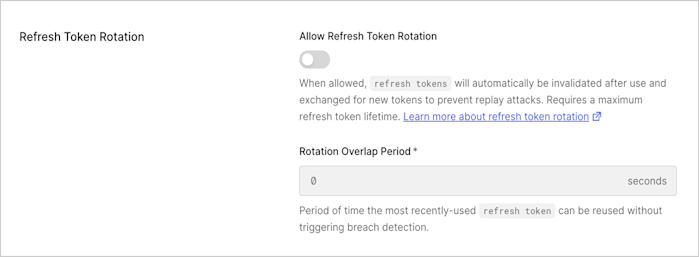 5. Enter **Rotation Overlap Period** (in seconds) for the refresh token to account for leeway time between request and response before triggering automatic reuse detection.
This overlap period helps to avoid concurrency issues when exchanging the rotating refresh token multiple times within a given timeframe. During the leeway window the breach detection features don't apply and a new rotating refresh token is issued. Only the previous token can be reused; if the second-to-last one is exchanged, breach detection will be triggered.
6. Select **Save Changes**.
Refresh Token Rotation is only supported for OIDC-conformant applications with the Refresh Token grant type enabled.
## Configure with the Auth0 SPA SDK
You can use the Auth0 SPA SDK to enable refresh token rotation. You must enable offline access and request the offline access scope in the client SDK.
1. Install the latest version of the `auth0-spa-js` SDK:
`npm install @auth0/auth0-spa-js`
2. Enable the feature on the SDK by setting `useRefreshTokens: true` to start sending the `offline_access` scope.
3. Configure the Refresh Token rotation settings. For example:
```http lines theme={null}
PATCH /api/v2/clients/{client_id}
{
"refresh_token": {
"rotation_type": "rotating",
"expiration_type": "expiring",
"token_lifetime": "2592000",
"leeway": 3
}
}
```
| Attribute | Description |
| ----------------- | ------------------------------------------------------------------------------------------------------------------------------------------------------------------------------------------------------------------------------------------------------------------------------------- |
| `rotation_type` | Text string: "rotating" or "non-rotating" |
| `expiration_type` | Text string: "expiring" or "non-expiring" |
| `token_lifetime` | The default refresh token expiration period, when **Refresh Token Rotation** is enabled, is 30 days (2,592,000 seconds). You can configure up to 1 year (31,557,600 seconds). **The lifetime does not extend when tokens are rotated.** |
| `leeway` | Allow the same refresh token to be used within the time period to account for potential network concurrency issues that would otherwise invalidate the token should the client attempt to retry using the same refresh token. By default leeway is disabled. Configurable in seconds. |
Refresh Token Rotation is only supported for OIDC-conformant applications with the Refresh Token grant type enabled.
## Automatic reuse detection
If a previously invalidated token is used, the entire set of refresh tokens issued since that invalidated token was issued will immediately be revoked along with the grant, requiring the user to re-authenticate.
## Learn more
* [Refresh Token Rotation](/docs/secure/tokens/refresh-tokens/refresh-token-rotation)
* [Use Refresh Token Rotation](/docs/secure/tokens/refresh-tokens/use-refresh-token-rotation)
* [Disable Refresh Token Rotation](/docs/secure/tokens/refresh-tokens/disable-refresh-token-rotation)
5. Enter **Rotation Overlap Period** (in seconds) for the refresh token to account for leeway time between request and response before triggering automatic reuse detection.
This overlap period helps to avoid concurrency issues when exchanging the rotating refresh token multiple times within a given timeframe. During the leeway window the breach detection features don't apply and a new rotating refresh token is issued. Only the previous token can be reused; if the second-to-last one is exchanged, breach detection will be triggered.
6. Select **Save Changes**.
Refresh Token Rotation is only supported for OIDC-conformant applications with the Refresh Token grant type enabled.
## Configure with the Auth0 SPA SDK
You can use the Auth0 SPA SDK to enable refresh token rotation. You must enable offline access and request the offline access scope in the client SDK.
1. Install the latest version of the `auth0-spa-js` SDK:
`npm install @auth0/auth0-spa-js`
2. Enable the feature on the SDK by setting `useRefreshTokens: true` to start sending the `offline_access` scope.
3. Configure the Refresh Token rotation settings. For example:
```http lines theme={null}
PATCH /api/v2/clients/{client_id}
{
"refresh_token": {
"rotation_type": "rotating",
"expiration_type": "expiring",
"token_lifetime": "2592000",
"leeway": 3
}
}
```
| Attribute | Description |
| ----------------- | ------------------------------------------------------------------------------------------------------------------------------------------------------------------------------------------------------------------------------------------------------------------------------------- |
| `rotation_type` | Text string: "rotating" or "non-rotating" |
| `expiration_type` | Text string: "expiring" or "non-expiring" |
| `token_lifetime` | The default refresh token expiration period, when **Refresh Token Rotation** is enabled, is 30 days (2,592,000 seconds). You can configure up to 1 year (31,557,600 seconds). **The lifetime does not extend when tokens are rotated.** |
| `leeway` | Allow the same refresh token to be used within the time period to account for potential network concurrency issues that would otherwise invalidate the token should the client attempt to retry using the same refresh token. By default leeway is disabled. Configurable in seconds. |
Refresh Token Rotation is only supported for OIDC-conformant applications with the Refresh Token grant type enabled.
## Automatic reuse detection
If a previously invalidated token is used, the entire set of refresh tokens issued since that invalidated token was issued will immediately be revoked along with the grant, requiring the user to re-authenticate.
## Learn more
* [Refresh Token Rotation](/docs/secure/tokens/refresh-tokens/refresh-token-rotation)
* [Use Refresh Token Rotation](/docs/secure/tokens/refresh-tokens/use-refresh-token-rotation)
* [Disable Refresh Token Rotation](/docs/secure/tokens/refresh-tokens/disable-refresh-token-rotation)