> ## Documentation Index
> Fetch the complete documentation index at: https://auth0.com/llms.txt
> Use this file to discover all available pages before exploring further.
> Learn how to migrate to the new Dashboard tenant member roles feature.
# Migrate to New Tenant Member Roles
The **Application Admin** Dashboard role will no longer be available after **01 February 2021**. That role is being replaced with the new **Editor - Specific Apps** role. Existing tenants will be able to keep the deprecated role during the grace period. Once the role reaches its end of life, any existing tenant member that has that role will be automatically reassigned to the new **Editor - Specific Apps** role. The new role provides edit access to the same set of applications but will not have permission to access connections and users.
Both your specific login implementation and your Auth0 plan or custom agreement affect whether this feature is available. To learn more, read [Pricing](https://auth0.com/pricing).
## What's changing
Previously, if you were a tenant administrator, you could invite additional administrators to have access to the Auth0 Dashboard and all or specific applications within that tenant. That role was called **Application Admin**. The tenant members with that role were given full access to the selected application(s) settings plus read-access to non-enterprise connections and users. After 01 February 2021, the Application Admin role as defined above will be replaced by a new set of least privileged roles.
### Why are we making this change
The new set of roles covers a wider range of use cases for Dashboard access. The Application Admin role is replaced by a similar but more restrictive **Editor - Specific Apps** role. The new role has access to the selected application(s), but not to connections and users, securing your data and complying with the least privileged principle. If you have team members who require additional access, you can grant access to connections and users by assigning them additional roles.
### Grace period and end of life
You will be able to keep the experience for existing members with the Application Admin role during the grace period but you won't be able to invite any new members with that role. Beginning on 01 February 2021 for Public Cloud tenants, and after the March 2021 release for Private Cloud tenants.
Your tenants will be affected by this deprecation if the following criteria are met:
* Created before 01 February 2021 (Public Cloud tenants) or before upgrading to the March 2021 release (Private Cloud tenants)
* Have at least one tenant member with the **Application Admin** role
* Haven't opted-in to the Dashboard roles feature preview (only applicable to Public Cloud enterprise tenants)
Beginning on 01 February 2021 for Public Cloud tenants, and after the March 2021 release for Private Cloud tenants, Auth0 will display tenant logs and a migration toggle to help you prepare for this change.
The Application Admin role will reach its end of life in the Public Cloud on 30 September 2021. Existing Application Admins will be automatically converted to the new Editor Specific Apps role at that time. For plans where the role is not available, any existing tenant member that has the Application Admin role assigned may be removed. You should migrate these members to Admins or remove them from the dashboard to prevent this situation.
The Application Admin role will be available for affected Private Cloud tenants until September 2021 monthly release which is the first release that will not include the Application Admin role.
## Actions
### Automatically assign new roles
This will convert any existing members that have the **Application Admin** role to the new **Editor - Specific Apps** role with permission to manage the same set of applications.
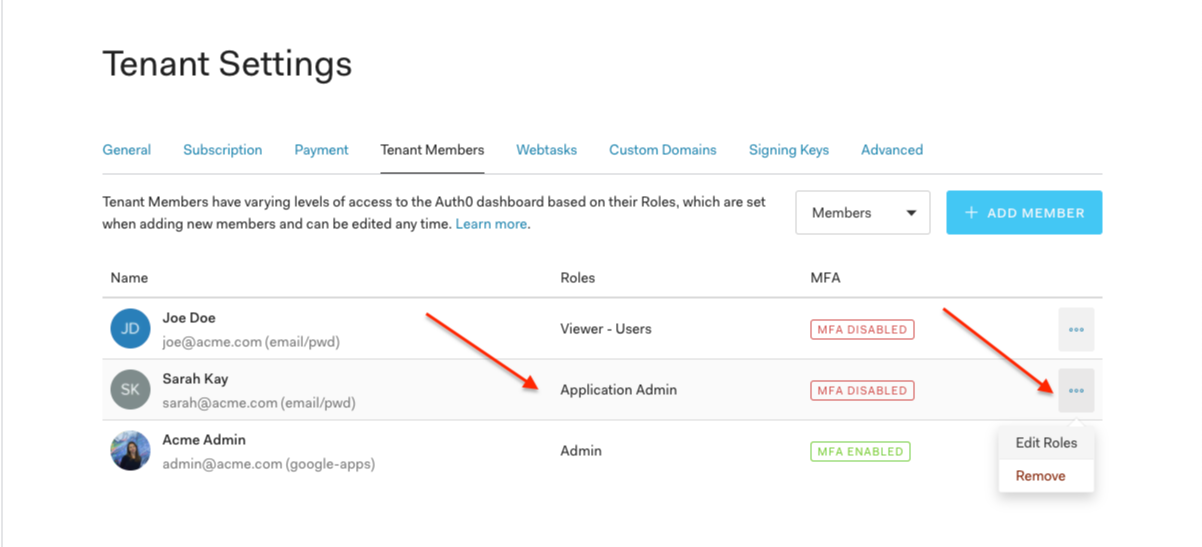
1. Go to [Dashboard > Tenant Settings > Tenant Members](https://manage.auth0.com/#/tenant/admins) and review which members have the **Application Admin** role assigned. (You may want to communicate to those members that their experience in the Dashboard will change: they will lose access to Users and Connections sections.)
 2. Go to [Dashboard > Tenant Settings > Advanced](https://manage.auth0.com/#/tenant/advanced) and under **Migrations**, turn off the **Application Admin role** migration toggle.
This will convert any existing members that have the **Application Admin** role to the new **Editor - Specific Apps** role with permission to manage the same set of applications.
3. If your plan doesn't support the Editor roles, please refer to the [subscription page](https://manage.auth0.com/#/tenant/billing/subscription) for relevant plans to enable the feature and keep it. Otherwise, proceed to manually assign members a supported role.
### Manually assign new roles
Do the following steps to ensure the members are assigned to a role supported by your subscription.
1. Go to [Dashboard > Tenant Settings > Tenant Members](https://manage.auth0.com/#/tenant/admins) and review which members have the **Application Admin** role assigned.
1. Go to [Dashboard > Monitoring > Logs](https://manage.auth0.com/#/logs) and see whether any of those members have used the Dashboard lately.
2. Use the following query to search for related logs: `type:depnote AND description:*Admin*`.
2. Go back to the **Tenant Members** tab under **Tenant Settings** and either remove those members or edit their roles to assign them one or more of the new roles that are supported in your subscription plan.
## Learn more
* [Auth0 Dashboard](/docs/get-started/auth0-overview/dashboard)
* [Manage Dashboard Access](/docs/get-started/manage-dashboard-access)
* [Dashboard Access by Role](/docs/get-started/manage-dashboard-access/feature-access-by-role)
* [Add Tenant Members](/docs/get-started/manage-dashboard-access/add-dashboard-users)
* [Edit Tenant Members](/docs/get-started/manage-dashboard-access/edit-dashboard-users)
2. Go to [Dashboard > Tenant Settings > Advanced](https://manage.auth0.com/#/tenant/advanced) and under **Migrations**, turn off the **Application Admin role** migration toggle.
This will convert any existing members that have the **Application Admin** role to the new **Editor - Specific Apps** role with permission to manage the same set of applications.
3. If your plan doesn't support the Editor roles, please refer to the [subscription page](https://manage.auth0.com/#/tenant/billing/subscription) for relevant plans to enable the feature and keep it. Otherwise, proceed to manually assign members a supported role.
### Manually assign new roles
Do the following steps to ensure the members are assigned to a role supported by your subscription.
1. Go to [Dashboard > Tenant Settings > Tenant Members](https://manage.auth0.com/#/tenant/admins) and review which members have the **Application Admin** role assigned.
1. Go to [Dashboard > Monitoring > Logs](https://manage.auth0.com/#/logs) and see whether any of those members have used the Dashboard lately.
2. Use the following query to search for related logs: `type:depnote AND description:*Admin*`.
2. Go back to the **Tenant Members** tab under **Tenant Settings** and either remove those members or edit their roles to assign them one or more of the new roles that are supported in your subscription plan.
## Learn more
* [Auth0 Dashboard](/docs/get-started/auth0-overview/dashboard)
* [Manage Dashboard Access](/docs/get-started/manage-dashboard-access)
* [Dashboard Access by Role](/docs/get-started/manage-dashboard-access/feature-access-by-role)
* [Add Tenant Members](/docs/get-started/manage-dashboard-access/add-dashboard-users)
* [Edit Tenant Members](/docs/get-started/manage-dashboard-access/edit-dashboard-users)