

- Configure sender constraining for a client application
- Configure sender constraining for a resource server
How it works
are sender constrained in Auth0 depending on how you configure sender constraining for your client application and resource server:-
Requested audience: In a token request, whether the requested audience is
/userinfoonly, or only intended to be used with the/userinfoendpoint, or is a custom API that may include/userinfowhen you also request the openid scope, affects whether access tokens are sender constrained. -
Client application: Whether you set sender constraining as
requiredby the client application. -
Resource server: Whether you configure sender constraining for the resource server:
none: You have not configured sender constraining for the resource server.allowed: You have configured sender constraining for the resource server by setting a sender constraining method.required: You have configured sender constraining as required for the resource server, meaning that access tokens must be sender-constrained to an application. You can require sender constraining for all applications or for public applications only. Requires a sender constraining method.
When using mTLS as the sender constraining method, sender constraining is always required for all applications. Public applications are not supported with mTLS, so you cannot limit mTLS sender constraining to public clients only.
-
Proof-of-Possession: Whether the client application sent a proof-of-possession assertion in the token request:
- mTLS sender constraining: The proof of possession is demonstrated through the client’s successful presentation of a specific private key (associated with a client certificate) during the TLS handshake.
- DPoP: The proof of possession is achieved by the client creating a DPoP Proof JWT by cryptographically signing it with its private key and including the
DPoPProof JWT in the DPoP HTTP header of every request where the associated access token is used.
How access tokens and refresh tokens are bound
Access tokens and refresh tokens are bound independently of each other:- Access tokens are bound per audience. Auth0 binds an access token only when the client sends a DPoP proof and the sender constraining settings for the requested API allow it. The resource server for that API is responsible for enforcing the binding.
- Refresh tokens are bound per tenant. Auth0 is the only audience that validates a refresh token. When a client sends a valid DPoP proof in a token request that issues a refresh token, Auth0 may bind the refresh token to the key in that proof and enforce that binding when the refresh token is exchanged, as the DPoP specification requires.
/token endpoint for an API that doesn’t have DPoP enabled, Auth0 returns an access token with a token_type of Bearer and a refresh token bound to your DPoP key. Auth0 enforces the binding when you exchange the refresh token.
To tell whether an access token is bound, check the token_type value in the token response. Use the DPoP authorization scheme (Authorization: DPoP <access_token>) for a token with a token_type of DPoP, and the Bearer scheme for a token with a token_type of Bearer.
Refresh tokens have no equivalent indicator, and your application doesn’t need one: the refresh token request is the same whether or not the refresh token is bound. Treat every refresh token as bound to the device that received it. Refresh tokens should never be moved between devices, and Auth0 rejects a bound refresh token unless the request includes a DPoP proof signed with the same key.
Refresh token binding
The DPoP specification (RFC 9449) requires an authorization server to issue bound refresh tokens when a client presents a valid DPoP proof, and to enforce that binding when the refresh token is exchanged. This is the default behavior for all new tenants. Earlier versions of DPoP support in Auth0 bind refresh tokens on a per-audience basis. Because switching to per-tenant binding can break some existing applications, existing tenants keep the earlier behavior until they opt in by enabling the Strict DPoP Refresh Token Binding option in the tenant settings (dpop_strict_refresh_token_binding in the Management API). Auth0 recommends that you enable strict DPoP refresh token binding if it is not already enabled.
With strict binding, a stolen refresh token is useless without the private key it is bound to, so an attacker can’t use it to get new access tokens for any API. With per-audience binding, a refresh token issued for an API that doesn’t have DPoP enabled isn’t bound, so an attacker who steals it can exchange it for new access tokens.
The Strict DPoP Refresh Token Binding setting changes only how Auth0 binds and enforces refresh tokens. It doesn’t affect access token binding, which depends on the sender constraining settings of each API.
Applications that don’t send DPoP proofs
Tenant settings and API settings don’t require an application to use DPoP unless you configure them to:- To require DPoP for all applications or for public applications only, configure the sender constraining policy for the API.
- To require DPoP for a specific application, require sender constraining for that application.
If a client starts sending DPoP proofs, it must store the key used to generate them securely and continue to send DPoP proofs on every request. If the client generates a new key pair or stops sending DPoP proofs, any tokens bound to the original key can no longer be used.
Configure sender constraining for a client application
When you require sender constraining for a client application, access tokens are constrained to that application. Auth0 verifies requests to ensure that only the application that requested the token can use it to access the associated resource. Once you configure a client application to require sender constraining, you can set the sender constraining method, either mTLS or DPoP, when configuring your resource server. You can configure sender constraining for a client application with the or .- Auth0 Dashboard
- Management API
- Go to Dashboard > Applications > Applications. Select the application you want to configure.
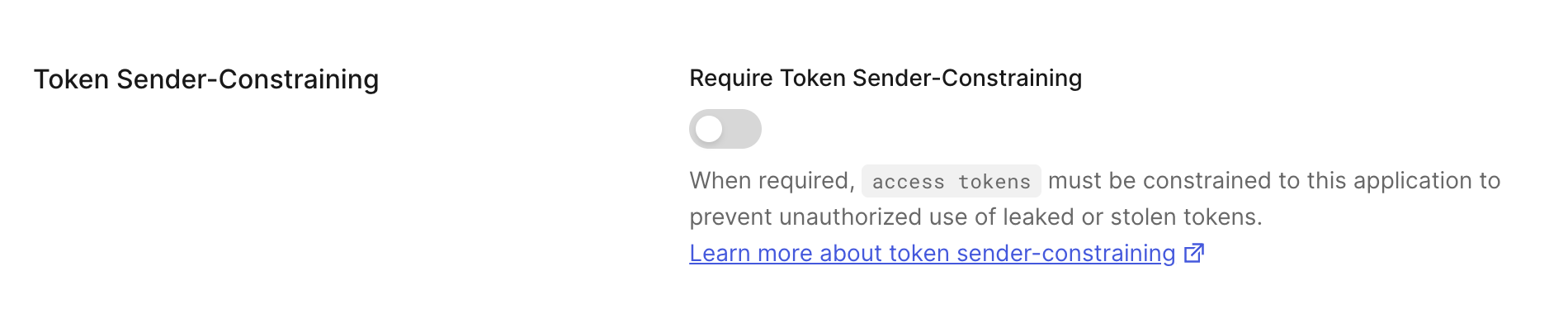
- Under Settings, scroll to Token Sender-Constraining.
- Toggle on to Require Sender Constraining. Toggle off to remove the requirement for Sender Constraining for the application.
Configure sender constraining for a resource server
Access tokens issued by Auth0 can be constrained to the sender (i.e. the client application) that needs to access APIs at a resource server. You can configure sender constraining for a resource server with the Auth0 Dashboard or Management API.- Auth0 Dashboard
- Management API
To enable Token Binding or sender constraining, configure the API Settings of your API.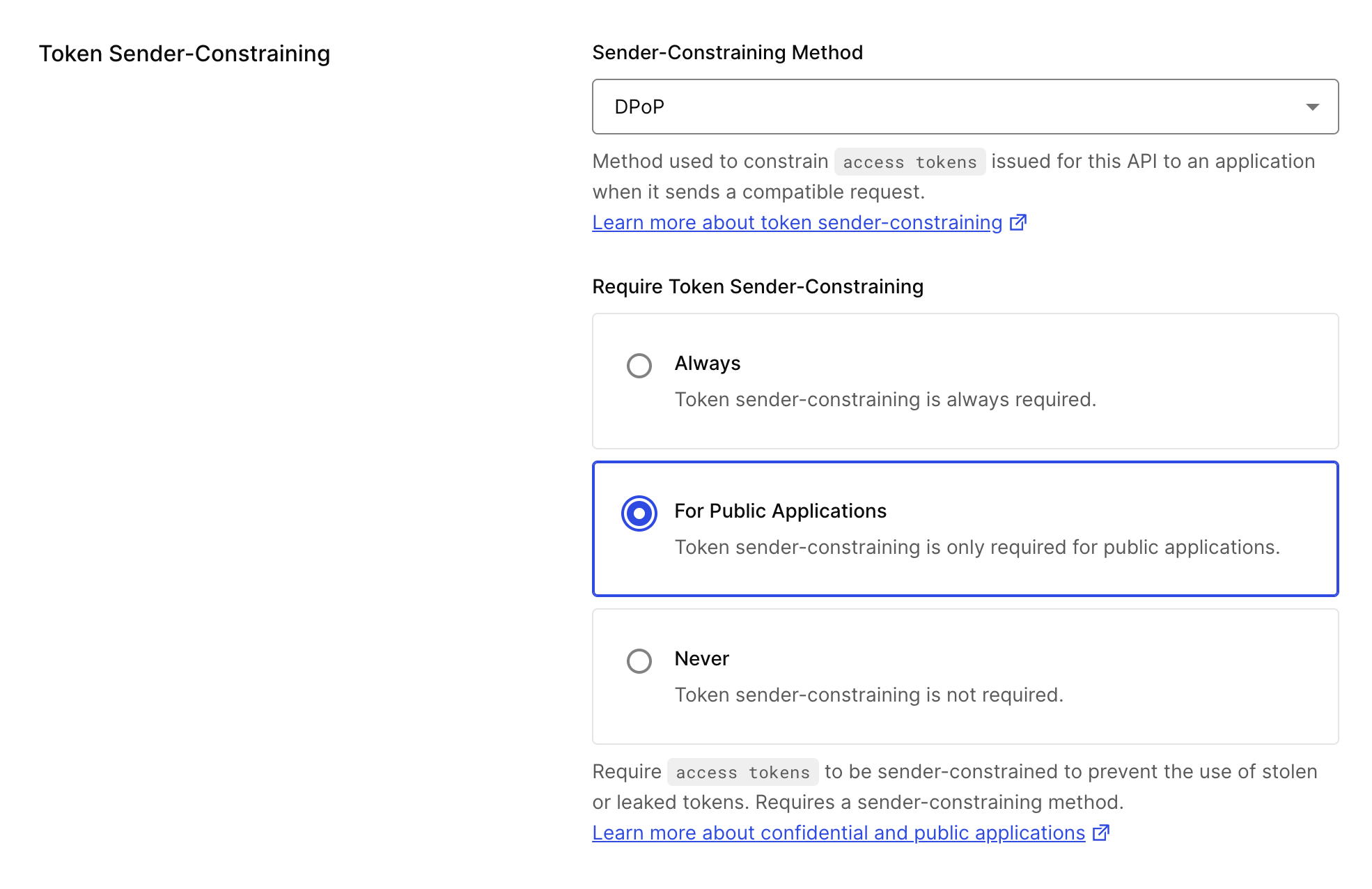
- Navigate to Auth0 Dashboard > Applications > APIs.
- Select the API you want to configure.
- Under the Settings tab, find the Token Sender-Constraining section.
-
Configure the following:
-
Sender Constraining Method:
- None: Don’t enable a sender constraining method for your resource server.
- mTLS: Enable mTLS as the sender constraining method for your resource server.
- DPoP: Enable DPoP as the sender constraining method for your resource server.
-
Require Token Sender Constraining: Select which sender constraining policy applies for this API:
- Always: Require sender constraining for all applications. This is the only option available when using mTLS.
- For Public Applications: Require sender constraining for public applications only. This option is not available when using mTLS.
- Never: Sender constraining is not required.
-
Sender Constraining Method: